View Career Paths for Your Careers of Interest
You can now view multiple career development options for a career role of your interest. This enables you to explore lateral and vertical career opportunities within your organization. Prior to this upgrade, you could only view a linear career progression path for a role. With this upgrade, you can view multiple career progression paths for a role, provided those career paths are allowed and defined by your organization in Oracle Fusion Cloud HCM application.
A career progression path consists of multiple steps. Each step is associated with one or more job profiles or position profiles, which could be lateral or vertical positions across your organization.
For example, if you’re an Associate Software Engineer in Software Development and are interested in the Product Development or UX Design tracks, two lateral career progression paths could be possible:
- Associate Software Engineer > Product Manager > Senior Product Manager > Director of Product
- Associate Software Engineer > UX Designer > Senior UX Designer > Director of Design
You can view these career progression paths for the Product Manager or the UX Designer role.
Here’s how you can view them:
- Click the Careers of Interest link in Grow. This takes you to Opportunity Marketplace.
- On the Explore tab, select Career Roles from the Opportunity filter.
- From the filter results, click a career role card, for example, Product Manager.
- On the career role details page, click the Career Progression tab. Here, you’ll see the career progression paths defined for this role. If there’s only one career path defined, you’ll see the career path details page displayed as below, with all the steps listed hierarchically, from the highest to the junior-most level.
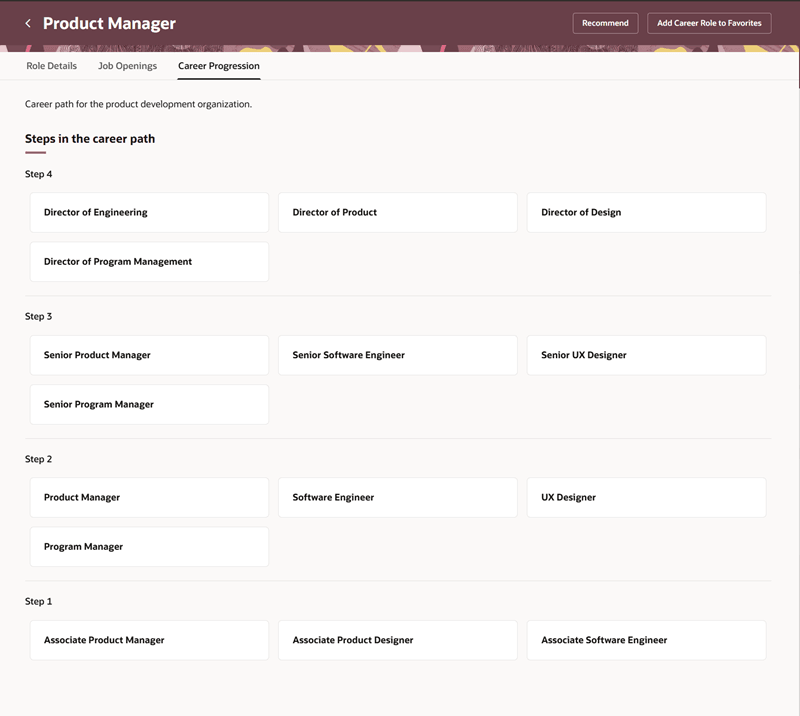
Career Progression Tab
If a role is included in more than one career path, you’ll see a list of career path cards as shown here. You can then click a career path card to view the steps in that path.
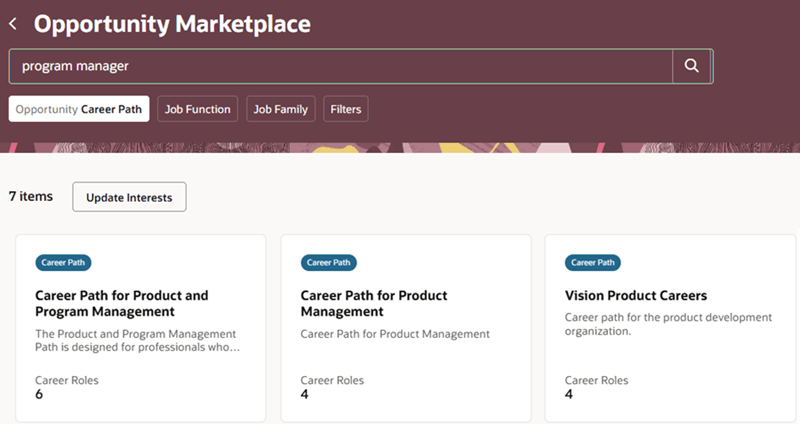
Career Path Cards
Note: The career path displayed on top of the page is the linear career progression path that was available before this upgrade.
Business Benefit: This feature enables you to explore career development opportunities and internal mobility options within your organization.
Steps to enable and configure
To enable this feature, see Configure Career Paths in Oracle Help Center.
For privileges, see the Access Requirements section.
Key resources
Also, refer to the 26B What’s New feature: Browse and View Career Paths.
To create and manage career paths, see the topic, Define Multiple Steps in a Career Progression Path, in Oracle Help Center.
Access requirements
These privileges are already added to the predefined employee role. If you’re using custom roles, ensure that you add them to the employee role:
- View Career Roles in Opportunity Marketplace (IRC_VIEW_CAREER_ROLES_IN_OPPORTUNITY_MARKETPLACE_PRIV)
- Manage Career (HRG_MANAGE_CAREER_DETAILS_PRIV)
- Use REST Service – Saved Searches (HRG_REST_SERVICE_ACCESS_CAREER_SEARCHES_PRIV)