Enhanced Skills Library Translation Agent
The enhanced Skills Library Translation agent now enables you to select the source language of skills to translate from. Prior to this upgrade, you could select only the target language to be translated to. Translation to English from another language wasn't supported, and the source language was the session language. In this upgrade, a new field, Translation From, has been introduced, which enables you to select the source language.
Using this feature, you can translate skills from any source language that’s installed in the Oracle Fusion Cloud application environment to multiple target languages available in the environment. The agent translates the skill title, description, and short description.
There’s also a new check box, Update existing translations. When you select this check box, existing translations of the skills will be overwritten with the new translation that you receive when you run this agent and curate the skills. However, if you want the existing translations to be preserved, don’t select this check box.
If your skills library consists of a mix of skills in different languages, only those skills that are in the language of the Translation From field will be translated. For example, in the screen shot below, Korean skills are being translated to American English. If your skills library has Japanese and Korean skills, only the Korean skills will be translated to American English. If any Korean skills were previously translated to American English, they won’t be overwritten with the new translation as the Update existing translations check box isn’t selected.
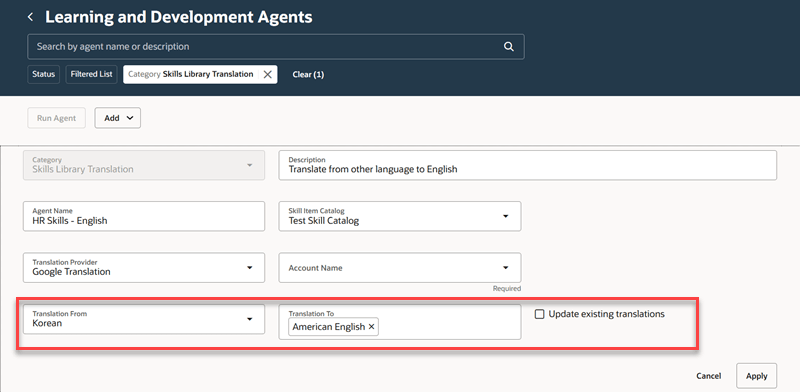
Skills Library Translation Agent
Business Benefit: This feature enables the skills catalog to be available in different languages.
Steps to enable and configure
The prerequisite for running this agent is to configure Google Translation as the external translation provider. For information on setting up the Google translation provider, see Set Up Google Translation.
For details on configuring and running this agent, see How do I configure and run the Skills Library Translation agent?
For privileges, see the Access Requirements section.
Access requirements
The HCM Application Administrator role needs to have the functional security privilege, Manage Skills Library Translation Agent (WLF_MANAGE_SKILLS_LIBRARY_TRANSLATION_AGENT), to run this agent.
A new functional security privilege, Configure External Providers for Learning and Development (WLF_CONFIGURE_EXTERNAL_PROVIDERS_FOR_LEARNING_AND_DEVELOPMENT) is granted to the HCM Application Administrator role. Using this privilege, they can access the Configure External Providers page under My Client Groups > Learning and set up the translation service provider.