Simplified and Intuitive Skill Chip for Learning Outcomes and Prerequisites in Self Service
Provides an intuitive skills and qualifications section for learners when they are viewing the learning items in Learning self-service. The color of the skill chips, and the ribbons and badges on each skill chip help you understand the requirements and progress.
In the outcomes section, skills and qualifications are grouped horizontally. Skills appear first followed by qualifications. Within each group, in addition to the alphabetical order, the ones that will be achieved are displayed first followed by the ones that would be covered.
In the prerequisites section, skills are grouped horizontally into required and suggested. Within each group, items are displayed alphabetically, with required skills appearing before suggested skills.
You click a skill chip to navigate to the Skills Center and update the skill details.
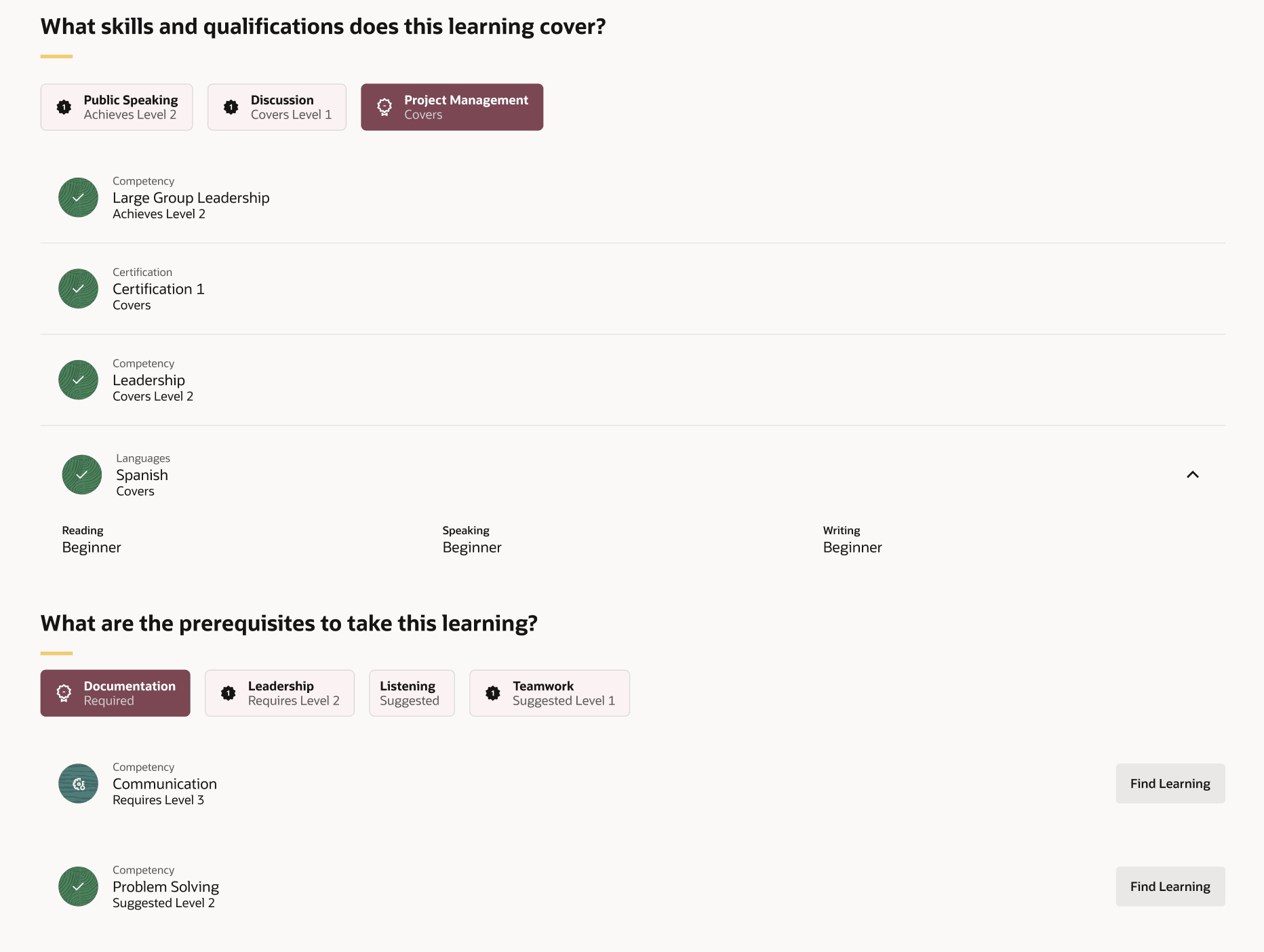
Example of skill chips in the Skills and Qualification section in Learning Catalog
The color of the skill chip depends on the setting Consider the requirement met only after the skill is validated, and display only the validated skill in dark color on the Skills Settings page. Dark color indicates that the skill is validated, whereas a light color indicates that the skill is not validated.
The skill chips contain badges to indicate the following:
| Badge | Indicates that the Skill is |
|---|---|
| Covers | Not copied to the person profile |
| Covers Level {level} | Not copied to the person profile |
| Achieves | Copied to the person profile |
| Achieves Level {level} | Copied to the person profile |
| Requires | A prerequisite for the learning item |
| Requires Level {level} | A prerequisite for the learning item |
| Suggested | An optional prerequisite for the learning item |
| Suggested Level {level} | An optional prerequisite for the learning item |
A gear icon on the skill chip indicates the proficiency rating level. The screenshot above helps understand how the skill chips, and the ribbons and badges on each skill chip are displayed.
Business Benefit
Provides skill and qualifications information that is easy to understand and show a worker’s current progress and the requirements needed to advance. They also include a subtext badge that indicates whether the skill is claimed or confirmed and whether it includes a defined proficiency level.
Steps to enable and configure
You don't need to do anything to enable this feature.