Automatic Vacation Liability Payout on Termination or Vacation Term End
This feature provides support for automatic processing of vacation liability payouts when an employee is terminated or when a vacation term ends.
You can now configure the automatic payout either at the vacation payout element level or at the Payroll Statutory Unit (PSU) or Tax Reporting Unit (TRU) levels. In all cases a new recurring vacation payout element would need to be created.
Configuration Options
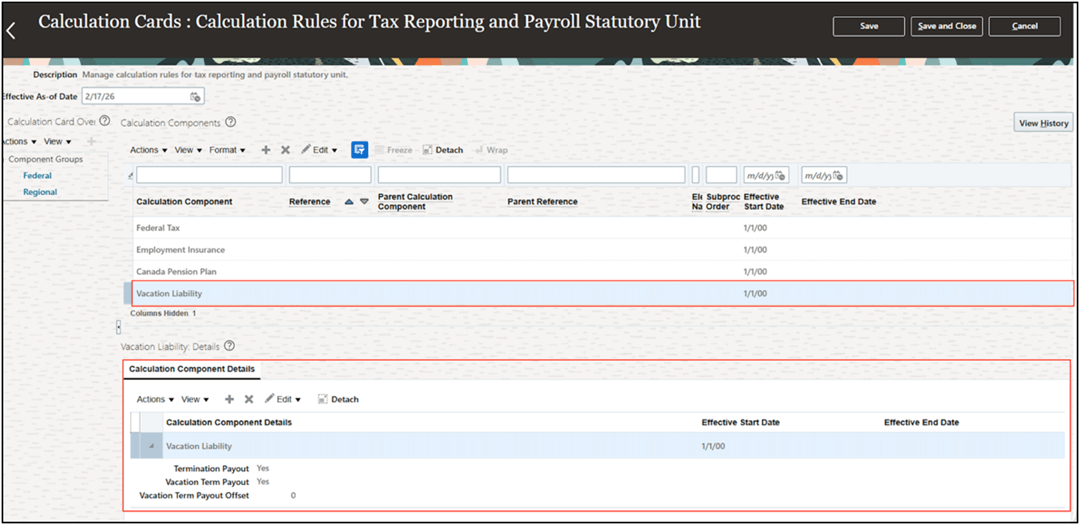
A new Vacation Liability calculation component has been introduced under the Federal component group and can be configured at the PSU and TRU levels using these pages:
- PSU: Legal Entity Calculation Cards > Calculation Rules for Tax Reporting and Payroll Statutory Unit
- TRU: Legal Reporting Unit Calculation Cards > Calculation Rules for Tax Reporting and Payroll Statutory Unit
The configuration options are:
- Termination Payout (Yes/No)
- Vacation Term Payout (Yes/No)
- Vacation Term Payout Offset (0–364 days)
No values are set by default.
This image illustrates the new Vacation Liability calculation component under the Federal component group on PSU Calculation Cards > Calculation Rules for Tax Reporting and Payroll Statutory Unit page.
PSU Calculation Cards > Calculation Rules for Tax Reporting and Payroll Statutory Unit page
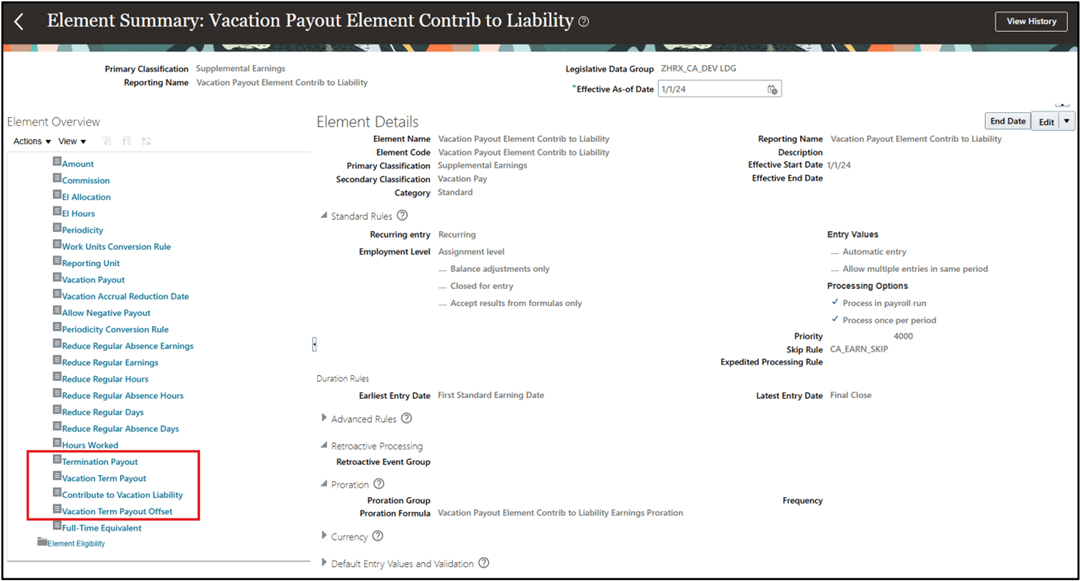
This image illustrates the Element Object Navigator page showing the new Vacation Liability payout input values available for a recurring vacation payout element.
Vacation Payout Element
Element Object Navigator page
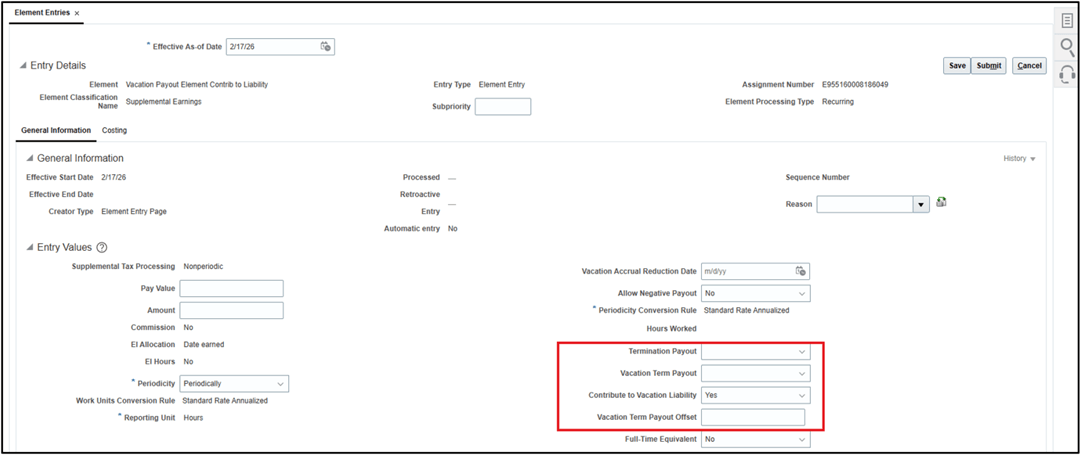
This image illustrates the Element Entries page showing the new Vacation Liability payout input values available for a recurring vacation payout element.
Element Entries
Element Entries page
Automatic Payout Processing Rules
These rules determine when vacation liability payouts are processed:
- If Termination Payout is set to Yes, the payout is processed in the next payroll run after the employee's termination date.
- If Vacation Term Payout is set to Yes, the payout is processed in the next payroll run after the vacation term end date, plus any configured Vacation Term Payout Offset.
Configuration Precedence and Processing Hierarchy
Automatic vacation liability payout element processing priority is based on this order:
- Element entry input values
- TRU configuration
- PSU configuration
These rules determine how automatic vacation liability payout processing occurs, based on configuration defined at the element entry, TRU, and PSU levels.
| Termination Payout (Input Value) | Vacation Term Payout (Input Value) | PSU/TRU Set-up | Processing Result |
|---|---|---|---|
| Not Entered | Not Entered | Not Entered | Processing follows existing behaviour |
| Not Entered | Not Entered | Yes | Processing uses PSU/TRU values |
| Yes | Yes | N/A | Processing uses element entry input values for termination and vacation term |
| Yes | Not Entered | Not Entered | Processing uses element entry input value for termination |
| Yes | No | N/A | Processing uses element entry input value for termination and vacation term |
| Not Entered | Yes | Not Entered | Processing uses element entry input value for vacation term |
| Yes | Not Entered | Yes | Processing uses element entry input value for termination and PSU/TRU value for vacation term |
| Not Entered | Yes | Yes | Processing uses element entry input value for vacation term and PSU/TRU value for termination |
| No | No | N/A |
Processing uses element entry input values for termination and vacation term (no automatic payout) |
| No | Yes | N/A | Processing uses element entry input values for termination and vacation term |
| No | Not Entered | Not Entered | Processing uses element entry input value for termination |
| Not Entered | No | Not Entered | Processing uses element entry input value for vacation term |
| No | Not Entered | Yes | Processing uses element entry input value for termination and PSU/TRU value for vacation term |
| Not Entered | No | Yes | Processing uses element entry input value for vacation term and PSU/TRU value for termination |
Table Legends
- “Not Entered” indicates no value is provided.
- “N/A” indicates that any configuration at the PSU/TRU level is irrelevant, as the element-level configuration will be used.
This feature now enables automatic vacation liability payouts at termination or when a vacation term ends, thereby reducing the need for manual intervention.
Steps to enable and configure
You don't need to do anything to enable this feature.
Tips and considerations
- This feature is available only for new, recurring vacation payout elements.
- The options configured at the element level overrides what is configured at the PSU/TRU levels.
- If neither the payout input values nor the PSU/TRU options are configured, processing behaves as it currently does, resulting in the payout occurring each time the element is processed.
- The Vacation Term Payout Offset option only applies to vacation term payouts, not termination payouts.
- At any time, the original element configuration can be modified at the element entry level.
Key resources
Refer to these documents on the Canada Information Center for additional information.
Canada Information Center: https://support.oracle.com/support/?anchorId=&documentId=KA144
- CA – Payroll tab > Product Documentation > Technical Briefs > Vacation Liability Processing