Record of Employment (ROE) Work Schedule Enhancement
Enhancements were made to the Record of Employment (ROE) process to introduce a configuration option at the Legal Entity to enable or disable deriving ROE dates from the employee's work schedule.This will address the needs of organizations that operate on work schedules other than the standard Monday to Friday work week. The section header and field labels on the Legal Entity HCM Information page were also updated for consistency.
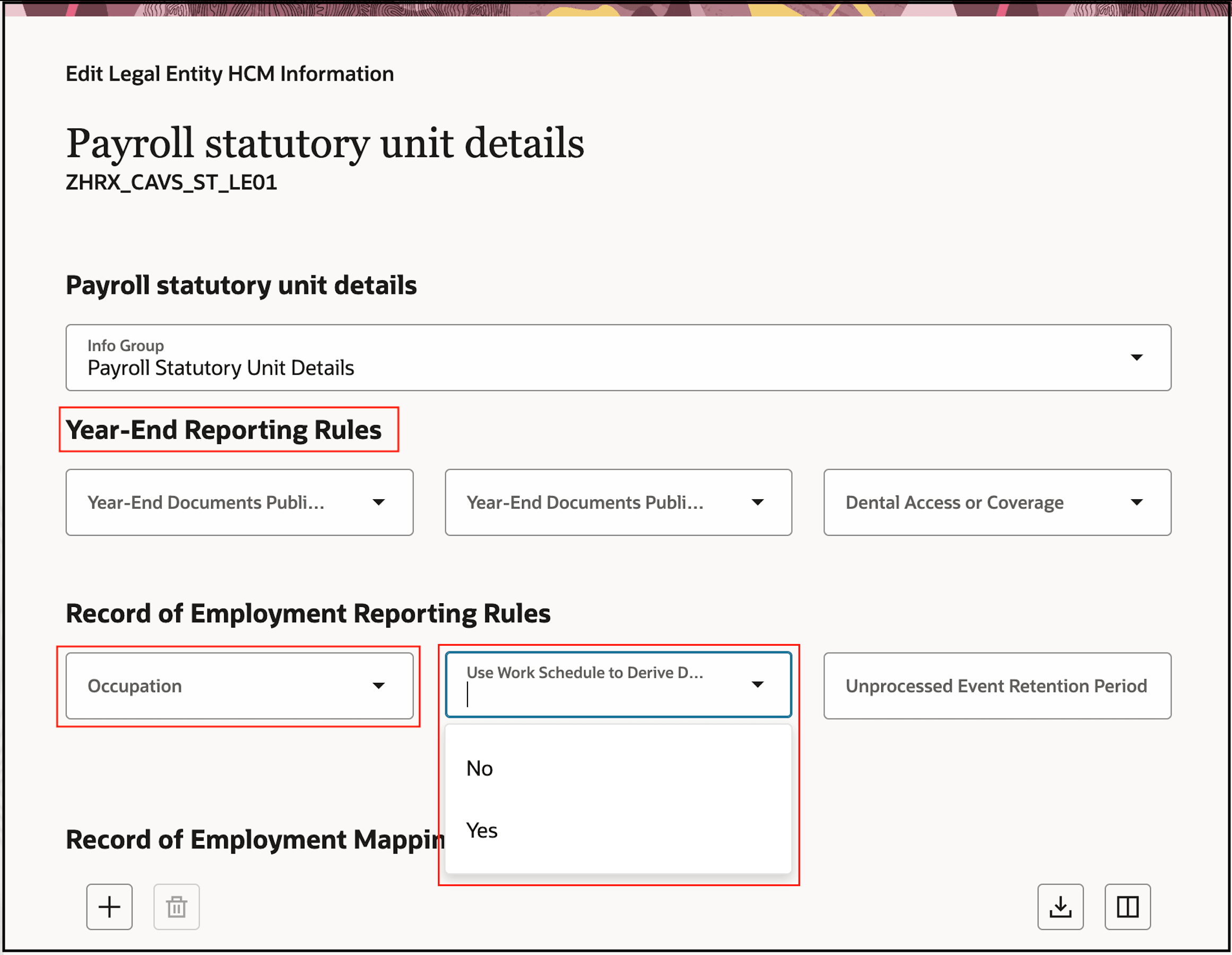
With this update, the following changes were made to the Legal Entity HCM Information -> Payroll Statutory Unit Details page:
- The Record of Employment Occupation header was renamed to Record of Employment Reporting Rules
- The Record of Employment Occupation field was renamed to Occupation
- A new field, Use Work Schedule to Derive Dates, was introduced to configure whether ROE dates are derived from the employee's work schedule
The options for the new field are:
- Yes (Default)
- No
When Yes is selected or the field is left Blank, ROE dates are reported using the employee’s work schedule.
When No is selected, work schedule is not used to derive the ROE dates. Instead, dates are determined as follows:
- First Day Worked is determined from the corresponding system employment date, even if it falls on a non-working day.
- Last Day Worked is determined as absence start date – 1 day (including weekends).
- Expected Recall Date is determined as absence end date + 1 day (including weekends).
This image illustrates the Legal Entity HCM Information -> Payroll statutory unit details page showing the updated “Record of Employment Reporting Rules” header, “Occupation” field and new “Use Work Schedule to Derive Dates” field.
Record of Employment Reporting Rules: Use Work Schedule to Derive Dates
Example
The example below illustrates how dates are reported when an employee has a Monday to Friday work schedule and a ROE for a leave of absence is processed using each “Use Work Schedule to Derive Dates” option.
Scenario
- Work schedule: Monday–Friday
- Hire date: January 3, 2026 (Saturday)
- Leave of Absence (LOA) start date: January 19, 2026 (Monday)
- Leave of Absence (LOA) end date: January 30, 2026 (Friday)
ROE Dates Reported
| ROE Date Reported | Use Work Schedule to Derive Dates: Yes | Use Work Schedule to Derive Dates: No |
|---|---|---|
| First Day Worked | January 5, 2026 (Monday) | January 3, 2026 (Saturday) |
| Last Day Worked | January 16, 2026 (Friday) | January 18, 2026 (Sunday) |
| Expected Recall Date | February 2, 2026 (Monday) | January 31, 2026 (Saturday) |
This enhancement provides flexibility for customers who have work schedules outside of the standard Monday to Friday work week. This ensures ROE dates are derived correctly to ensure compliance and correct reporting.
Steps to enable and configure
You don't need to do anything to enable this feature.
Tips and considerations
- “Use Work Schedule to Derive Dates” field must be configured on every Legal Entity for the work schedule setting to take effect for employees belonging to that Legal Entity.
- When the field is left Blank or set to Yes, the work schedule is used to derive the Last Day Worked and Expected Recall Date, as before. The First Day Worked will now also be derived using the work schedule.
- To configure this field, use the “Correct” action on the Legal Entity HCM Information page. When prompted on the Info to Include step, enable the Payroll Statutory Unit Details toggle to include the Payroll Statutory Unit Details step, where the field can be configured.
- These enhancements impact both ADF and Redwood versions of the UI.
Key resources
Refer to these documents located on the Canada Information Center (KA144) for additional information.
Administering Payroll for Canada
- CA – Payroll tab > Product Documentation > Payroll Guides > Administering Payroll for Canada
Record of Employment processing:
- CA – Payroll tab > Product Documentation > Technical Briefs > Record of Employment Processing