Redwood Experience: Interview Schedule Template List
Take advantage of the Interview Schedule Templates list page that has been recreated in the Redwood toolset called Visual Builder Studio.
When Redwood profile options are enabled, upon clicking the Interview Schedule Templates action under My Client Groups > Show More > Hiring, you access the Redwood Interview Schedule Templates list page.
With the Redwood list, you can:
- Search for interview schedule templates and save your searches.
- Filter search results. Selected filters are displayed as chips.
- Sort the list of interview schedule templates.
- Customize columns to display specific information about interview schedule templates.
- View details about an interview schedule template by clicking on it.
- Take actions on individual interview schedule templates.
- Create interview schedule templates.
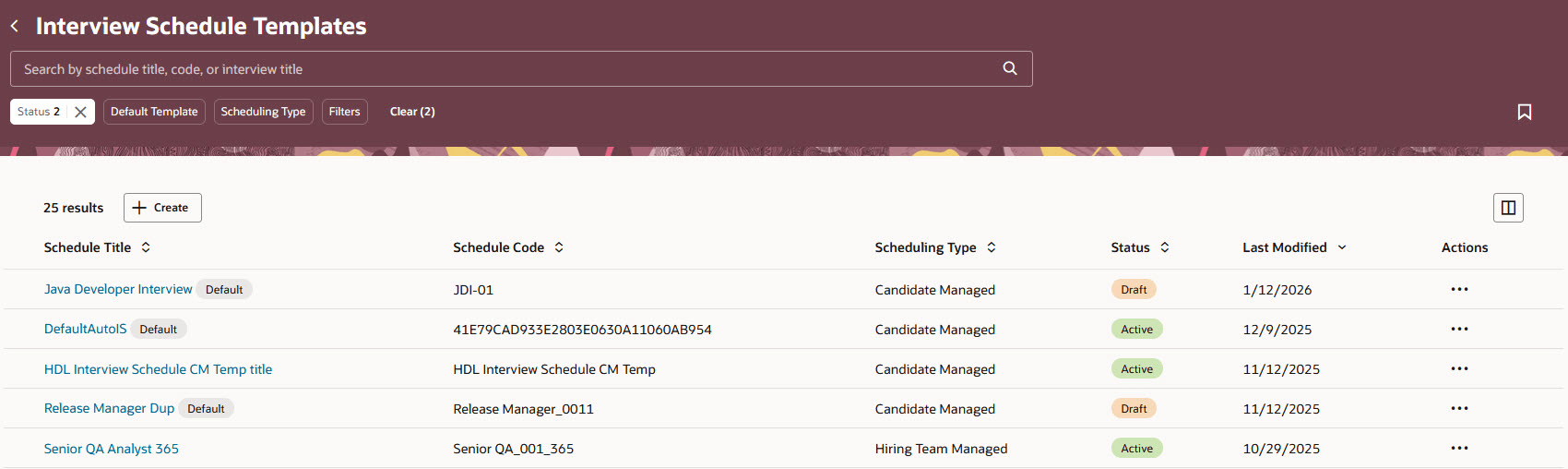
Interview Schedule Template List Page
Business benefit: The Redwood Interview Schedule Templates list page aligns with the other Redwood lists to provide a consistent user experience when viewing, searching, and managing interview schedule templates.
Steps to enable and configure
To use the Redwood experience for interviews, you need to enable these profile options:
- ORA_IRC_RECRUITING_REDWOOD_ENABLED
- ORA_IRC_JOB_APPLICATION_REDWOOD_ENABLED
- ORA_IRC_INTERVIEW_REDWOOD_ENABLED
For details, see How do I enable a profile option?
For details on enabling and customizing Redwood for HCM, see How do I adopt Redwood for HCM? and Extending Redwood Applications for HCM and SCM Using Visual Builder Studio.
For privileges, see the Access Requirements section.
Access requirements
A new privilege controls the availability of the Interview Schedule Templates action for users:
- Manage Interview Schedule Templates (IRC_MANAGE_INTERVIEW_SCHEDULE_TEMPLATES)