Redwood Experience: Create Prescreening Questions While Creating or Editing Job Requisitions
You can create ad-hoc prescreening questions while creating or editing job requisitions.
When you add a prescreening question to a job requisition, the Question selector displays a new Create question link and you can create an ad-hoc prescreening question with its responses and score.
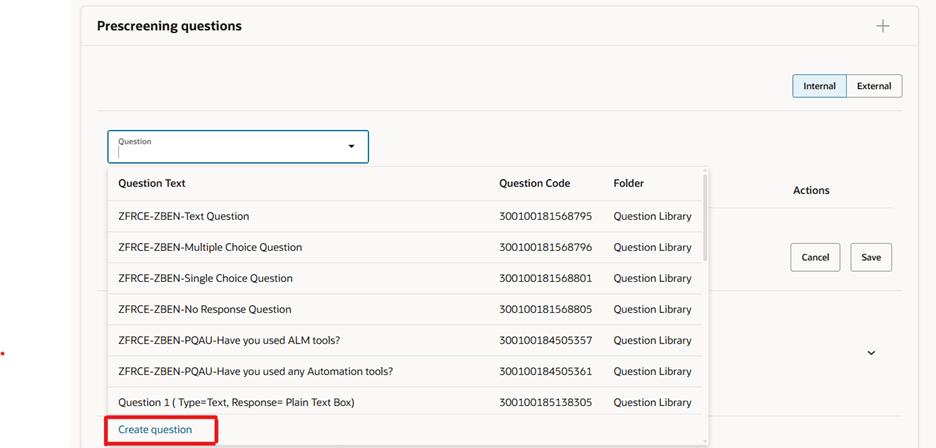
Create Question Link in the Question Selector
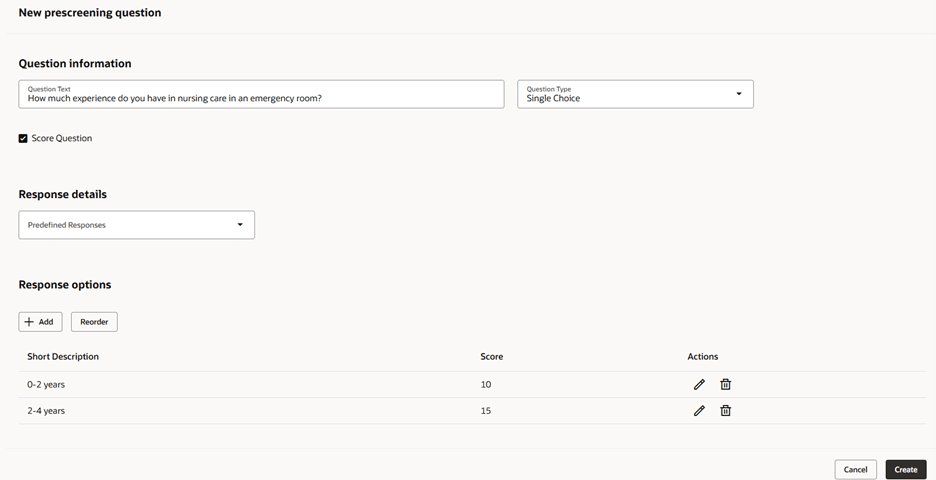
Creation of Prescreening Question
Once the ad-hoc prescreening question is created, the question appears in a temporary table. You need to save it for the question to be added to the job requisition.
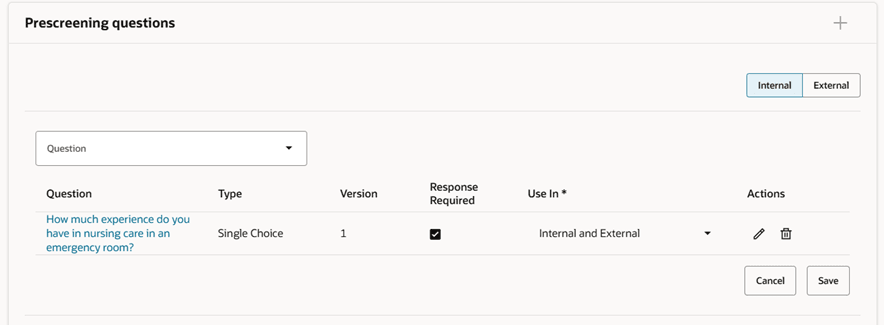
Prescreening Question
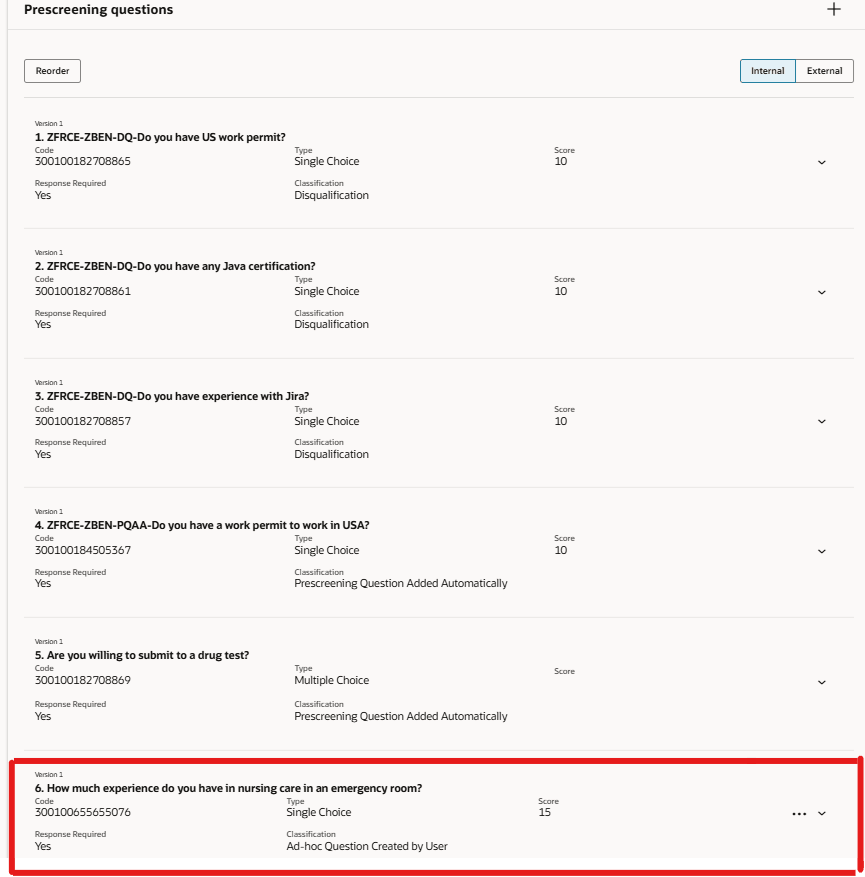
Prescreening Question Added to the Requisition Prescreening Questions
After an ad-hoc prescreening question is created, it’s available in the list of questions and other users can add the question to their job requisitions.
You can modify an ad-hoc prescreening question from Create Job requisition or Job Requisition details page only if you’re the owner of the question.
When you create a requisition using an existing requisition which includes ad-hoc prescreening questions, the questions are copied in the new requisition.
When an ad-hoc prescreening question is modified after it has been used, the system creates a new version. Here’s an example:
Requisition 1:
- Recruiting user 1 creates an ad-hoc prescreening question. The question is added to a questionnaire and candidates respond to the question. This is version 1 of the question.
Requisition 2:
- Recruiting user 1 edits the ad-hoc prescreening question. The system automatically creates version 2. Other users trying to add this question in their job requisition will see the latest version (Version 2) of the ad-hoc question.
Changes in Setup and Maintenance
(Path: Recruiting and Candidate Experience > Candidate Job Applications > Question Library)
When you’re on the Questions page, a new sub-folder Ad-hoc Prescreening Questions is available for the Recruiting subscriber. Ad-hoc questions are stored in this folder so that other users can use them while creating job requisitions. It also helps the organizations in keeping the questions created by administrators separate from the ad-hoc questions.
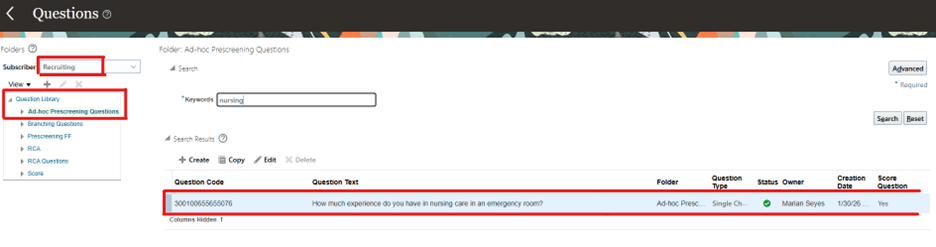
Ad-hoc Prescreening Questions Sub-Folder
A new classification Ad-hoc Question Created by User was created for ad-hoc prescreening questions. This classification is automatically added to questions created by recruiting users. The new classification isn’t available when administrators create questions in the Question Library.
Administrator can modify ad-hoc prescreening questions, their responses and scores. However, they can’t modify the classification of such questions.
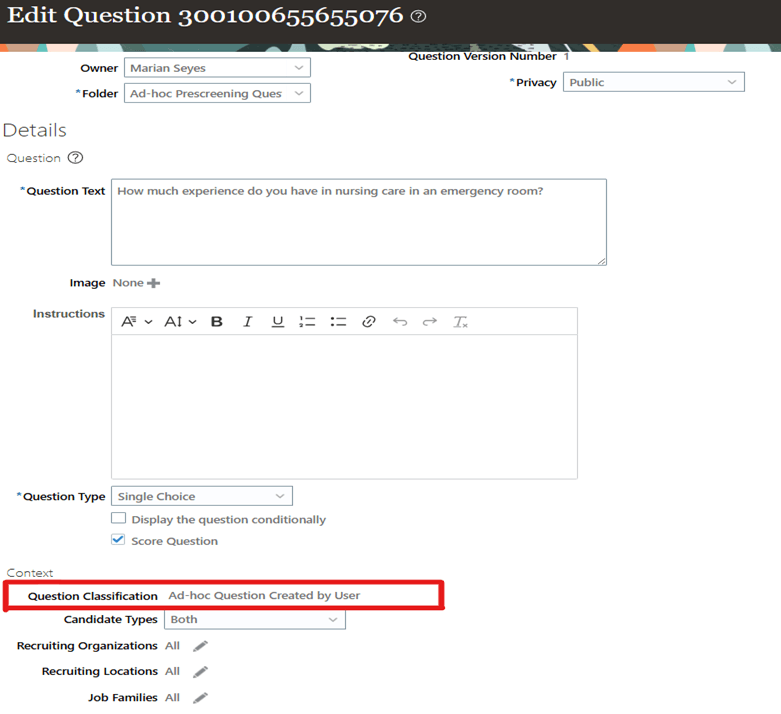
Ad-hoc Question Created by User Classification
Business benefits:
- Recruiting users can tailor questions to nuances specific to each job requisition.
- Recruiting users can capture screening criteria directly during intake discussions with hiring managers.
- Avoids over-reliance on generic question templates that may not fully qualify candidates.
- Reduces operational friction in high-velocity hiring environments.
- Enables knockout-style filtering early in the funnel.
- Avoids irrelevant or repetitive standard screening questions.
- Supports specialized and niche hiring scenarios.
Steps to enable and configure
To view the link to create adhoc question, you need to enable Redwood job requisition pages using below profile options:
- ORA_IRC_RECRUITING_REDWOOD_ENABLED
- ORA_IRC_REQUISITION_REDWOOD_ENABLED
- ORA_IRC_CREATE_REQUISITION_REDWOOD_ENABLED
For details, see How do I enable a profile option?
For details on enabling and customizing Redwood for HCM, see How do I adopt Redwood for HCM? and Extending Redwood Applications for HCM and SCM Using Visual Builder Studio
For privileges, see the Access Requirements section.
Access requirements
A new privilege is available:
- Create Prescreening Question for Job Requisition (IRC_CREATE_PRESCREENING_QUESTION_FOR_JOB_REQUISITION_PRIV)
By default, this privilege has been added to the Recruiting Manager job role. Customers who are using custom roles for Recruiter and Recruiting Manager need to add this new privilege.