Purge Workforce Management Staging Data Process
Administrators responsible for Workforce Management staging data retention can now use a new process to identify and remove outdated staging records.
They can use this on-demand or scheduled process that either reports on or permanently deletes WFM staging data older than a customer-defined retention period. The process applies to all types of WFM staging data together and uses a single days-based parameter to determine which records are affected.
-
Two process modes: Report (shows how many records are affected and which table they are stored in) and Purge (permanently deletes affected records).
-
A required Purge Data Older Than parameter (integer) specifies the age threshold; default value is 30 days.
-
Can be launched on demand or scheduled to run regularly (for example, monthly).
-
Applies uniformly to WFM staging tables; no additional filters or per-data-type settings are required.
-
Users with Run Global HR Processes privilege can run this ESS process
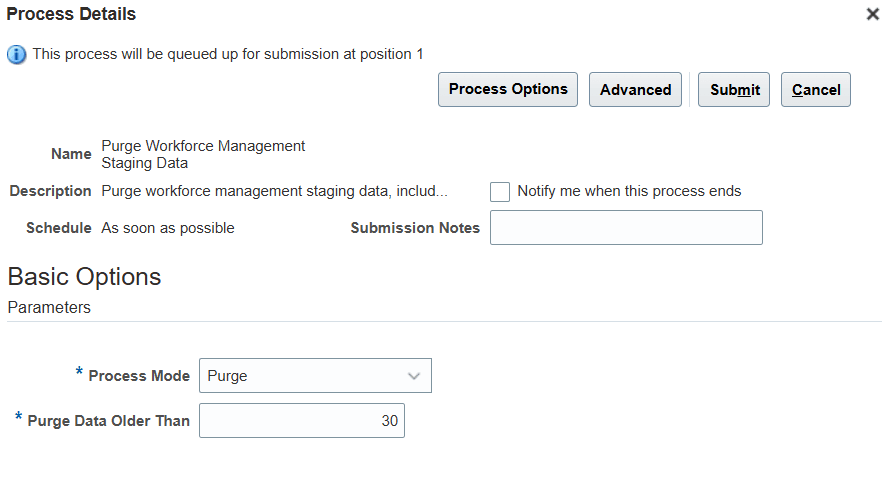
Purge Workforce Management Staging Data Process Page
The staging data that are affected by this process are:
- All data related to threaded processing, including the related parameters, ranges, logs, messages;
- All transient data related to schedule import and time card processing using the Time Records REST API.
This enhancement helps in data minimization reducing redundant and old data that is no longer needed from Workforce Management staging tables.
Steps to enable and configure
You don't need to do anything to enable this feature.
Tips and considerations
-
Report mode does not delete data; it only lists records that meet the age threshold so you can verify before purging.
-
Purge mode permanently deletes the identified staging records; this action cannot be undone.
-
The process targets WFM staging/process data only; this processing data is not directly linked to primary customer records.
-
All staging data types that meets the 'Data Older than' criteria are purged.
Access requirements
Execution of the process requires the Run Global HR Processes permission (HCM Application Administrator role).