Manage Approved Certification Documents in Subsequent Life Events
Benefits administrators now have greater flexibility when a certification document has already been approved and a later life event requires additional documentation.
Previously, after a document was approved, all fields except the Received Date became read-only. If the same certification was required for a subsequent life event and the approved document’s validity end date was still valid, the document was automatically linked to the new certification. As a result, organizations couldn’t require employees to submit a new document for the later life event.
With this enhancement:
- The Add Attachment button remains available when a document is in Approved status.
- Validity End Date remains editable after approval.
- Comments remain editable in Benefits Summary.
- Validity End Date and Comments remain editable even when the certification action item is completed.
- Hover text on the Validity End Date field displays the validity rule applied to calculate the date.
- Attachments on past life events can be previewed and downloaded without allowing additional updates.
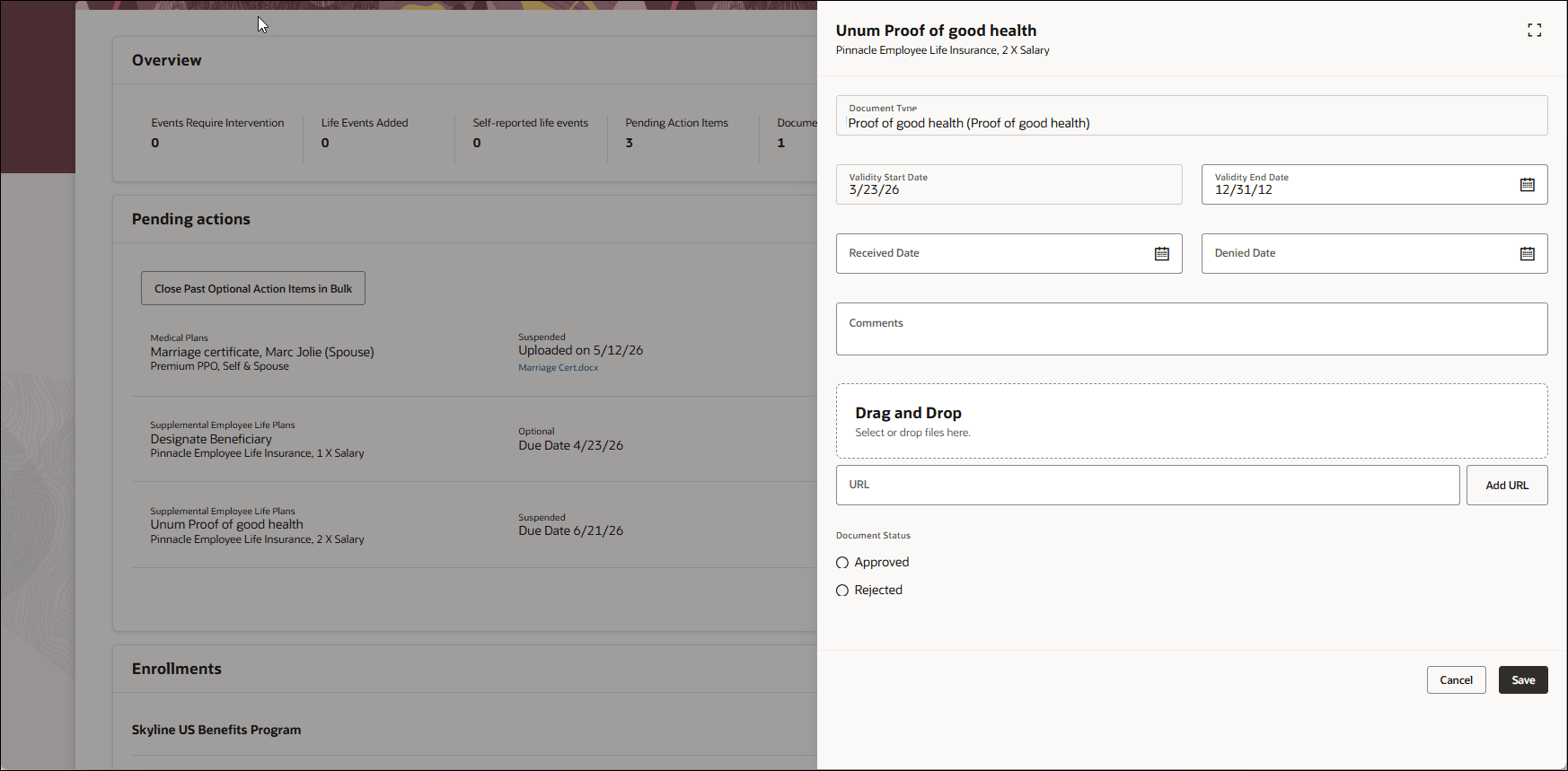
Attachments
This feature gives organizations more control over documentation requirements for recurring or subsequent life events. Administrators can expire existing approved documents, require updated documentation when needed, and preserve historical document records without replacing prior approvals.
Steps to enable and configure
Enable these profile options. To learn how to enable a profile option, see How do I enable a profile option?
-
ORA_HCM_VBCS_PWA_ENABLED
-
ORA_BEN_ADMINISTRATIVE_ENROLLMENT_REDWOOD_ENABLED
-
ORA_BEN_SELF_SERVICE_ENROLLMENT_REDWOOD_ENABLED
No additional feature-specific setup is required.
Tips and considerations
- Previously approved documents remain in the document history.
- If a previously approved document is still valid, the system can automatically link it to a subsequent life event certification.
- To require a new document for a subsequent life event, update the Validity End Date so the prior document is expired.
- When you upload a new attachment to a certification that already has an approved document, the new document is linked to the document of record and doesn't overwrite existing documents.
- Validity End Date edits are validated. The system prevents invalid dates, such as a date before the life event occurred date or before the maximum certification received date.
- This enhancement doesn’t change document storage, DOR attachment lifecycle behavior, or approval routing.
Key resources
- Overview of Benefits Certifications and Other Action Items
- How Action Items Are Processed
- Manage Action Items Process
- How can I change the validity period for documents?
Access requirements
Users with these roles can view and manage certification documents:
- Benefits Manager
- Benefits Administrator
- Benefits Specialist