Redwood: New Employee Skills Center Experience
Displays skills related to the employee, in Enhanced Skills Center, by grouping them in tabs as follows:
- Required – Skills assigned by a manager
- Self Developing – Skills voluntarily assigned by the employee
- All Skills
Skills in each of the tabs can be sorted based on Recently Updated and Unattained Skills.
Employees can rate the skill level for a required or self-developing skill by clicking the circular or text-based rating in the Self-Rated Level column. Information icons in this column provide guidance for each rating level.
The target level for voluntarily added skills can be modified, or the skill can be unassigned, in the Self Developing and All Skills tab. Only managers can change the target level for skills they assigned (Core Skills). Only HR can change the target level of Role Skills. Employees can only change the target level for self-assigned skills. The Assigned Source column displays who assigned the skill.
Employees can request a manager’s endorsement by clicking Request in the Manager-Rated Level column. Once the manager provides a rating, it’s displayed in the Manager-Rated Level column.
If rating models are not enabled, self and manager level endorsements can be provided for each skill.
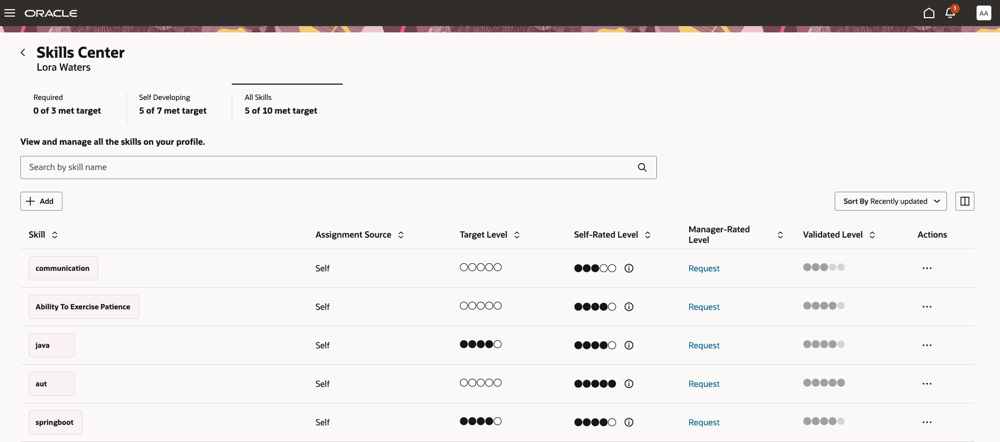
Employee dashboard for viewing their skills when rating model is enabled
To view more details about the skill, click the skill chip or select View Details in the Actions column. You will navigate to Skill Details page.
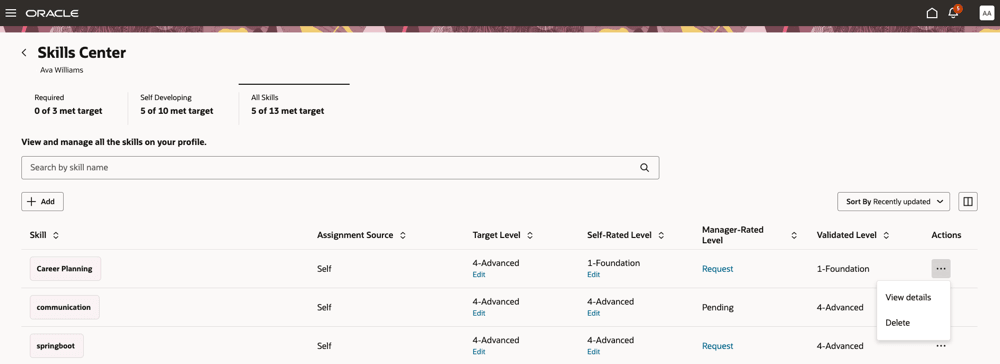
Viewing more details about the skill
A badge with a check mark on the skill chip indicates that the skill has been validated for the target level based on the validation rules. Unlike in the legacy Skills Center, the color of the skill chip doesn’t change once the skill has been met.
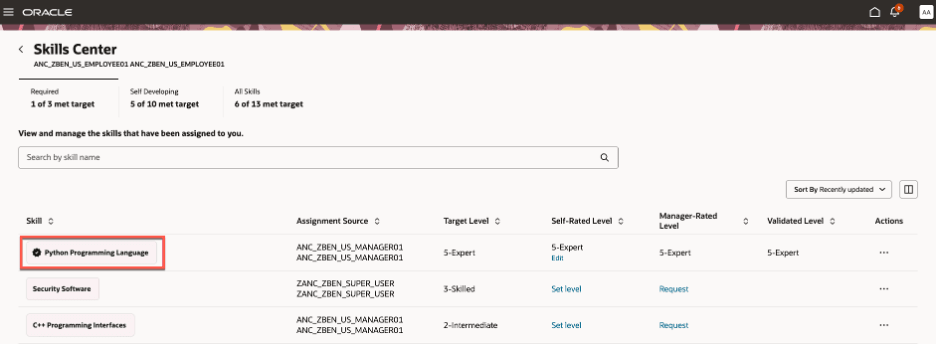
Skill has been met
Provides employees with a holistic, actionable view of their skills. With this enhanced experience, employees can:
- See and manage required, self-developing skills, and comprehensive skill lists: Employees can now clearly distinguish between organization-mandated skills, self-developing (voluntary) skills, and view all skills in one, streamlined interface.
- Visual skill insights: Each skill displays key information at a glance, including its source, validation level, self-rating, and manager rating, helping employees understand skill importance and development status quickly.
- Actively track and evidence skill progression: Employees can self-rate skills using an intuitive circle-based interface and easily log progress. Each update is captured in the skill endorsement evidence table, supporting robust tracking and reporting.
- Seamlessly collaborate in skill validation: Employees can request manager endorsements and peer validations, fostering a culture of feedback, recognition, and continuous improvement.
These improvements make the Skills Center a dynamic hub for skill management, talent development, and organizational agility-empowering both employees and leadership to address business priorities and personal growth objectives.
Steps to enable and configure
You have enabled:
- Enhanced Dynamic Skills. For details, see Pathways to Enhanced Dynamic Skills.
- Enhanced Skills Center. For details, see How can i enable Enhanced Skills Center?
Rating levels can be displayed as circular or textual. Circular ratings are supported only when there are 7 or fewer rating levels. If there are more than 7 rating levels, the display switches to text-based ratings. If the display is set to textual, rating levels are displayed as text regardless of the number of rating levels. Select how the rating levels are displayed. For details, see How can I enable circle rating?
Tips and considerations
As a profile administrator define a numeric rating even if the field is optional. To define or manage numeric ratings, navigate to My Client Groups >Profiles >Profile Rating Models.