Search Configurability of Jobs LOV in Redwood Workforce Structures Pages
We have enhanced the REST-based Jobs List of Values (LOVs) in Redwood to include the new attribute of Job Subfamily to improve usability and enhance the search configurability of this LOV.
The Job Subfamily column is now added in the Jobs LOV. This allows you to search for and filter the jobs in the Jobs LOV based on the search term you select for the job subfamily. The Job Subfamily column is added for Oracle Search.
For more information, see the Steps to Enable and Configure section of this What’s New.
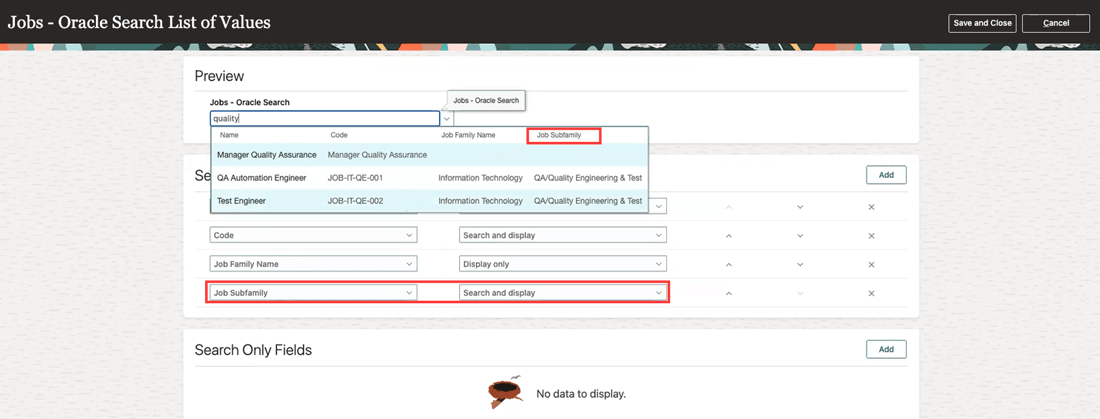
Job Subfamily can be searched on and displayed in Jobs LOV
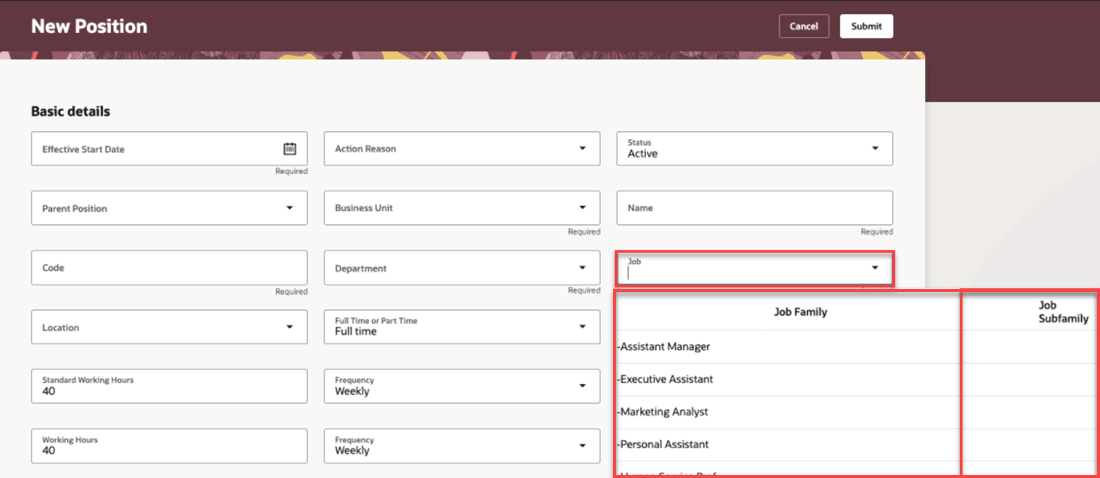
Job Subfamily column displayed in the Jobs LOV on the New Position page
This enhancement allows you to filter jobs based on the job subfamily. It helps reduce data entry time and improves accuracy by enabling faster, more targeted selection of jobs, leading to increased productivity and a smoother user experience.
Steps to enable and configure
For more information about setting up Oracle Search for List of Values (LOVs), see the Set Up Oracle Search for List of Values chapter in the Oracle Search Cloud Service playbook.
For more information about how to configure the Action Reason LOV, see How do I configure a list of values?
Key resources
For more information, refer to these resources on the Oracle Help Center:
- Set Up Oracle Search for List of Values chapter in the Oracle Search Cloud Service playbook
- How do I configure a list of values?
Access requirements
You need to have the HR Specialist or Line Manager roles to set up Oracle Search for List of Values (LOVs) and to configure the Jobs LOV.