Additional Filter of Job Subfamily on Redwood Job Families Search Page
We have added a new filter called Job Subfamily on the Redwood Job Families search page. This filter helps you to additionally filter the search results for a job family, based on the selected job subfamily.
Navigation path: My Client Groups > Show More > Workforce Structures > Job Families. On the Job Families Redwood search page, select the Job Subfamily field.
A list of values is displayed, showing the different job subfamilies associated with the job. You can also see the aggregate counts in brackets next to each job subfamily, denoting the number of records. Select the job subfamily by which you want to filter the search results and click See Results.
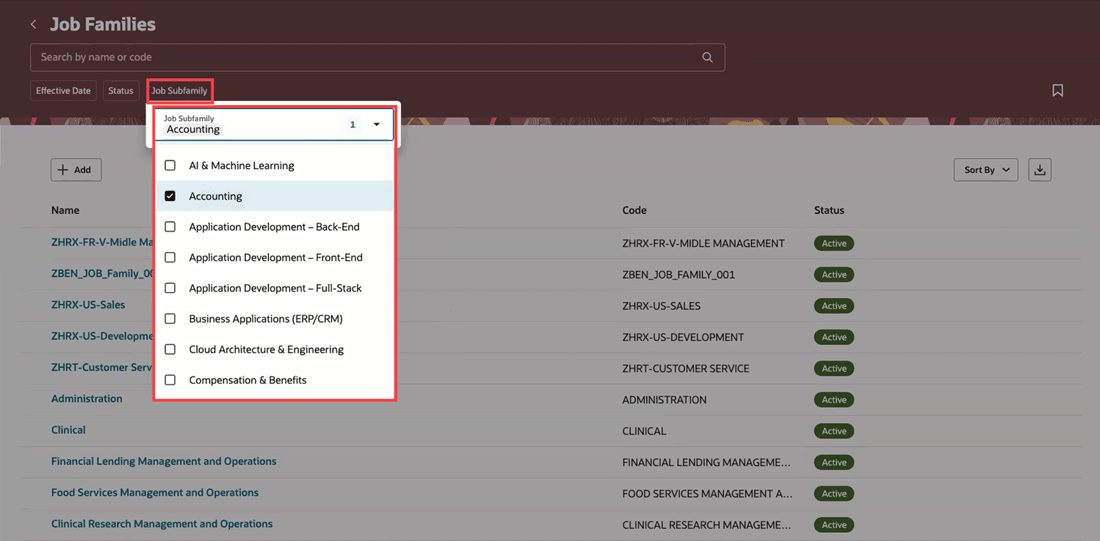
Job Subfamily filter on the Redwood Job Families search page
Let's suppose you select a job subfamily that’s associated with the Finance, Human Resources, and Information Technology job families. Then you’ll see these three job families on the Job Families search page.
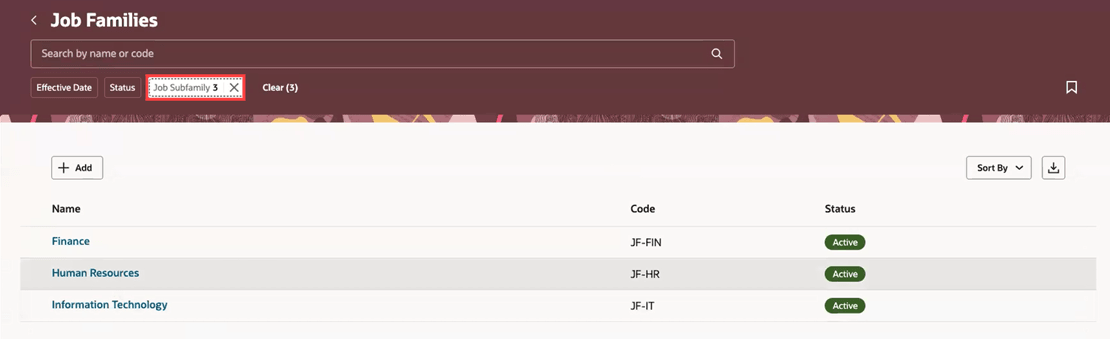
Search results displayed after applying a Job Subfamily filter
Similarly, if you select another job subfamily, you can see all the job families with which the selected job subfamily is associated.
This feature is useful when multiple job subfamilies are associated with a job family, and you want to view the job family records that are associated with only a specific job subfamily.
Steps to enable and configure
You don't need to do anything to enable this feature.
Key resources
For more information, refer to these resources on the Oracle Help Center: