Agent as Task Performer in Journeys
You can now configure an AI agent in journey tasks as a task performer or task type. This enhancement lets journey tasks trigger or start HCM agents as part of a journey flow.
Here’s how the configuration works:
-
Agent as the task performer: The agent performs the task automatically when the task is initiated. In this case, the task type defaults to Agent, and the selected workflow agent is triggered from the backend.
-
Agent as the task type: The task itself is an agent task. When the user starts the task, the selected agent is initiated. If the selected agent is a supervisor agent, the agent chat window opens. If the selected agent is a workflow agent, the agent is invoked from the backend and the user sees a toast message after successful initiation.
This feature is available when configuring tasks in these pages:
-
Journey Templates
-
Task Library
-
Task Groups
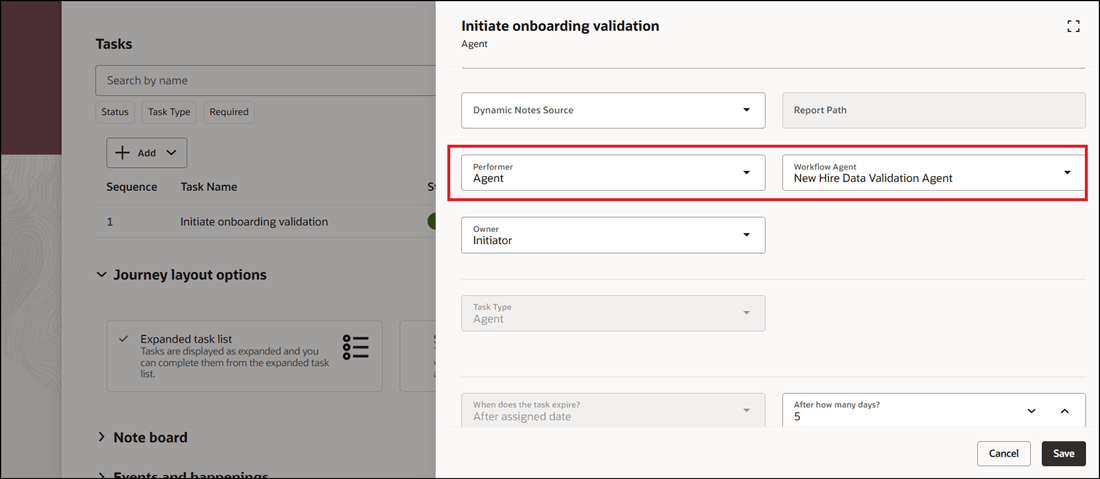
Here are some use case examples where you can embed agent-driven automation and assistance directly in journeys.
-
Onboarding automation: Add an agent task to an onboarding journey that triggers a workflow agent to collect required data, validate onboarding prerequisites, or initiate downstream setup activities.
-
Manager-guided actions: Add a supervisor agent task in a manager journey so that managers can start an agent chat for help in completing a guided action. The help request can include reviewing a new hire readiness checklist or preparing for a transition discussion.
-
Automated HR process steps: Configure an agent as the performer for a journey task so the task automatically initiates a workflow when it becomes active. In this case, the employee, manager, or HR specialist don’t have to manually complete the task.
-
Task library reuse: Create reusable agent tasks in the task library and add them to multiple journey templates or task groups where the same agent-driven process is needed.
Here are some key benefits of this feature:
-
Reduces manual work: Workflow agents can be triggered automatically when journey tasks are initiated.
-
Improves user guidance: Supervisor agents can be started from journey tasks to provide users with an interactive chat experience.
-
Supports consistent processes: Agent tasks can be defined in journey templates, task groups, and the task library for reuse across multiple journeys.
-
Simplifies configuration: When the performer type is Agent, the task type defaults to Agent and unrelated fields are hidden or disabled, reducing configuration complexity.
-
Improves process orchestration: Journey tasks can now initiate backend agent workflows as part of a structured employee, manager, or HR process.

Agent as Task Performer

Agent as Task Type
This enhancement helps organizations bring agent-driven automation and conversational assistance to their journeys.
Steps to enable and configure
For more information, see this topic: Configure AI Agent as Task Performer or Task Type
Tips and considerations
-
When you select Agent as the performer type, only workflow agents are shown in the workflow list.
-
When you select Agent as the task type, workflow agents and supervisor agents are shown in the workflow list.
-
For Agent performer tasks, the workflow is triggered when the task is initiated.
-
Alert notifications aren’t sent for tasks where the performer type is Agent.
-
You can experience the following UI behavior for the Agent task type:
-
Supervisor agents open the agent chat window.
-
Workflow agents are invoked from the backend.
-
A toast message is displayed after successful workflow initiation.
-
-
The task sub type is hidden and defaults to Workflow when the task type is Agent.
Key resources
-
AI Agents feature in 24D HCM Common What's New
Access requirements
Access Intelligent Agent Chat, HRC_ACCESS_AI_AGENT_CHAT_PRIV privilege secures this feature. You must add this function privilege to your custom roles to use this feature. See the Release 13 Oracle Human Capital Management Cloud Security Upgrade Guide on My Oracle Support (Document ID 2023523.1) for instructions about implementing new functions in existing roles.
For information about existing security privileges, refer to the Security Reference for Common Features guide on the Oracle Help Center.