AI Agent Support for Change Assignment Processes
The AI Agent Assignment Change Assistant helps managers and HR specialists complete employment updates for a single worker and assignment through a guided conversational experience.Managers and HR specialists can ask the assistant to make common employment updates, provide the required details in the conversation, review the proposed changes, and submit the transaction without manually navigating the Change Assignment pages.
The assistant guides you through the full assignment change process. You can search for a worker by name or person number, confirm the assignment they want to update, select the assignment change type, enter the effective date, provide the required values, and review the updates before submission. After the user confirms the changes, the assistant submits the transaction through the existing Change Assignment approval process.
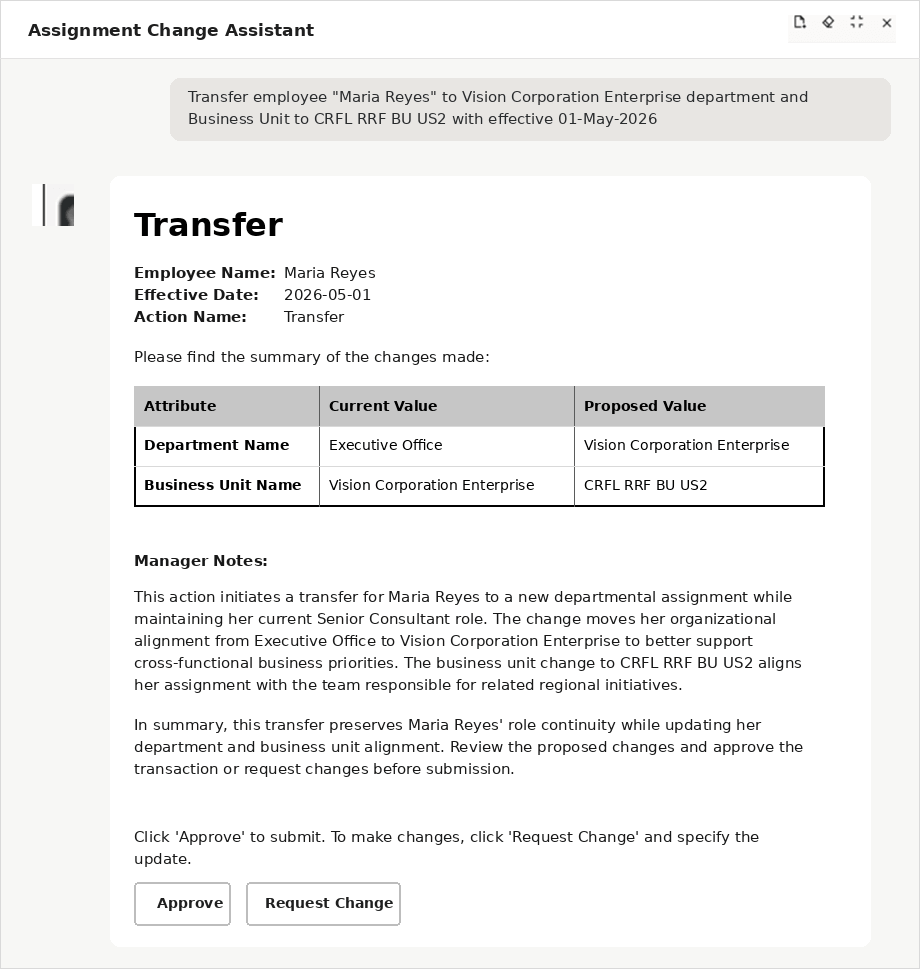
The assistant determines the appropriate employment process based on your request and the attributes being changed. For example, location-only changes are considered as Change Location, business unit or department changes are considered as Transfer, and mixed or broader updates are handled through Change Assignment.
Supported Assignment Attributes
The assistant supports updates to these assignment attributes:
- Action
- Reason
- Effective Date
- Business Unit
- Job
- Business Title
- Position
- Department
- Location
- Building
- Floor
- Office Number
- Union Member
- Working as Manager
- Working at Home
- Notes
Guided Validation and Review
The assistant captures the effective date early in the flow and uses it to help validate the assignment change. It collects required values using lists of values and helps users select the correct value when similar matches are found.
The assistant also determines the appropriate employment process based on the user’s request and the attributes being changed. For example, location-only changes can be considered as Change Location, business unit or department changes can be considered as Transfer, and broader or mixed updates can be handled through Change Assignment.
Before submission, the assistant generates an assignment note that summarizes the selected changes and displays a review summary for confirmation. This gives users a clear opportunity to verify the worker, assignment, effective date, change type, and updated attributes before the transaction is submitted.
Example Uses
Managers and HR specialists can use the Assignment Change Assistant for common single-worker employment updates, including transfers, department changes, location changes, probation updates, title changes, and other supported assignment updates.
For example, a manager can ask the assistant to move a worker from HR to Operations and update the worker’s business title to Program Lead. The assistant collects the details, validates the department and title values, generates an assignment note, displays the proposed changes for review, and submits the transaction after confirmation.
An HR specialist can also use the assistant to transfer a worker to a different office effective on a future date. The assistant captures the future effective date, validates the new department and location, shows a review summary, and submits the transaction through the existing approval process.
Assignment Change Assistant
This feature helps managers and HR specialists complete routine worker assignment updates faster and with less manual navigation. You can request supported changes through a conversational assistant instead of opening and completing the full Change Assignment transaction page manually.
The assistant improves the assignment update experience by guiding you through the required steps, validating entered values, resolving ambiguity when similar values are found, and presenting a clear review summary before submission. This helps you to complete common assignment changes more confidently and efficiently while continuing to use the existing Change Assignment approval process.
Steps to enable and configure
- Your environment must have certain necessary configurations. Ask your help desk to contact Oracle Support, who can verify what your environment has and address any gaps. For more information, see FAQ2521 on My Oracle Cloud Support.
- Set the Enable Security Console External Application Integration (ORA_ASE_SAS_INTEGRATION_ENABLED) profile option to Yes, and enable permission groups for the appropriate roles. See Access Requirements for AI Agent Studio.
-
To learn how to set up AI agents, see Create AI Agents Using Preconfigured Agent Team Templates.
You need to configure security to use this feature. See the Access Requirements section.
Tips and considerations
- The assistant supports updates for a single worker and one assignment. It doesn’t perform mass updates.
- The assistant supports direct conversational updates for supported assignment attributes. If you request an unsupported attribute or employment action, the assistant routes the user to the appropriate Change Assignment page or deep link.
- Promotion, Global Transfer and Change Manager are routed through deep links when they can’t be completed directly in the conversation.
- Pending workers aren’t supported for employment actions using this assistant.
- If a worker has a pending transaction, the assistant displays a message and provides a link to review the pending transaction details.
- The assistant uses the existing Change Assignment approval process and doesn’t introduce a separate approval path.
- This is a predefined runnable agent.
- The option to customize this agent will be supported in future releases.
Key resources
Access requirements
The agents you can view depend on the roles and privileges assigned to you. To access this agent, your role must be explicitly granted access to it by an AI Studio Administrator. See How can I give users access to AI agents and Access Requirements for AI Agent Studio.