Ability to Delete Synchronization From Position Assignment Record from Redwood Employment Details Page and HCM Data Loader
You can now delete assignment records that were created with the Position Synchronization action, from the Redwood Employment Details page. This capability is controlled by a new profile option that enables organizations to determine whether Position Sync-generated employment history records can be deleted.
When Position Synchronization is enabled and assignment changes are created automatically due to position updates, users can delete these assignment records directly from the Redwood Employment Details > Delete page if the profile option is enabled.
A new profile option, ORA_PER_EMPL_ALLOW_DELETE_POS_SYNC_ROW controls this behavior. You can set it either to Y or N
- Y – Users can delete assignment records created through Position Synchronization.
- N – Deletion of Position Synchronization-generated assignment records is prevented.
If deletion is not allowed, the application displays an appropriate message and the employment history record remains unchanged.

Summary of employment changes
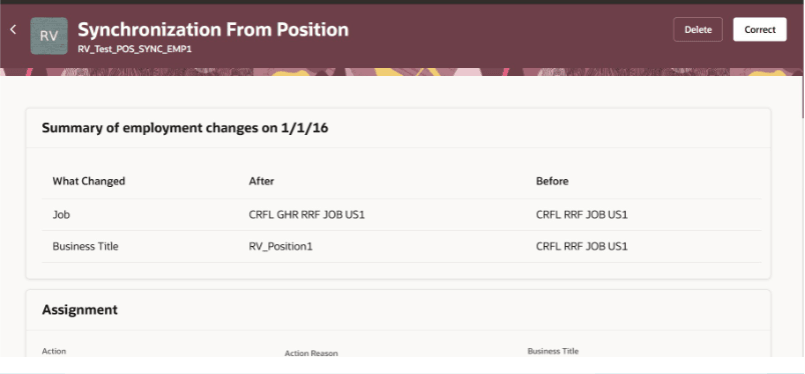
Select a position sync record for deletion
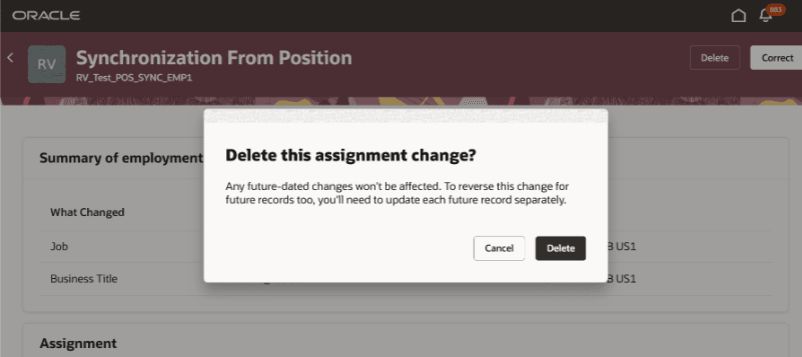
Delete position sync record
Deleting a Position Synchronization Assignment Record Using HDL
You can delete an assignment record created by position synchronization using HDL. The ORA_POS_SYNC action code identifies a position synchronization row. Deleting position synchronization records using HDL is allowed and isn’t dependent on the profile option that controls deletion from the application.
This enhancement provides greater flexibility in managing employment history records created through Position Synchronization. Administrators and HR specialists can correct or remove unwanted Position Sync-generated assignment changes when business processes require.
Steps to enable and configure
You need to enable the ORA_PER_EMPL_ALLOW_DELETE_POS_SYNC_ROW profile option to delete assignment records with the position sync action.
- Navigate to the Manage Administrator Profile Options page.
- Search and set the ORA_PER_EMPL_ALLOW_DELETE_POS_SYNC_ROW to Y.
- Save the change.
From the Redwood Employment Details page:
- Select an assignment record created with the Position Synchronization action.
- Click Delete.
- Submit the transaction.
When the profile option is enabled, the record is deleted successfully and employment history is updated accordingly.
Tips and considerations
- This enhancement applies only to assignment records created through Position Synchronization.
- Existing Position Synchronization functionality remains unchanged.
Key resources
For more information, refer to this resource on the Oracle Help Center:
- Position Synchronization in the Implementing Global Human Resources guide.