Enhanced TDS Challan Mapping Process
You can now use the enhanced flow for TDS challan mapping using configurable parameters such as Financial Year, Payroll Month, Tax Reporting Unit (TRU), Payroll, Legal Employer, and Payroll Relationship Group. This flow automatically maps the challan and dates based on the parameter input and populates this information in the inbound interface table.
The enhancement aims to avoid the manual file conversion from .txt to .csv, simplify the mapping of Employee groups with challan payments within the TRU level, reduces manual mapping errors and improve compliance accuracy during Form 24Q quarterly filing.
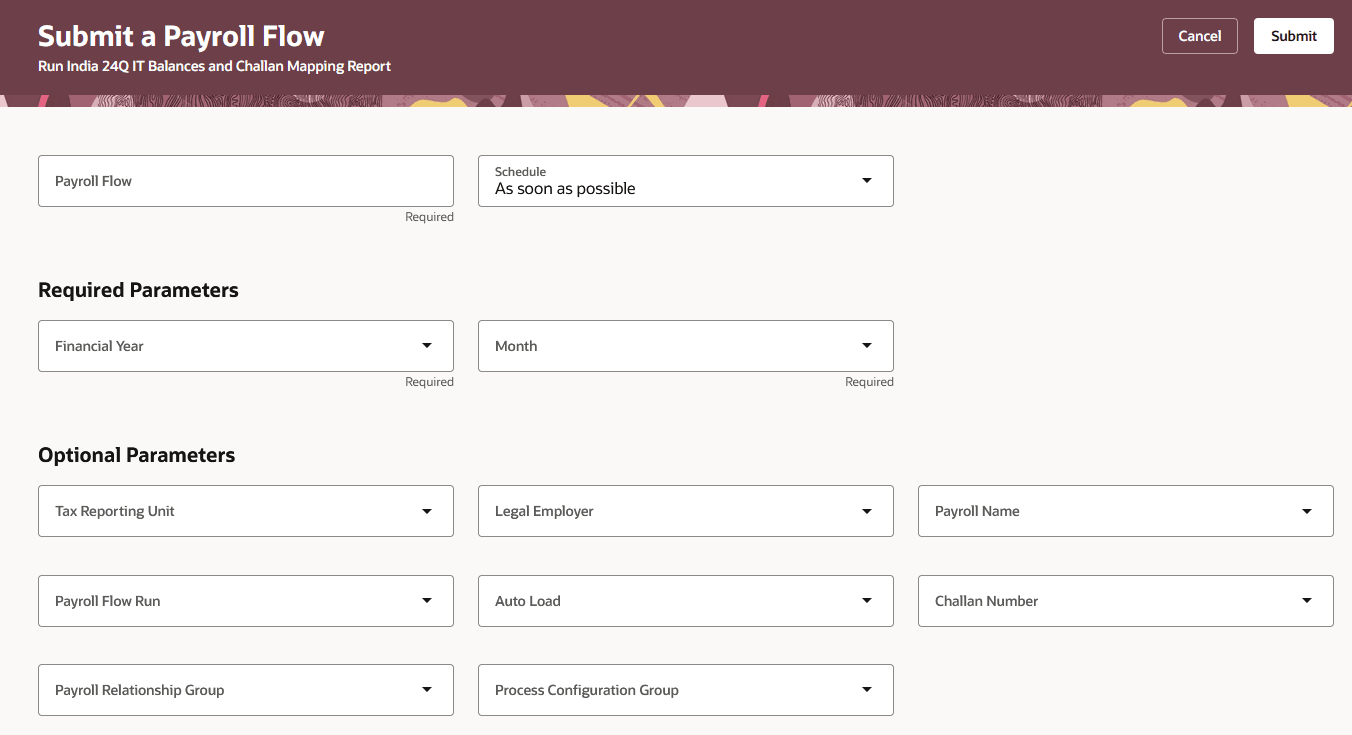
TDS Challan Mapping Flow
To run this process:
1. Go to My Client Groups > Payroll > Submit a Flow.
2. Select your IN legislative data group.
3. Search for and select Run India 24Q IT Balances Report and Challan Mapping Report.
4. Enter the flow name, schedule, financial year, and month.
5. Enter the tax reporting unit, legal employer, payroll flow run.
6. Select the challan number from the list of values derived from the selected TRU. The challan number automatically loads the challan date.
7. Select the Payroll Relation Group to segregate the employees.
8. Select Submit
The generated output file now includes additional audit attributes such as Payroll Relationship Number, Payroll Action ID, Flow Name, Challan Number, and Challan Date to improve traceability and reconciliation during Form 24Q processing. The flow execution and uploaded records are fully auditable, helping organizations maintain compliance and improve monitoring of challan mapping activities.
This enhancement helps organizations reduce manual CSV editing, improve challan mapping accuracy, support multiple challan scenarios, and strengthen statutory compliance for India Payroll Form 24Q reporting.
Steps to enable and configure
You don't need to do anything to enable this feature.