Redwood Experience: Display Relationship Between Interviews and Feedback Requests
Take advantage of these interview feedback enhancements.
Display of relationship between interviews and feedback requests
We now clearly show the relationship between interviews and feedback requests across interview and feedback pages. In areas where interviews are displayed, the associated feedback requests are displayed. For example:
- On the job application Interviews tab, feedback requests are listed for each interview.
- The Provide Feedback page displays the interview name.
- The Request Feedback action is available for each interview.
In areas where feedback requests are displayed, the associated interviews are displayed. For example:
- The View feedback drawer displays the interview name when the feedback is for an interview. You can click the interview name which opens the interview details page.
- The View questionnaire drawer displays the interview name when the feedback is for an interview. You can click the interview name which opens the interview details page.
- The Request feedback drawer displays the interview name when the feedback is requested for an interview.
- The Provide Feedback page displays the interview name at the top of the page when the feedback is for an interview. You can click the interview name which opens a drawer to preview interview details. The Preview page includes a link to navigate to the interview details page.
Provide separate feedback for each interview even when the interviews use the same questionnaire
When a respondent participates to multiple interviews for the same candidate, they can now provide feedback for each interview using the same questionnaire (or rating-only feedback).
Here are the rules being used:
- If a feedback request is for a job application (not for an interview), the respondent can provide one feedback per questionnaire (or rating-only).
- If a feedback request is for an interview, the respondent can provide one feedback per questionnaire (or rating-only).
Let’s say there are two interviews for a job application. The respondent can provide feedback 3 times using the same questionnaire (or rating-only):
- Once for the job application (not related to the interview)
- Once for the first interview
- Once for the second interview
Label to indicate the type of feedback request
For feedback requests displayed in the job application Feedback tab, we now display a label underneath the respondent name to indicate if the feedback request is for a job application or an interview.
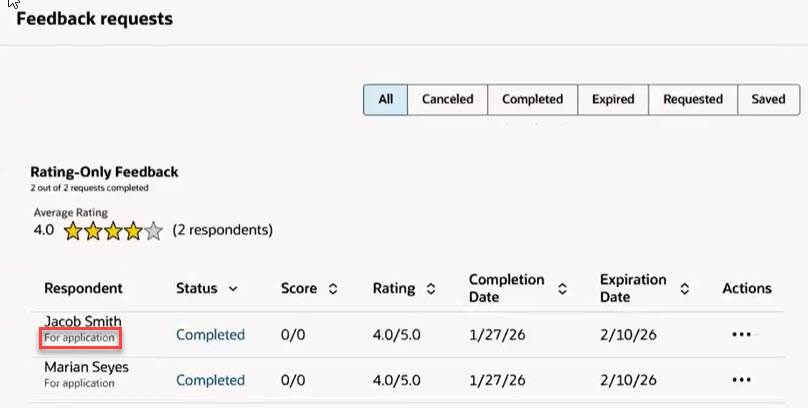
Label Indicating the Feedback Request is for a Job Application
New database items (DBI) for fast formulas
These new database items for fast formula are available to determine if an interview is associated to an interview or not, and if so, to which one.
IRC_CSP_ INTFEEDBACK_INTRVWRQST_ID: Interview request to which the feedback request is associated.
IRC_CSP_INTFEEDBACK_RATING_SCORE: Rating score of the feedback request.
IRC_CSP_INTFEEDBACK_RATING_ONLY: Indicates if the feedback request includes only a rating.
IRC_CSP_INTFEEDBACK_QSTNR_ INTRVWRQST_ID: Interview request to which the questionnaire used for the feedback request is associated.
For details, see Database Items for Oracle Recruiting Cloud Fast Formulas (KB49415) on My Oracle Support.
Business benefit: This feature gives recruiters clearer visibility into how interviews and feedback requests are connected, and it allows respondents to provide feedback for multiple interviews using the same questionnaire.
Steps to enable and configure
To use Redwood experience, you need to enable the Recruiting Redwood pages profile options. For details, see Set profile options for Redwood pages.
For details on enabling and customizing Redwood for HCM, see How do I adopt Redwood for HCM? and Extending Redwood Applications for HCM and SCM Using Visual Builder Studio