Redwood Experience: Generate Interview Resources Using AI Agent
Take advantage of an AI agent to generate interview guidelines. The agent replaces the deprecated Prompt Lab prompts while preserving the same content-generation and regeneration experience for supported fields.
The new agent template is available in AI Agent Studio: Recruiting Interview Resources Agent.
When you create or edit an interview or interview schedule and the interview guidelines fields are empty, the AI agent is called and it automatically populates the Interview guidelines field. Note that the following 3 fields aren't populated automatically by the agent but you can use the AI Assist button to generate content for these fields:
- Info for the candidate before scheduling the interview
- Info for the candidate for the scheduled interview
- Additional notes for the candidate
Note: Interview guidelines are automatically generated only when fields are empty. This is to avoid overwriting information already defined. Guidelines aren’t generated automatically for shared interview schedules or interview schedule templates.
If AI Assist is enabled, you can click AI Assist to modify the text. You can click Regenerate to regenerate the text, or you can click the arrow next to it to use one of the options to change the length or tone of the proposed text.
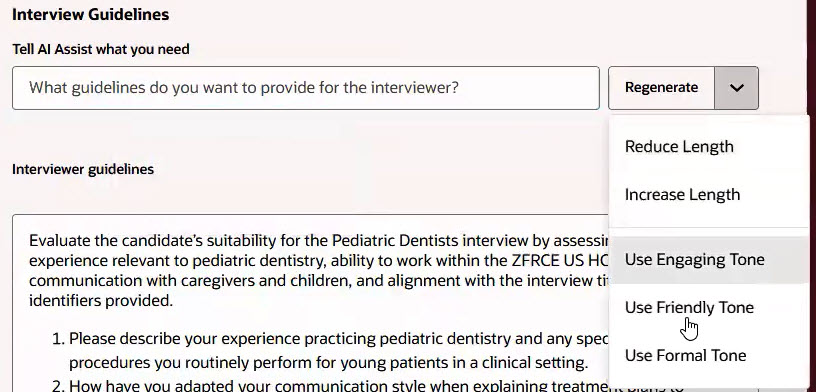
Regenerate Interviewer Guidelines
Business benefits:
- Tailored guidelines for each interview, using available context to help interviewers be better prepared, improve efficiency in scheduling, and ensure a more positive, consistent candidate experience.
- Structured guidelines lead to more actionable interviewer feedback for informed hiring decisions.
- Edit functionality allows hiring managers and recruiters to ensure the interview focuses on relevant topics and supports effective candidate evaluation.
- Ability to enable or disable the feature allowing teams to control how and when interview guidelines are created, adapting to their specific workflow needs.
Steps to enable and configure
You can enable the automatic generation of interview guidelines using the AI Agent. In Visual Builder Studio, go to Hiring > Create Interview Schedule or Create Interview and set the Automatically Generate Interview Guidelines page property to true.
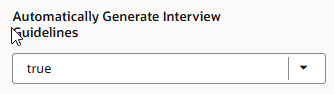
Automatically Generate Interview Guidelines Page Property
You can control the display of the AI Assist button for the four fields included in Interview Resources. In Visual Builder Studio, go to Hiring, select the Interview, Interview Schedule, or Interview Schedule Template pages where the AI Assist button appears, and set the AI Assist page properties to true.
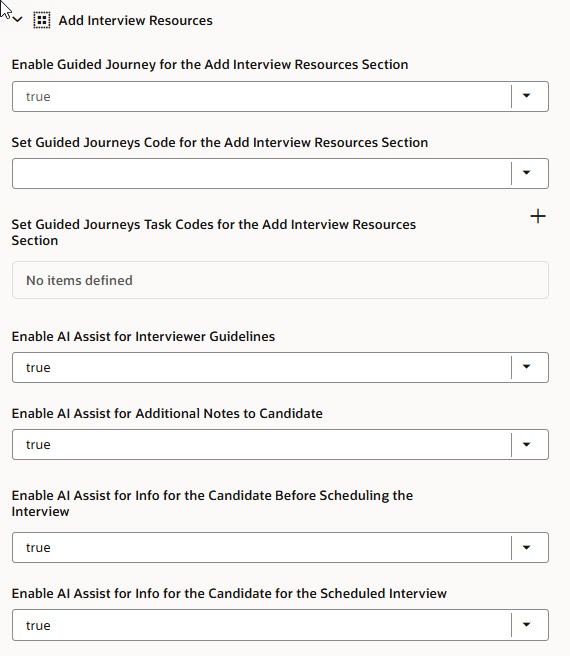
Page Properties in Visual Builder Studio
For details, see How do I control the display of a UI element in Visual Builder Studio?
To use Redwood experience, you need to enable the Recruiting Redwood pages profile options. For details, see Set profile options for Redwood pages. For details on enabling and customizing Redwood for HCM, see How do I adopt Redwood for HCM? and Extending Redwood Applications for HCM and SCM Using Visual Builder Studio
Key resources
- Explore AI Agents for Oracle Fusion Cloud Applications
- How do I use AI Agent Studio?
- How can I give users access to AI agents
- Access Requirements for AI Agent Studio
Access requirements
The AI agent is secured by these new roles. You need to associate one of these roles to your user roles:
- ORA_HCM_IRC_RECRUITER_WF_AGENT_ACCESS
- ORA_HCM_IRC_HIRING_MGR_WF_AGENT_ACCESS
- ORA_HCM_IRC_REC_ADMIN_WF_AGENT_ACCESS