Redwood Experience: Generate Job Requisition Posting Description Using AI Agent
Use a workflow agent to power AI Assist for generating job requisition posting descriptions, replacing the deprecated Prompt Lab prompts while keeping the same generation experience.
A new agent template is available in AI Agent Studio: Recruiting Job Requisition Posting Description Agent.
When you select AI Assist to generate the posting description of a job requisition while creating or editing the requisition, the agent is called and it generates the text in the following fields:
- Short Description
- Description
- Responsibilities
- Qualifications
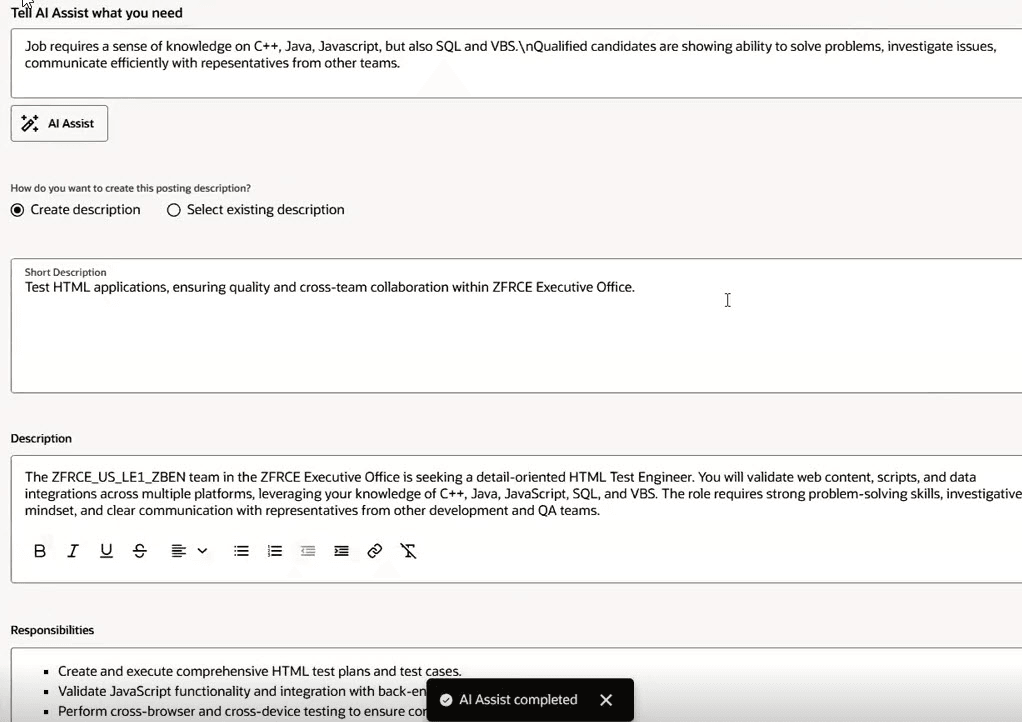
AI Assist in Posting Description
Business benefit: This change modernizes the technology behind posting description generation, providing a more reliable and extensible experience over time.
Steps to enable and configure
The Qualifications and Responsibilities fields are hidden by default. To make them visible, in Visual Builder Studio go to Hiring > Job Requisition > Posting description and Hiring > Create Job Requisition > Posting description and create business rules. For details, see How do I hide or show a field in Visual Builder Studio?
You can configure for which posting description fields AI Assist will generate text. In Visual Builder Studio, go to Hiring > Job Requisition > Posting description and Hiring > Create Job Requisition > Posting description and configure the AI Edited Sections page property. For details on enabling AI Assist, see How do I enable AI Assist for the job requisition posting description in Redwood?
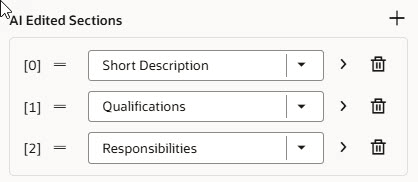
AI Assist Page Properties
To use Redwood experience, you need to enable the Recruiting Redwood pages profile options. For details, see Set profile options for Redwood pages.
For details on enabling and customizing Redwood for HCM, see How do I adopt Redwood for HCM? and Extending Redwood Applications for HCM and SCM Using Visual Builder Studio
Key resources
- Create AI Agents Using Preconfigured Agent Team Templates
- Explore AI Agents for Oracle Fusion Cloud Applications
- How do I use AI Agent Studio?
- How can I give users access to AI agents
- Access Requirements for AI Agent Studio
Access requirements
The AI agent is secured by these new roles. You’ll need to associate one of these new roles to your user roles:
- ORA_HCM_IRC_RECRUITER_WF_AGENT_ACCESS
- ORA_HCM_IRC_HIRING_MGR_WF_AGENT_ACCESS