Redwood Experience: Pipeline Requisitions Enhancements
Take advantage of the following enhancements.
Link a standard requisition to a pipeline requisition
You can link a standard requisition that has job applications or prospects to a pipeline requisition when the following conditions are met:
- Both the standard and pipeline requisitions have the same:
- Apply flow
- Recruiting type
- The standard requisition:
- Isn’t scheduled for posting
- Isn’t posted on internal or external career sites
- Isn’t posted on job boards
- Doesn’t have staffing agents assigned
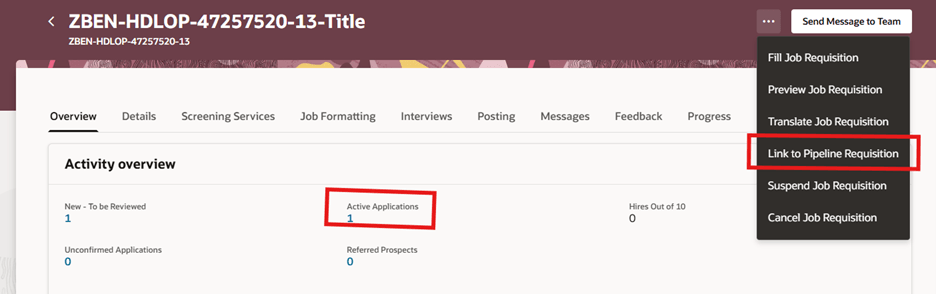
Link to Pipeline Requisition Action
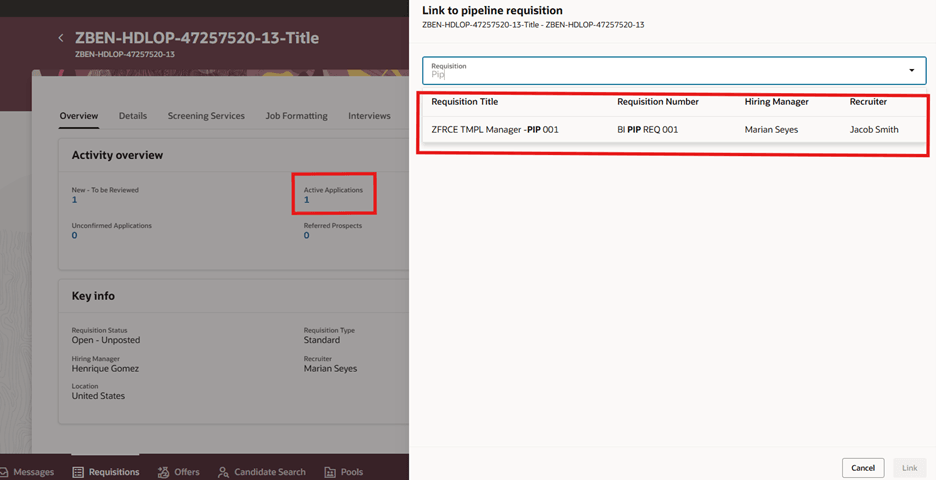
Link to Pipeline Requisition Drawer Panel
You can’t link a standard requisition to a pipeline requisition if the pipeline requisition is in any of these statuses:
- In Draft phase
- In Approval phase
- Filled
- Canceled
Unlink a pipeline requisition from a standard requisition
You can unlink a pipeline requisition from a standard requisition after it has been linked.
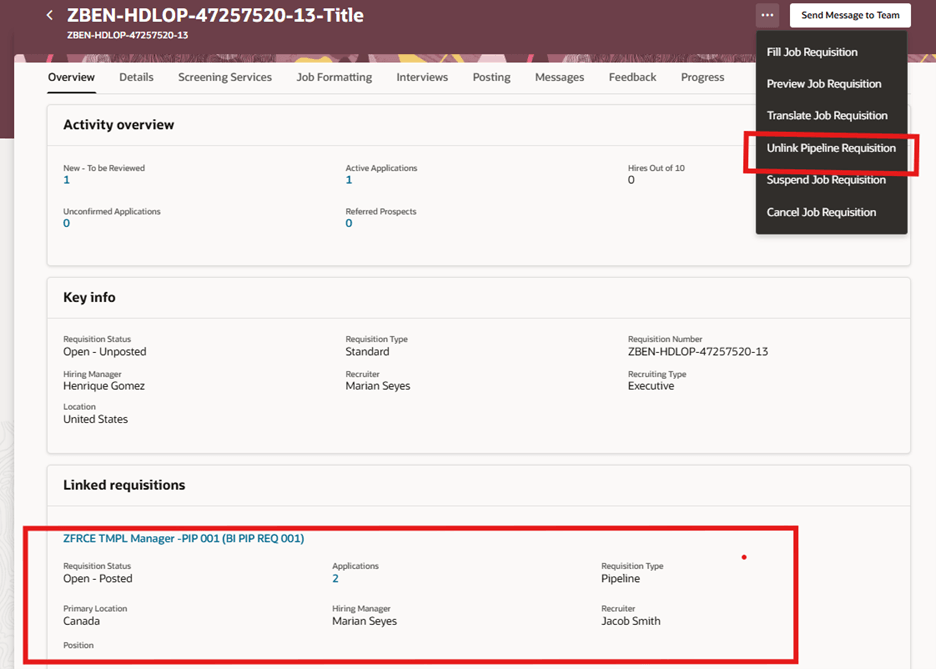
Unlink Pipeline Requisition Action
Business benefits:
- Greater flexibility in requisition management: Easily align and realign standard requisitions with appropriate pipeline requisitions as business needs evolve.
- Improved candidate pipeline utilization: Leverage existing job applications and prospects more effectively by associating them with relevant pipeline requisitions.
- Enhanced control and governance: New role-based privileges ensure that only authorized users can perform linking and unlinking actions.
- Reduced operational friction: Eliminates the need for workarounds when requisitions become misaligned, improving overall recruiting efficiency.
Steps to enable and configure
To use Redwood experience, you need to enable the Recruiting Redwood pages profile options. For details, see Set profile options for Redwood pages.
For details on enabling and customizing Redwood for HCM, see How do I adopt Redwood for HCM? and Extending Redwood Applications for HCM and SCM Using Visual Builder Studio
Access requirements
The Link to Pipeline Requisition and Unlink Pipeline Requisition actions are controlled only with the following privileges. Organizations should review and assign privileges carefully to maintain data integrity and process control.
Users need this privilege to see the Link to Pipeline Requisition action and associate a standard job requisition that has candidate job applications or prospects to a pipeline requisition:
- Associate Job Requisition With Applications to Pipeline Requisition (IRC_ASSOCIATE_JOB_REQUISITION_WITH_PIPELINE_REQUISITION_PRIV)
Users need this privilege to see the Unlink Pipeline Requisition action to unlink a pipeline requisition from a standard requisition:
- Unlink Pipeline Requisition from Standard Requisition ( IRC_UNLINK_PIPELINE_REQUISITION_FROM_STANDARD_REQUISITION_PRIV)