Redwood Experience: Collect More Info From Candidates During Offer Acceptance Flow
We have introduced an enhancement as part of Capture electronic signature on multiple offer documents feature.
If you have configured the Request Information action on the Offer Accepted state of a candidate selection process, candidates will see a Provide More Info button immediately after accepting their offer. Selecting this button launches the Request Information flow, allowing candidates to submit any additional information you have configured to collect.
The Request Information flow can be used to collect:
- Sensitive information
- Additional personal details
- Responses to supplemental questions
- Education information
- Supporting documents
- Other required information
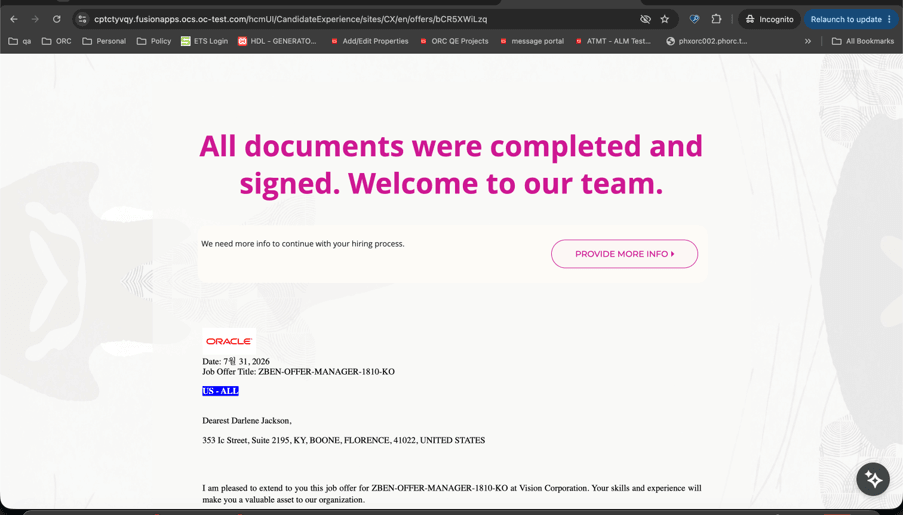
Provide More Info button
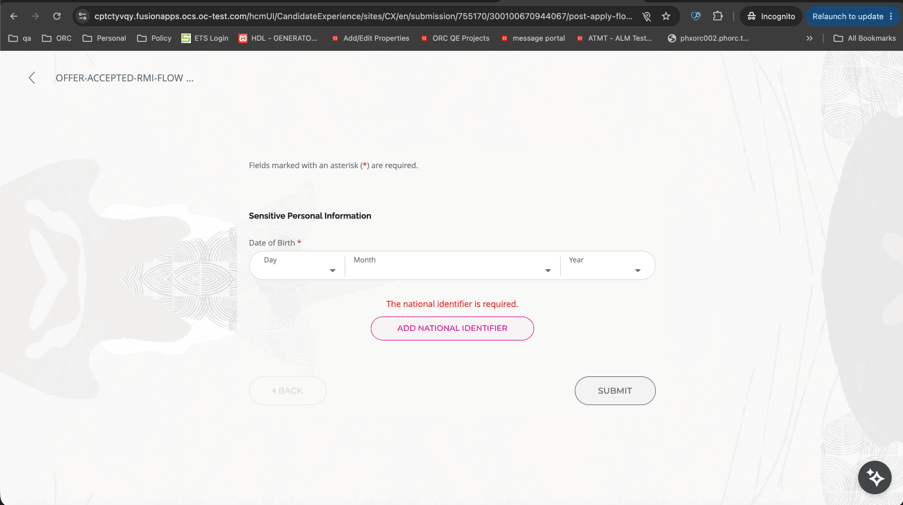
Accessing the Request Information flow from the accepted offer screen
Business benefits:
Faster Candidate Onboarding Process: Candidates can provide additional required information immediately after accepting their offer, eliminating the need to wait for a separate Request Information notification and accelerating the transition from offer acceptance to onboarding.
Improved Candidate Experience: By presenting a Provide More Info option directly on the offer acceptance page, candidates can complete all required post-offer activities in a single, seamless experience, reducing confusion and the likelihood of missed tasks.
Reduced Administrative Follow-up: Recruiters and HR teams spend less time following up with candidates for missing information because candidates are prompted to complete required details as part of the offer acceptance journey, helping reduce delays and manual intervention.
Steps to enable and configure
To enable this enhancement, set the site profile value to Y for the ORA_IRC_OFFER_MULTI_DOCUMENT_SIGNATURES profile option.
-
Go to Setup and Maintenance > Search > Manage Administrator Profile Values.
Tips and considerations
-
The Provide More Info section is displayed only when the Request Information flow is configured to trigger at the Offer Accepted state of the candidate selection process. If auto-progression is enabled at the Offer Accepted state and the job application advances to the next phase or state, the Provide More Info section isn't displayed.
-
The notification associated with the Request Information flow continues to be sent as a fallback, allowing candidates to provide the requested information later if they don't complete it during the offer acceptance process.