Redwood: Hide Comments Column for Facilitators
As administrators, you can hide the comments column for facilitators if your organization doesn’t need them to add comments for ratings when viewing the table view of the Talent Review dashboard.
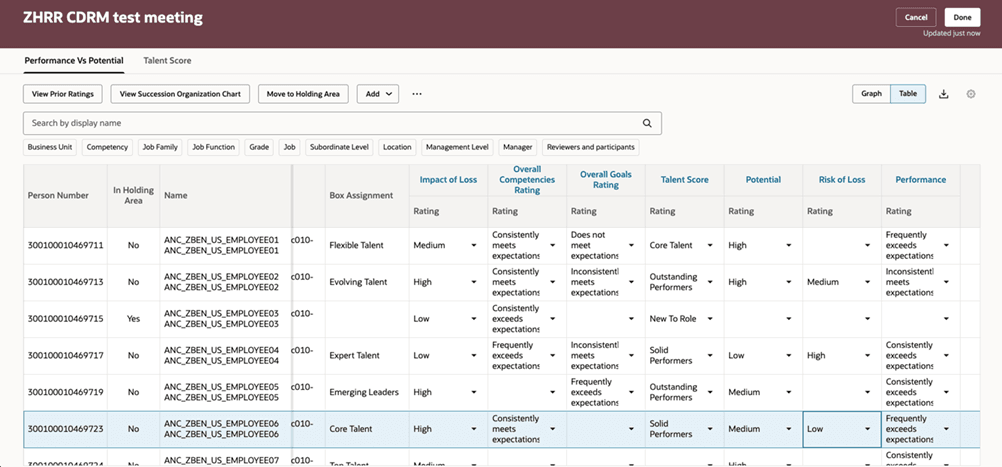
Table view of a Talent Review meeting dashboard with no Comments columns
Business Benefit
This feature simplifies the talent review process and enables facilitators to conduct the Talent Review meeting with ease.
Steps to enable and configure
To view the Redwood redesigned Talent Review meeting pages, you need to enable the profile options indicated in the table.
|
Profile Option Code |
Profile Option Display Name |
Value |
|---|---|---|
|
ORA_HCM_VBCS_PWA_ENABLED |
Enable VBCS Progressive Web Application User Interface |
Y |
| ORA_HRR_TALENT_REVIEW_REDWOOD_ENABLED | Redwood Talent Review Enabled | Yes |
| ORA_HRR_REDWOOD_DASHBOARD_ENABLED | Redwood Talent Review Meeting Dashboard Enabled | Y |
For more information, see How do I enable a profile option?.
To hide the comments column for facilitators when they view the table view of the meeting dashboard, edit the page in Visual Builder Studio and set the Show Rating Comments page property to false.
For more information on how to do this, see How do I control the display of a UI element in Visual Builder Studio?.
Key resources
For more information on extending Redwood pages in HCM, refer to this guide on the Oracle Help Center: