Redwood: Enhanced User Experience for Reviewers
From this release, reviewers can easily identify the ratings that they can edit in the rating grid when preparing review content. Editable cells have a single-value selection list. You can select the rating to rate review population members with a single click from this list.
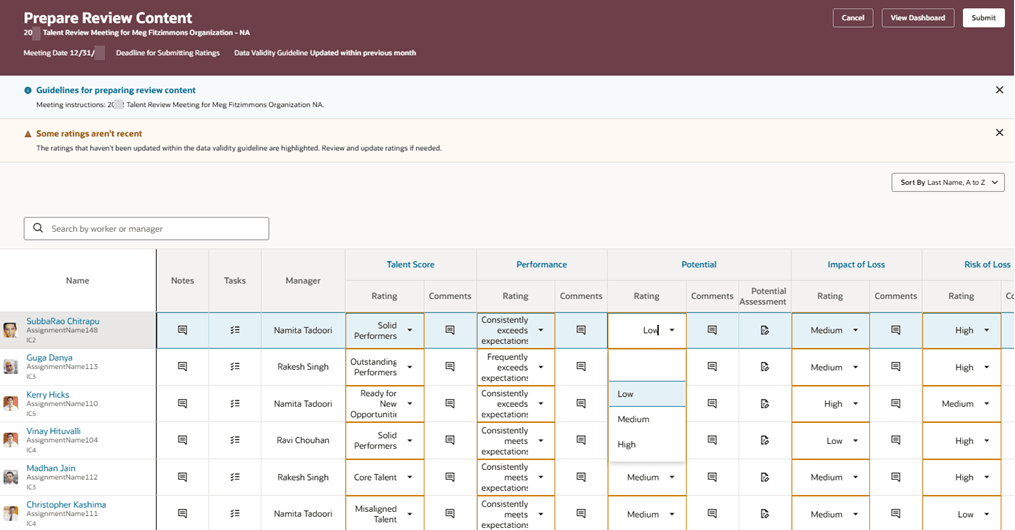
Manager's Prepare Review Content Page
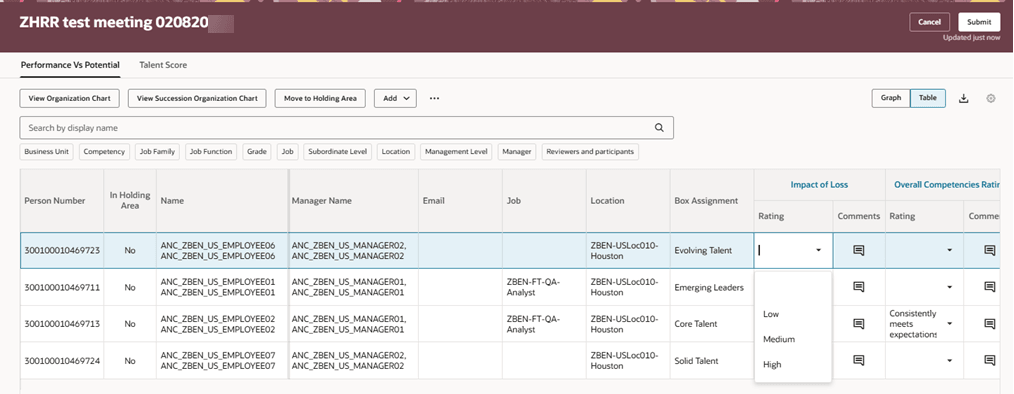
Facilitator Providing Rating in Table View
Business Benefit
This feature simplifies the talent review process by enabling managers and facilitators to select the desired rating with ease.
Steps to enable and configure
To view the Redwood redesigned Talent Review meeting pages, you need to enable the profile options indicated in the table.
|
Profile Option Code |
Profile Option Display Name |
Value |
|---|---|---|
|
ORA_HCM_VBCS_PWA_ENABLED |
Enable VBCS Progressive Web Application User Interface |
Y |
| ORA_HRR_TALENT_REVIEW_REDWOOD_ENABLED | Redwood Talent Review Enabled | Yes |
| ORA_HRR_REDWOOD_DASHBOARD_ENABLED | Redwood Talent Review Meeting Dashboard Enabled | Y |
For more information, see How do I enable a profile option?.