Redwood: Support Business Rules on Profiles DFFs
Enables profile administrators to configure DFF fields with business rules on the Skills and Qualifications page.
Example:
When a worker submits an Accomplishment item, the customer may want to capture additional information if the item is rejected. For example, the administrator can create a business rule for the Accomplishment section with the following condition;
If Approval Status equals Rejected
When this condition is met, the rule applies the following behavior to the profile item descriptive flex fields under the PERSON_ACCOMPLISHMENT segment:
| Field | Behavior |
|---|---|
| Approval Date | Hidden |
| Approved By | Hidden |
| Rejection Reason | Required |
With this configuration, when the submitted Accomplishment item is rejected, the reviewer must enter a rejection reason. The Approval Date and Approved By fields are hidden because they aren't relevant for a rejected item. This helps customers capture consistent rejection feedback while showing users only the fields that apply to the current approval outcome.
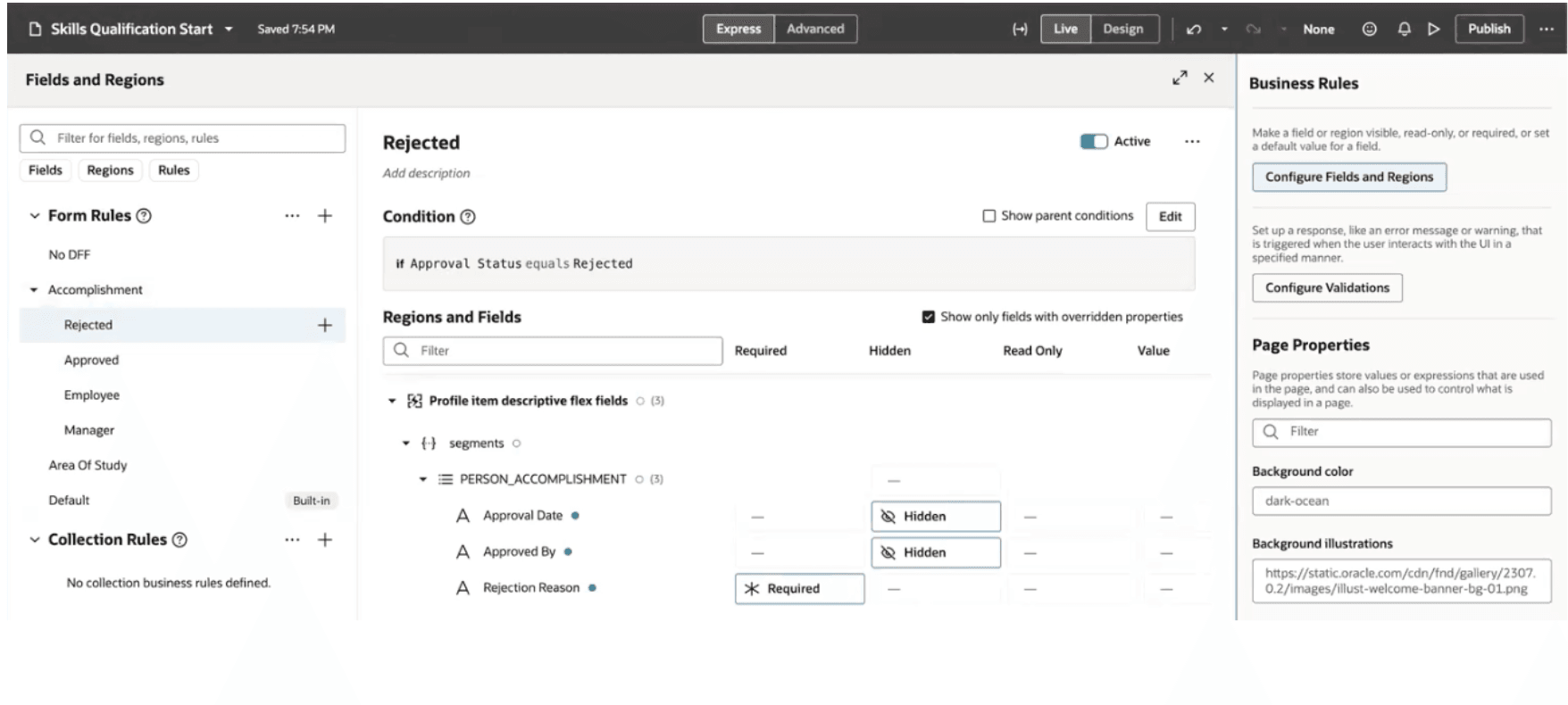
Business rules configuration for DFF
Business Benefit
Provides flexibility to configure DFF fields on the Skills and Qualifications page.
Steps to enable and configure
You don't need to do anything to enable this feature.
Key resources
For more details on extensibility, see Extending Redwood Applications for HCM and SCM Using Visual Builder Studio.