Dynamic Staffing Grid calculations
Administrators can now configure staffing grids to calculate requirements dynamically instead of relying on precomputed matrix lookups. Schedule administrators and managers can now select a Dynamic grid configuration for staffing grids so staffing requirements are calculated dynamically at schedule generation time instead of being manually entered in the grid.
Dynamic grid calculation option
Staffing grids can be set to a new Dynamic calculation mode so the application calculates staffing requirements from volumes, calculation types (Staffing Ratio or Fixed), job profiles, competencies, minimum staffing, and time intervals instead of using a static matrix lookup. A new grid configuration option lets you choose Dynamic alongside existing Single Value and Range options. Staffing plans can contain a mix of Dynamic and lookup-based grids.
- Dynamic grids don't use Maximum Capacity when calculating requirements.
- When a grid is Dynamic the Calculate button is removed for that grid
- Staffing Grid configuration changes can still be reset and saved.
- Recognize Single Value and Range grid types for grids defined with those types; Dynamic replaces the matrix lookup only where selected.
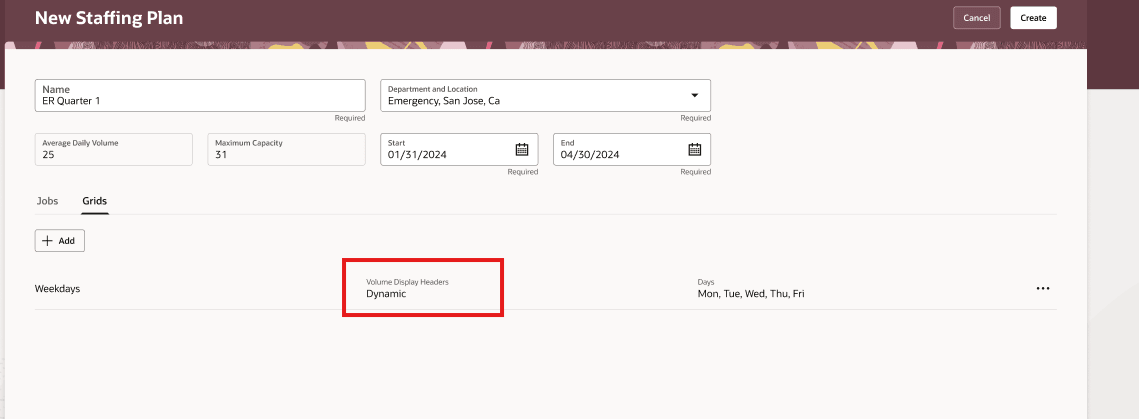
Dynamic staffing requirement calculation
When workload consolidation runs (for example when opening a schedule period or after a volume import),the application evaluates the staffing plan and the staffing grid configured for each day and time. It calculates staffing requirements dynamically for each job, competency, and time interval using the grid's calculation settings. Calculation types supported per job and competency are Staffing Ratio, Fixed, and None.
- Staffing Ratio:Multiplies the configured staffing ratio percentage by the volume, or weighted volume when available to produce the staffing requirement. If the configured minimum staffing level is greater than the calculated value, the minimum replaces the calculated value.
- Fixed: Uses the configured minimum staffing level as the staffing requirement for the job, competency, and time interval.
- None: Produces no staffing requirement for that job, competency, and time interval.
- Volume source: Uses imported volume for the specific date and time when available. If imported volume isn’t available, Average Daily Volume is used as a fallback.
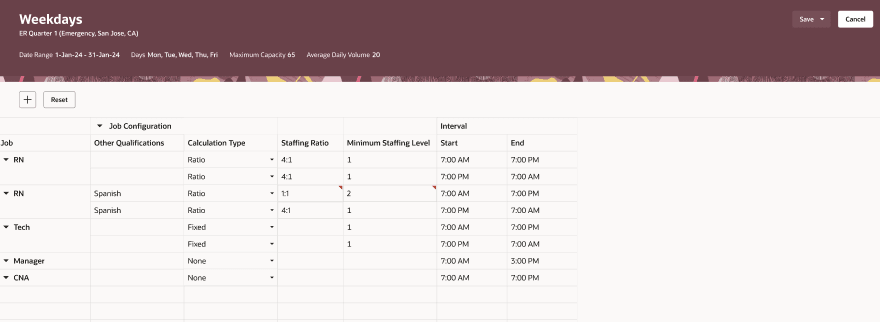
Staffing Grid view for Dynamic calculation
Workload Consolidation
Workload consolidation uses the dynamic calculation when a schedule period is opened or when new volume data overlaps an active schedule. The consolidation uses the same outcome rules as clicking Calculate on a staffing grid but derives staffing at the time of consolidation from either the Average Daily Volume or Staffing Volume Imports rather than the fixed staffing grid. Staffing requirements are computed at schedule generation or when new staffing volume data is received.
The consolidation process:
- Still utilizes a workload plan over a staffing plan if the workload plan data exists.
- Applies job and competency overrides defined on the grid.
- Recognizes Single Value and Range grid types for grids defined with those types; Dynamic replaces the matrix lookup only where selected.
Example scenario: Dynamic staffing calculation workflow (with sample data)
1) Admin configures a Dynamic staffing grid (no matrix entries)
- Grid Configuration: Dynamic
- Applies to: Mon–Fri, all day (or specific time windows as defined by intervals)
- Volume source: Use imported volume by date/time when available; otherwise consolidation will use fall back to Average Daily Volume (ADV)
Staffing Grid rows (per job/competency + time interval):
Staffing Grid row configuration
| Job | Calculation Type | Staffing Ratio Override | Minimum Staffing | Time Interval |
|---|---|---|---|---|
| Customer Support Rep | Staffing Ratio | 0.08 (13:1 Ratio) | 2 | 12:00 AM - 12:00 PM |
| Customer Support Rep | Staffing Ratio | 0.06 (17:1 Ratio) | 2 | 12:00 PM- 12:00 AM |
| Escalation Specialist | Fixed | 1 |
12:00 AM - 12:00 AM |
|
| New Hire Shadowing | None |
12:00 AM - 12:00AM |
2) Volumes are provided (imported) and schedule generation triggers consolidation
Let's assume a schedule period is opened for Mon 2026-03-02, and volume is imported for two 30-minute intervals.
- If Weighted Volume is present for an interval, Dynamic calculation uses it instead of raw Volume.
- If no imported volume exists for a given interval, the system falls back to ADV for that day/time (if configured).
Staffing Volumes import
| Date | Interval | Volume | Weighted Volume |
|---|---|---|---|
| 2026-03-02 | 9:00AM - 12:00 PM | 120 | 150 |
| 2026-03-02 | 12:00PM - 19:00 PM | 80 |
3) Dynamic staffing requirement is calculated per interval
Rules applied:
- Staffing Ratio: Requirement = Ratio × (Weighted Volume if present else Volume)
Then enforce Minimum Staffing if the minimum is higher. - Fixed: Requirement = Minimum Staffing
- None: No requirement generated
Interval 09:00A-12:00P
- Customer Support Rep (Ratio 0.08, Min 2): Volume used = 150 (weighted) -> 0.08 × 150 = 12 -> min not needed -> 12 Workers
- Escalation Specialist (Fixed, Min 1): 1 Workers
- New Hire Shadowing (None): 0 (no requirement)
Interval 12:00P-19:00P
- Customer Support Rep (Ratio 0.06, Min 2): Volume used = 80 -> 0.06 × 80 = 4.8 -> 4.8 Workers
- Escalation Specialist (Fixed, Min 1): 1
- New Hire Shadowing (None): 0
4) What gets produced
- The system generates staffing requirements automatically at schedule generation or when workload consolidation occurs when new volumes arrive, using the grid’s configuration rather than a manually maintained matrix.
- Overrides and minimums are honored per job/competency and per time interval.
- If imported volumes exceed a configured Maximum Capacity, they are still accepted for Dynamic grids (no error/warning), and the calculation proceeds.
This improvement to the staffing plans and grids will help users with efficient staffing grid configuration and the use of volume points which exceed one hundred.
Steps to enable and configure
You don't need to do anything to enable this feature.
Tips and considerations
- Maximum Capacity is ignored for Dynamic grids - do not rely on it to limit computed requirements for those grids.
- If you use manual overrides at the grid or job level for the time interval, those overrides will continue to apply to Dynamic calculations.
- Because Dynamic grids can accept more than 100 volume points and ranges, you may import larger volume datasets—confirm any internal volume formats you use match import requirements.
- Switching an existing grid to Dynamic changes when and how staffing is derived (runtime calculation vs. matrix lookup); test changes in a non-production environment before wide rollout.
- Staffing plans can mix Grid Configuration types (Dynamic, Single, Range). Validations for Single and Range grids remain in effect when those types are used.
- The Calculate button and manual calculation flow are not available with Dynamic grids.
- Choosing None for a job, competency, and time interval prevents any staffing requirement from being produced for that combination.
- These calculations run as part of workload consolidation for each time interval in scope and are intended to support large numbers of volume points (for example when many volumes or ranges are present).
Key resources
N/A
Access requirements
N/A