HCM Professional Concierge Workspace
Use HCM Professional Concierge Workspace to review and act on workforce insights across the workforce from a single workspace. The agentic app supports HR roles with operational activities, questions, and additional insights, helping teams access contextual guidance as they work.
Key capabilities include:
- In-app assistance: Ask operational HR questions and generate in-app summaries or draft review notes for the selected workforce scope.
- Actionable Activity Insights: Review workforce activity that needs attention, including pending transactions, onboarding and offboarding tasks, transfers, notifications, and communication posts.
- Workforce Health Insights: Review risks in staffing and span-of-control capacity in the organization.
- Workforce Activity Insights: Review workforce activity operational status that needs attention based on completed, overdue, and pending transactions, and journey tasks.
- Compliance Insights: Identify work eligibility and worker identification records that may need follow-up, such as upcoming expirations or incomplete worker ID information.
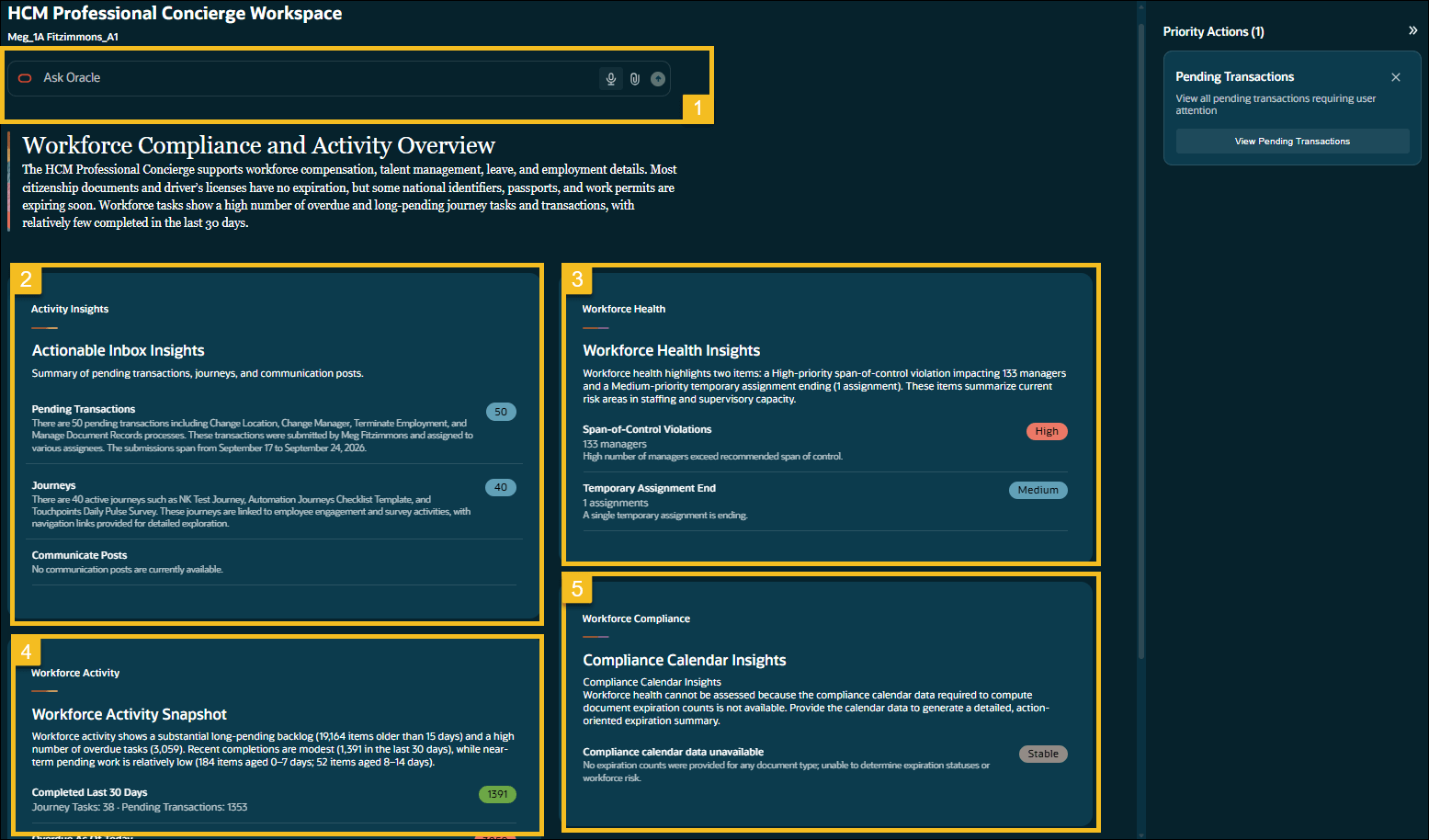
HCM Professional Concierge Workspace
Help HR representatives identify priority workforce items and take informed follow-up actions without navigating across multiple HCM work areas.
Steps to enable and configure
No additional setup other than configuring the agent is required for this feature. However, you must grant users a privilege. See the Access Requirements section.
Configuring the agent
- Your environment must have certain necessary configurations. Ask your help desk to contact Oracle Support, who can verify what your environment has and address these gaps. For more information, see FAQ2521 on My Oracle Cloud Support.
- Set the Enable Security Console External Application Integration (ORA_ASE_SAS_INTEGRATION_ENABLED) profile option to Yes and enable permission groups for the appropriate roles. See Access Requirements for AI Agent Studio.
To learn how to set up AI agents, see Create AI Agents Using Preconfigured Agent Team Templates.
Key resources
- Explore AI Agents for Oracle Fusion Cloud Applications
- How do I use AI Agent Studio?
- Choose How to Create Workflows and Agentic Applications
Access requirements
Assign this privilege to a custom HR role to give access to the HCM Professional Concierge Workspace. The Human Resource Specialist role is granted this privilege as an out-of-box solution. See How can I give users access to AI agents and Access Requirements for AI Agent Studio.
| Privilege | Code | Description |
|---|---|---|
| HCM Professional Concierge Workspace Access Duty | ORA_HRL_HCM_PROFESSIONAL_CONCIERGE_WORKSPACE_ACCESS_DUTY | Allows users to access the HCM Professional Concierge Workspace. |
Access to workforce information and available actions is determined by assigned roles, data roles, and security profiles. Workforce Health Insights, Workforce Activity Snapshot, and Workforce Compliance are sourced from Transaction Business Intelligence queries. Access to these panels is determined by access to the corresponding reporting data privileges.