Use Grow Coach Workspace and Ask Oracle in Grow to receive learning guidance
Workers can use the Grow Coach Workspace and Ask Oracle banner in Grow to receive prioritized guidance for skills and learning activities and understand why skills are recommended. The Grow Coach agent in Grow is integrated with Grow Coach Workspace, ensuring that consistent recommendations are provided across both experiences.
Users can:
- Review skills prioritized in this order: manager-assigned skills, followed by capability guide or role guide skills, and then current role gap skills, career-of-interest skills, and developing skills.
- See learning activities ranked by urgency and development impact, with required and voluntary learning clearly distinguished. Completed learning is excluded from prioritized activities.
- Chat with Ask Oracle to ask questions about priorities, recommendations, role gaps, and the reasons behind a recommendation.
- Maintain a persisted development journey across user visits.
- Use the True Up Now feature to sync development journeys between the Journeys app and Grow Coach when recommendations or priorities change. Active learning enrollments remain available even if an activity is removed during development journey changes.
Try it out - Grow Coach Workspace
- Open Oracle AI Agent Studio and make sure Grow Coach Workspace is available on the Applications tab.
- Go to the HCM UI shell: https://<environment>/hcmUI/faces/FuseWelcome. Or, if users access the application from another shell FSCM UI, create a custom menu entry using this deep link: https://<environment>/hcmUI/redwoodAI/ora_hcm_hrt_grow_coach_workspace.
- From Me > Quick Actions > Show More, open Grow Coach Workspace.
- Review prioritized skills in the Review Your Development Priorities section and learning activities presented as a development journey in What to Work on Next. If a development journey doesn’t exist, Grow Coach creates one for you. This will also be listed in the Journeys app with the name, Recommended Activity Plan from your Grow Coach.
- Change the due date on a learning item that’s part of a development journey and see how the priority badges change in Grow Coach. Review activities that are marked as "New" or "New priority." Select the True Up Now action to sync development journeys across Journeys and Grow Coach.
- Use Ask Oracle chat in Grow Coach Workspace to ask questions about skill priorities or development activities such as:
- Tell me why a skill is on my list and what is its source
- Why does a skill rank higher?
- Build a prioritized learning plan for me.
- I’ve only got half an hour. Give me one quick course to level up a skill today.
- Where am I falling short in my role? Chart a path that tackles multiple gaps at once.
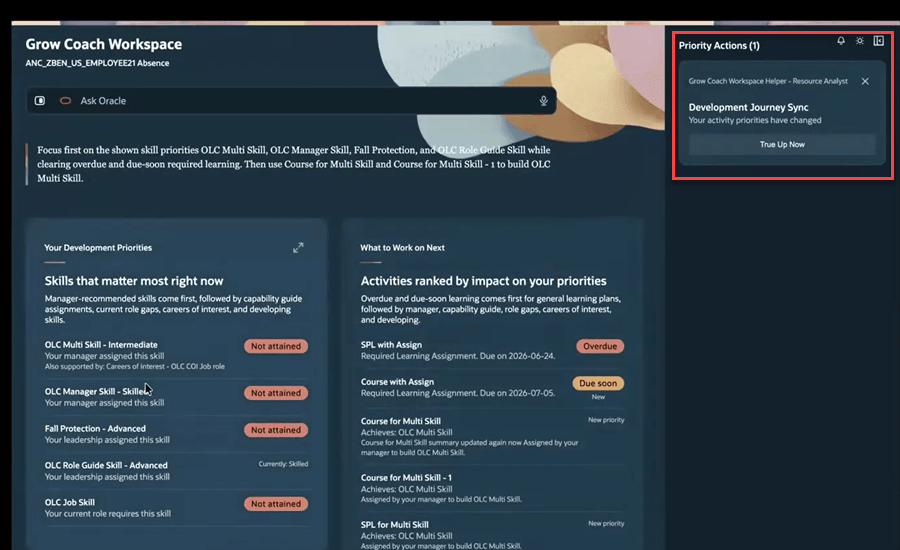
Skills listed by priority on the left panel and development journey activities listed on the right panel. Sync development journeys using the True Up Now action when activity changes occur.
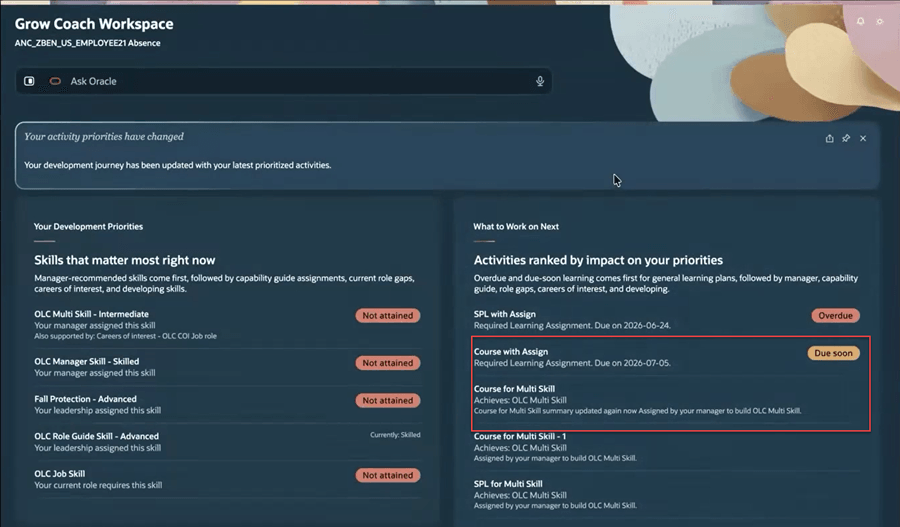
Synced right panel after the True up Now action. Priority of development activities change.
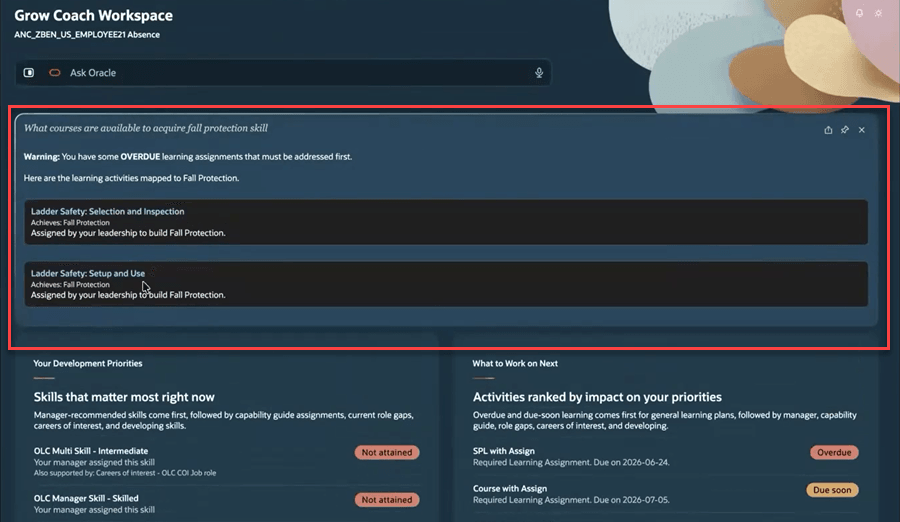
Response from Ask Oracle chat
Try it out - Ask Oracle Banner in Grow
- Go to Me > Grow.
- Open the Ask Oracle banner.
- You can chat with the Grow Coach agent to get a list of your skill priorities or development activities, similar to Grow Coach Workspace.
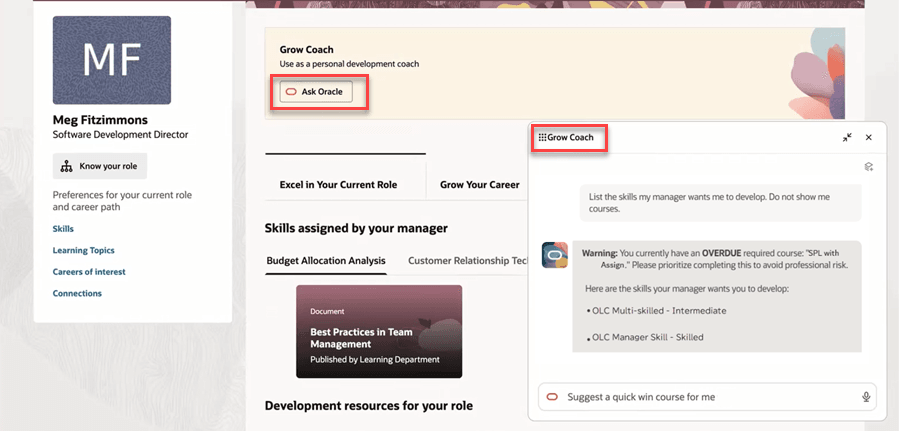
Conversation with the Grow Coach agent
Business benefit: Workers can focus on the most important skills and learning activities with prioritized, consistent recommendations. They can also use Ask Oracle to understand their recommendations and get guidance throughout their development journey.
Steps to enable and configure
Prerequisites for Grow Coach Workspace
- Grow is implemented and the data for swim lanes is set up. For details, see Implement Grow.
- Make sure you have access to Oracle AI Agent Studio. The prerequisites for using AI Agent Studio are:
- Your environment must have the appropriate services for Oracle Applications Platform deployed. For more information, see FAQ2521 on My Oracle Cloud Support.
- Enable permission groups for the appropriate roles. See Access Requirements for AI Agent Studio.
- Assign the Access Grow Coach Workspace function privilege to employees.
Prerequisites for Ask Oracle Banner in Grow Dashboard
Make sure that these tasks are completed:
- Grow Coach banner is enabled on the Grow page. For details, see Create a Guided Journey for Grow Coach.
- Assign the Grow Coach access duty role to employees.
Key resources
- How do I explore and use published AI agents and applications in Oracle Fusion Cloud Applications?
- How do I use AI Agent Studio?
- Choose How to Create Workflows and Agentic Applications
Access requirements
| Duty role status | Duty role name and code |
|---|---|
| Previously delivered | Grow Coach access duty ORA_DR_HRT_GROW_COACH_ACCESS_DUTY |
| Duty role status | Duty role name and code |
|---|---|
| New | Access Grow Coach Workspace HRT_ACCESS_GROW_COACH_WORKSPACE_PRIV |