Identify potentially suspicious candidates using an AI agent
Use the Candidate Authenticity Assessment Agent in Oracle Recruiting to help identify candidates whose submitted information may indicate potentially fraudulent, bot-generated, or otherwise suspicious job applications.
The Candidate Authenticity Assessment Agent helps recruiting teams to identify potentially suspicious candidates during the recruiting process. When the feature is enabled, the agent looks at new and updated candidate profiles and candidates associated with confirmed job applications, it evaluates candidate information, resumes, screening results, available risk signals, then classifies each candidate as suspicious or not suspicious.
Suspicious candidates are clearly identified in candidate and job application list pages, making them easier to spot during high-volume recruiting.
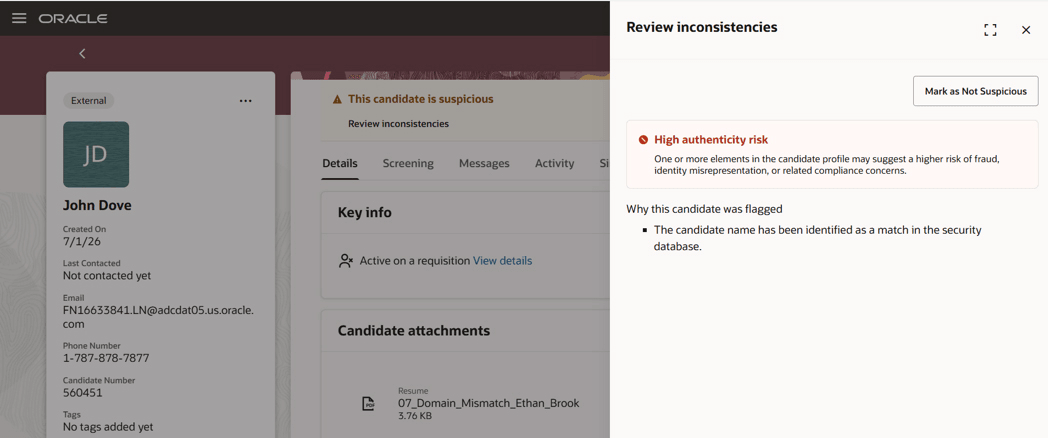
Review inconsistencies drawer that contains the reasons a candidate was identified as potentially suspicious.
Recruiting users can use the Show suspicious candidates only filter to focus on suspicious candidates only.
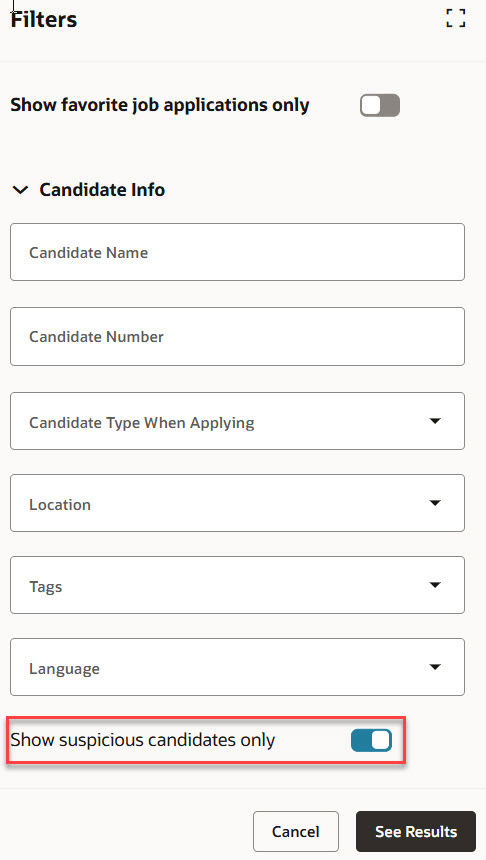
Show suspicious candidates filter
When a candidate is flagged as suspicious, a persistent banner message is displayed on both the candidate profile and the job application. The banner includes an authenticity summary so recruiting users can understand the factors that contributed to the assessment. The latest authenticity status and summary remain synchronized across the candidate profile and related job applications.
Recruiting users can clear the suspicious status when they determine that a candidate is legitimate. This action is available from the candidate profile, the job application, and as a bulk action from list pages so recruiters can efficiently resolve flagged candidates at scale.
Note: After a candidate is marked suspicious, the Recruiting application doesn't continue to rerun the agent for that candidate. If a user clears the suspicious status, that cleared status remains in place and the candidate isn't automatically reevaluated again.
Candidates can be reevaluated when their profile is updated or when a previous evaluation is more than 5 years old.
Business benefit: This feature helps organizations reduce the time spent reviewing potentially fraudulent applications and makes it easier to prioritize authentic candidates. By surfacing suspicious signals directly in Oracle Recruiting, the feature improves recruiter efficiency, supports more consistent review workflows, and keeps final review decisions in the hands of recruiting teams. The feature can also help organizations add an additional layer of protection against coordinated hiring threats, including threat actors attempting to gain employment by submitting deceptive or automated candidate information.
Steps to enable and configure
- Create a service request with Oracle Support to request enablement for the applicable Oracle Recruiting environment. In the request, state that you want to enable the Candidate Authenticity Assessment Agent and the supporting Threat Intelligence Service. Include the information listed in the Required Onboarding Info table rather than entering duplicate information in multiple places. Oracle uses the service request details to complete onboarding and to provide the service endpoint URL, OAuth token endpoint, required OAuth scope, and OAuth client credentials through secure communication channels. A separate onboarding request may be required for each Fusion HCM environment or pod.
- Include the required onboarding details in the service request.
Required Onboarding Info
| Onboarding Info | Description |
|---|---|
| Customer name | Your organization name. |
| OCI tenancy details | The OCI tenancy associated with the customer environment. |
| OCI home region | The home region for the OCI tenancy. |
| Target Fusion pod or environment | The Fusion HCM or Oracle Recruiting environment where the feature must be enabled. |
| Environment type | Specify whether the request is for production, test, stage, development, or another environment. |
| Customer contact email | Email address for the customer contact responsible for onboarding coordination. |
| Public encryption key | Public key used for secure credential exchange. |
| Requested capability | Candidate Authenticity Assessment Agent and supporting Threat Intelligence Service for Oracle Recruiting. |
- Provide a public encryption key that Oracle can use for secure credential exchange.
- After Oracle completes onboarding, securely receive the service endpoint URL, OAuth token endpoint, required OAuth scope, and OAuth client credentials. OAuth client credentials are delivered through a separate secure communication channel.
- Enable the Candidate Authenticity Assessment Agent and the scheduler template in AI Agent Studio.
- Optionally update the delivered agent prompt and scheduling configuration to align with your business requirements.
- Enable the candidate authenticity feature for the applicable Oracle Recruiting environment (Go to Setup and Maintenance > Recruiting and Candidate Experience > Recruiting and Candidate Experience Management > Enterprise Recruiting and Candidate Experience Information > Candidate Authenticity).
Tips and considerations
- This feature is opt-in and is disabled by default.
- When the feature is disabled, the related UI, including the Authenticity filter, is hidden from users. Existing authenticity data is preserved and becomes visible again if the feature is re-enabled.
- Bulk actions are available so users can mark multiple candidates as not suspicious from list pages.
- The authenticity assessment is intended to provide supplemental information for customer-defined review workflows. It doesn't automatically reject, advance, rank, or otherwise determine candidate outcomes.
- Customers are responsible for reviewing risk information and ensuring their use of the feature aligns with applicable employment, privacy, and compliance requirements.
Access requirements
The agent is secured by this role: ORA_HCM_IRC_RECRUITING_SCHEDULED_WF_AGENT_ACCESS.
Users with access to job application and candidate profile can view the authenticity state and description. Only users with the Create or Update Candidate (IRC_CREATE_OR_UPDATE_CANDIDATE_PRIV) privilege can clear suspicious candidates.