Mass Process Performance Document Reopen, Restore, and Transfer Actions
Use the Redwood Mass Action Processes for Performance Documents page to do these actions:
- Reopen completed or canceled performance documents
- Restore canceled performance documents
- Transfer performance documents to a new manager
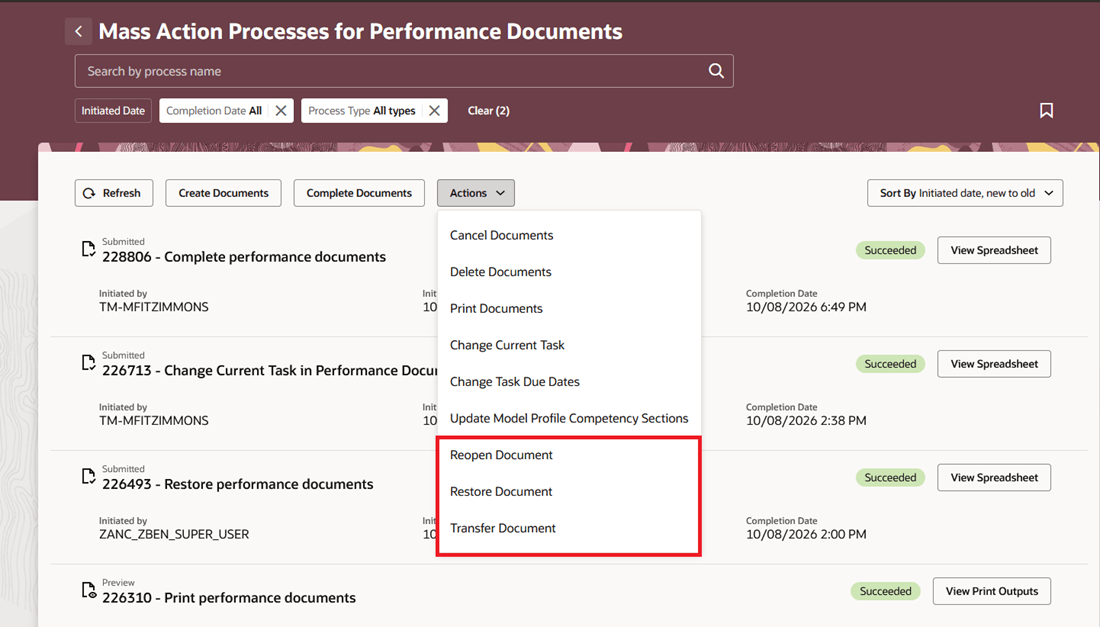
Mass Actions
Select the action, performance document, and applicable population, then generate a preview or submit the process.
Mass Actions for Performance Documents processes records using HCM Data Loader. Administrators can also use the Performance Document business object in HCM Data Loader directly to reopen, restore, or transfer Performance Documents for specific populations.
Configure HCM Alert notification templates in Alerts Composer for these actions. Notifications are triggered when the action is processed through either Mass Actions for Performance Documents or HCM Data Loader. Configure separate templates for employees and managers. Transfer notifications also support the previous and new manager.
Helps HR correct performance documents at scale or for targeted populations while keeping affected workers and managers informed of changes and any follow-up work.
Steps to enable and configure
- Go to Tools > Alerts Composer.
- Search for the HRA Performance Document alert, then enable and configure the templates for mass reopened, restored, and transferred performance documents as needed.
Tips and considerations
- Reopen applies to completed and canceled Performance Documents. Restore applies only to canceled Performance Documents that were completed when canceled.
- When a completed Performance Document is reopened, the last task in the process flow is set to in progress. A canceled document is reopened with the task that was in progress when it was canceled.
- Employee notifications are sent only when the Performance Document includes the worker role and is visible to the worker. Manager notifications are sent only when the Performance Document includes the manager role.
- Actions performed from the HR Administration Performance Documents task or individually by managers continue to use BIP notifications configured in Talent Notifications.
Key resources
- For a listing of all profile options for the recreated pages across HCM, see the following document in My Oracle Support:
- For information on how to test email alert notifications in nonproduction environments, see Define Recipients and Test Email Notifications.
Access requirements
- Reopening documents requires the Reopen Performance Document (HRA_REOPEN_PERFORMANCE_DOCUMENT) privilege.
- Restoring documents requires the Restore Performance Document (HRA_RESTORE_PERFORMANCE_DOCUMENT) privilege.
- Transferring documents requires the Transfer Performance Document (HRA_TRANSFER_PERFORMANCE_DOCUMENT) privilege.
- Mass Actions for Performance Documents processes records using HCM Data Loader. Viewing and processing the generated spreadsheet requires the applicable HSDL privilege and spreadsheet plug-in.