Identify Coaching Insights for your Team Using Manager Coaching Workspace
With Manager Coaching Workspace, managers can use agentic apps to transform Oracle Fusion HCM Talent data into prioritized, evidence-based coaching insights for their team. This helps managers intervene early, understand emerging team-level themes, and hold timely, consistent, and informed coaching conversations.
The workspace is not a performance scorecard. It is a coaching-prioritization aid that highlights evidence-backed signals so managers can decide where a conversation or follow-up may help most.
Note: Managers are accountable for deciding the appropriate action. Recommended actions in the workspace or panels are not available in this release.
Workspace at a glance
Managers can review information in the My Team, Team Coaching Insights, and Time to Reconnect panels. The team summary information present below the title is generated from the data in the individual panels, which are described in the following sections.
Each panel has a focus workspace:
- My Team Member Focus Workspace
- Team Insights Focus Workspace
- Time to Reconnect Focus Workspace
| Panel | What it answers... | Scope |
|---|---|---|
| My Team | Where does each direct report stand right now? | Every direct report is listed only once |
| Team Coaching Insights | What team patterns need coaching attention? | Only employees who meet a criteria |
| Time to Reconnect | Who may be quietly drifting or losing momentum? | Employees with at least two reconnect signals |
What’s a signal?
- A signal is a prompt to investigate and coach, not a conclusion about an employee.
- Recent evidence is weighted more heavily.
- Each panel has its own sources and lookback period.
- The rules use deterministic thresholds for inclusion and ordering. AI is used for semantic interpretation and evidence-backed wording.
Ask Oracle in Manager Coaching Workspace is embedded with the Manager Edge agent and supports voice. Sample questions include:
- Who on my team might need support based on recent check-ins, feedback, or performance signals?
- Which goals or priorities are at risk, and what’s driving those risks?
- Where am I missing opportunities to recognize or reward strong contributions across my team?
My Team panel
This panel provides a complete view of the team using the My Team Status Assistant. It displays all direct reports for the manager and assigns a coaching classification to each report.
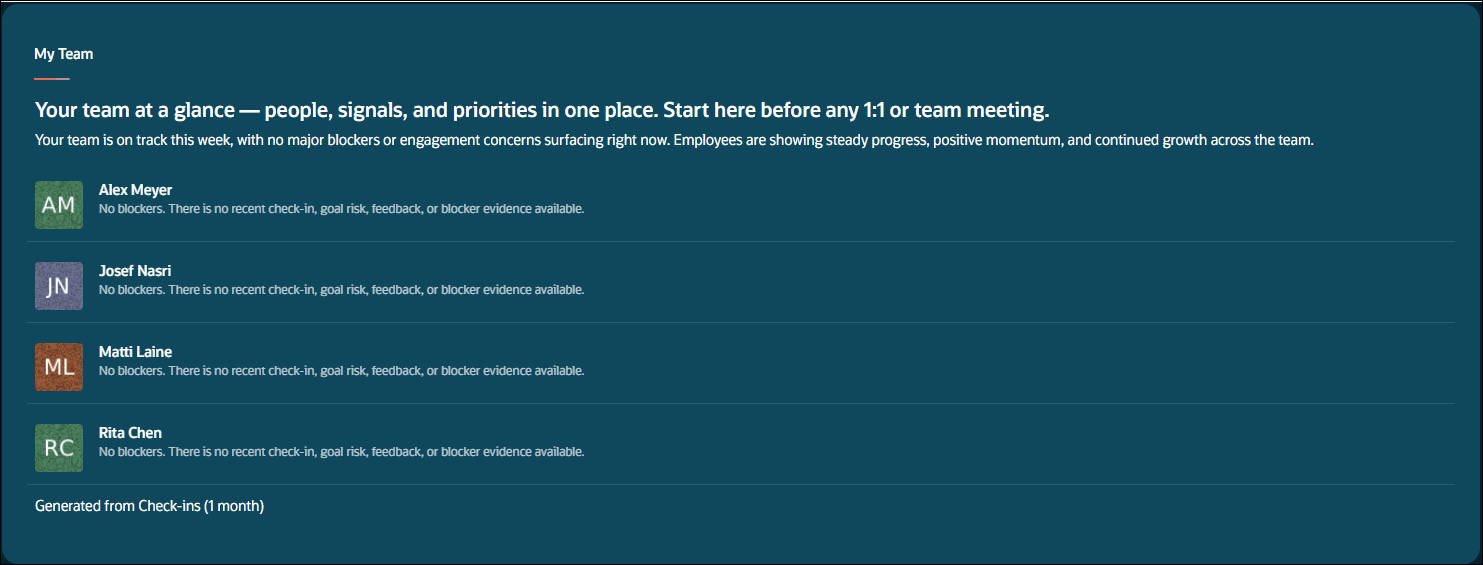
My team panel
The workflow evaluates each person using a waterfall of rules. The first matching rule wins, and lower rules are not considered for that employee.
| Source | Lookback period | Used for... |
|---|---|---|
| Team Sync check-ins | Past 14 days | Highest priority blockers, unresolved risks, and ask for help |
| Check-ins | Past 30 days | Frustration, disengagement, repeated unresolved concerns, low morale, or an active issue harming progress |
| Performance goals and development goals | Past 90 days | Overdue, at-risk and missed or stale goal |
| Feedback (Requested and Anytime) | Past 90 days | Constructive or corrective feedback that requires manager follow-up |
| Recognition | Past 1 year | Stronger performance but no recognition given in last one year |
| Performance evaluation | Latest available evaluation document in the past 2 years | Positive stretch opportunity when maximum rating is obtained by the employee |
The information collected from the sources is prioritized as follows:
| Priority | An employee match occurs when… | Badge |
|---|---|---|
| P0 Status blocker | A team sync status update in the last 14 days has an active blocker, unresolved risk or dependency, or an explicit ask for help | Needs Support |
| P1 check-in concern | Check-ins during the past 30 days show frustration, disengagement, repeated unresolved concern, low morale, or harm to progress | Needs Support |
| P1 goal risk |
A goal in the past 90 days is:
|
Needs Support |
| P1 feedback follow-up | Feedback in the past 90 days requires follow-up on behavior or development feedback | Needs Support |
| P2 recognition gap | Evidence is positive, but there has been no recognition in the last one year | No badge displayed |
| No issue | No rule matches. If the latest evaluation has the maximum rating and indicates advancement interest or readiness, a stretch opportunity statement may appear. | No badge displayed |
Employees are displayed in order of matched priority, rule rank, and employee name. The row summary uses the winning evidence from the winning rule.
Team Coaching Insights
This panel helps managers identify where to invest coaching time by using Team Insights Focus Workspace. An employee appears in only one row.
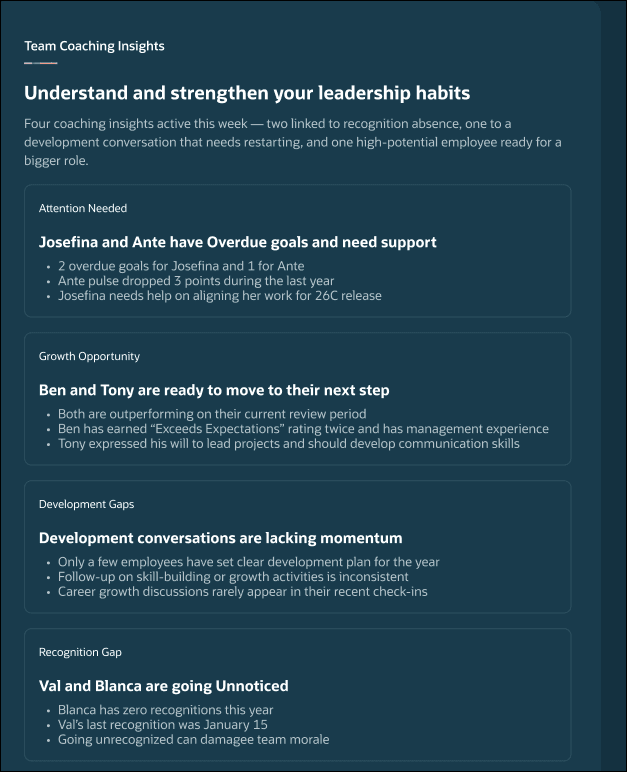
Team coaching insights
The rows are ordered as Attention Needed, Development Gaps, Recognition Gap, and Growth Opportunity. Each row can include one or more employees. The Team Coaching Insights Assistant classifies employees using the following rules:
| Source | Lookback period | Purpose |
|---|---|---|
| Check-ins | Past 30 days | Days since check-in, recent counts, negative evidence, and growth-readiness evidence |
| Performance goals | Past 90 days | Overdue goal count and recent activity |
| Development goals | Past 90 days | Development inactivity |
| Feedback (Requested and Anytime) | Past 90 days | Negative signals and positive peer feedback |
| Recognition | Past 1 year | Recognition count and time since recognition |
| Performance evaluation with participant feedback | Latest available evaluation document in the past 2 years | Structural candidate for growth opportunity |
Using information from the sources, employees are classified and a summary is generated. If no employee qualifies, the panel displays an empty message.
| Classification | An employee classifies when... |
|---|---|
| Attention Needed | At least 1 overdue performance goal, and 30 days since a check-in, and a clear negative signal |
| Development Gaps | A development goal has had no updates for more than 60 days and goal is not complete |
| Recognition Gap | No recognition in the past 60 days, but clear positive feedback is available |
| Growth Opportunity | Maximum rating candidate and when the evidence clearly supports readiness, or advancement potential, or explicit growth momentum |
Team Insights Focus Assistant displays classification badges based on the rules run by Team Coaching Insights Assistant.
Time to Reconnect
This panel is an early-warning view that helps managers identify employees who may benefit from renewed manager contact before a concern becomes visible.
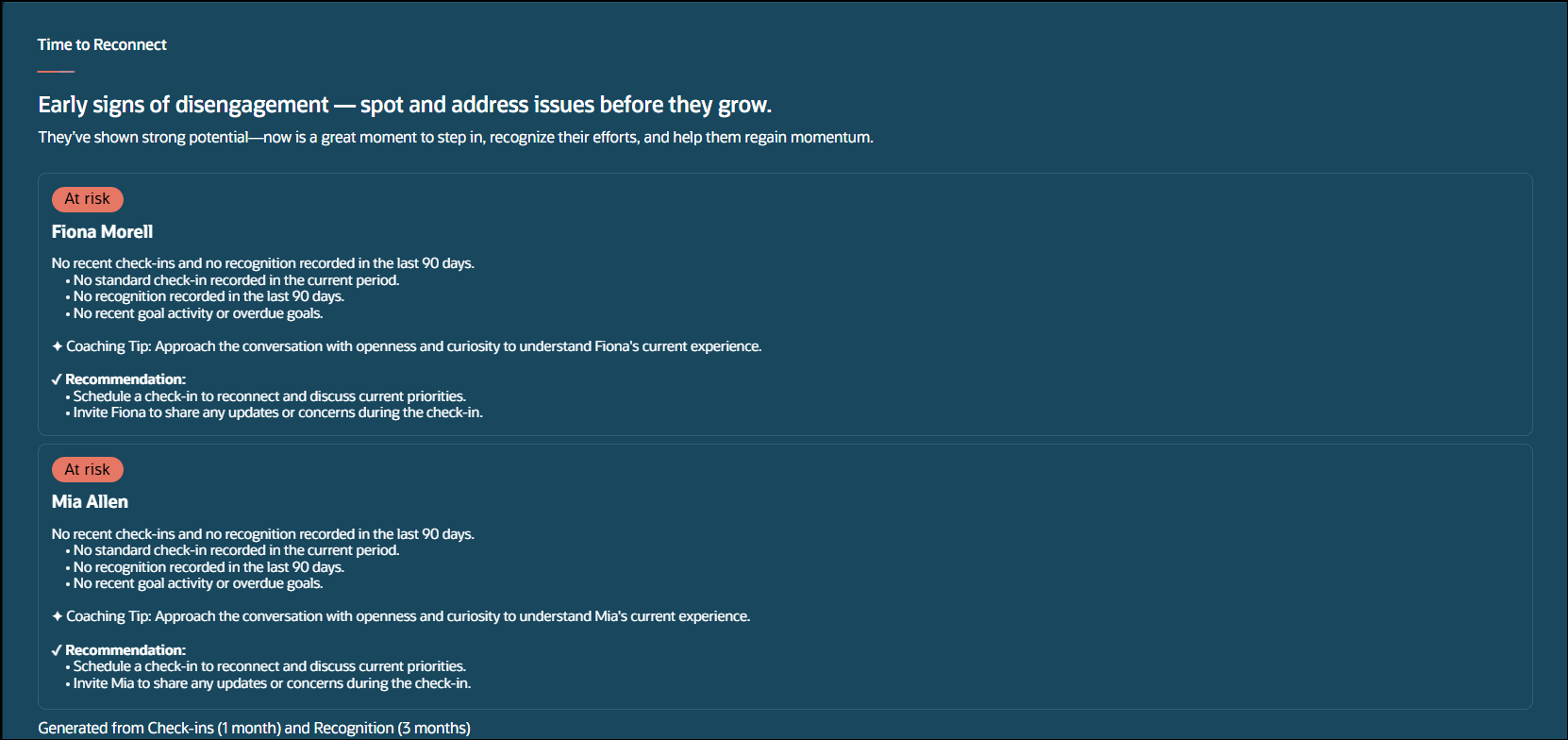
Time to reconnect
This panel uses Time to Reconnect Assistant to:
- Identify employees when at least two valid drift signals are present and the employees don’t meet the workflow’s defined Team Coaching Insights Attention Needed badge.
- Provide employee-specific signals and a coaching tip to help you understand the situation and prepare for an appropriate follow-up.
| Source | Lookback period | Purpose |
|---|---|---|
| Team Sync check-ins | Past 14 days | Repeated unresolved blockers or stalled work |
| Check-ins | Past 30 days | Negative or declining sentiment and days since the last check-in, excludes team sync |
| Performance goals and development goals | Past 90 days | Stale goal activity and overdue performance goal count |
| Feedback (Requested and Anytime) | Past 90 days | Bounded negative or corrective feedback signal |
| Recognition | Past 90 days | No recognition signal |
The classification rules are:
| Classification | Criteria |
|---|---|
| At Risk |
Flag an employee for attention when at least two of the following signals are present:
Two or more signals helps avoid highlighting employees:
|
Team Member Focus
My Team Member Focus Workspace opens an employee-specific panel when a manager selects an employee in the My Team or Time to Reconnect panel. Each section displays specific signals and a recommendation or coaching tip to help managers understand the situation and prepare for an appropriate follow-up.
The panels appear in this order: Unblock and Accelerate, Coaching Insights, and Strengths and Development Opportunities.
Unblock and Accelerate
This section selects one current focus using the same priority logic as My Team, but displays a single artifact preview for the selected employee. It uses the same sources and lookback periods as My Team to help a manager solve problems for the employee. The Team Member Focus Assistant selects one Unblock and Accelerate focus for an employee.
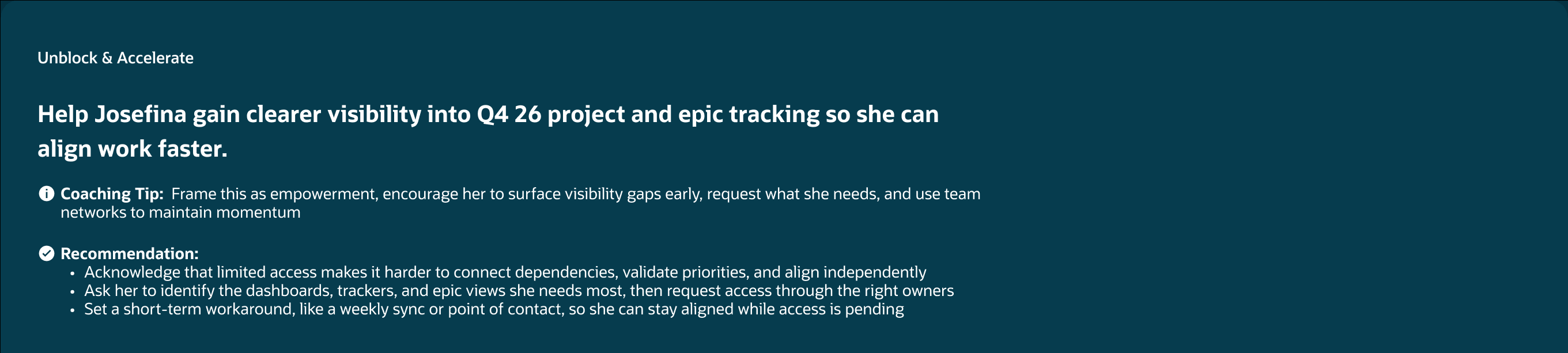
Unblock and accelerate
Coaching Insights
This section displays employee-specific coaching cards based on performance goals, feedback, and career development through the Team Coaching Insights Focus Assistant.
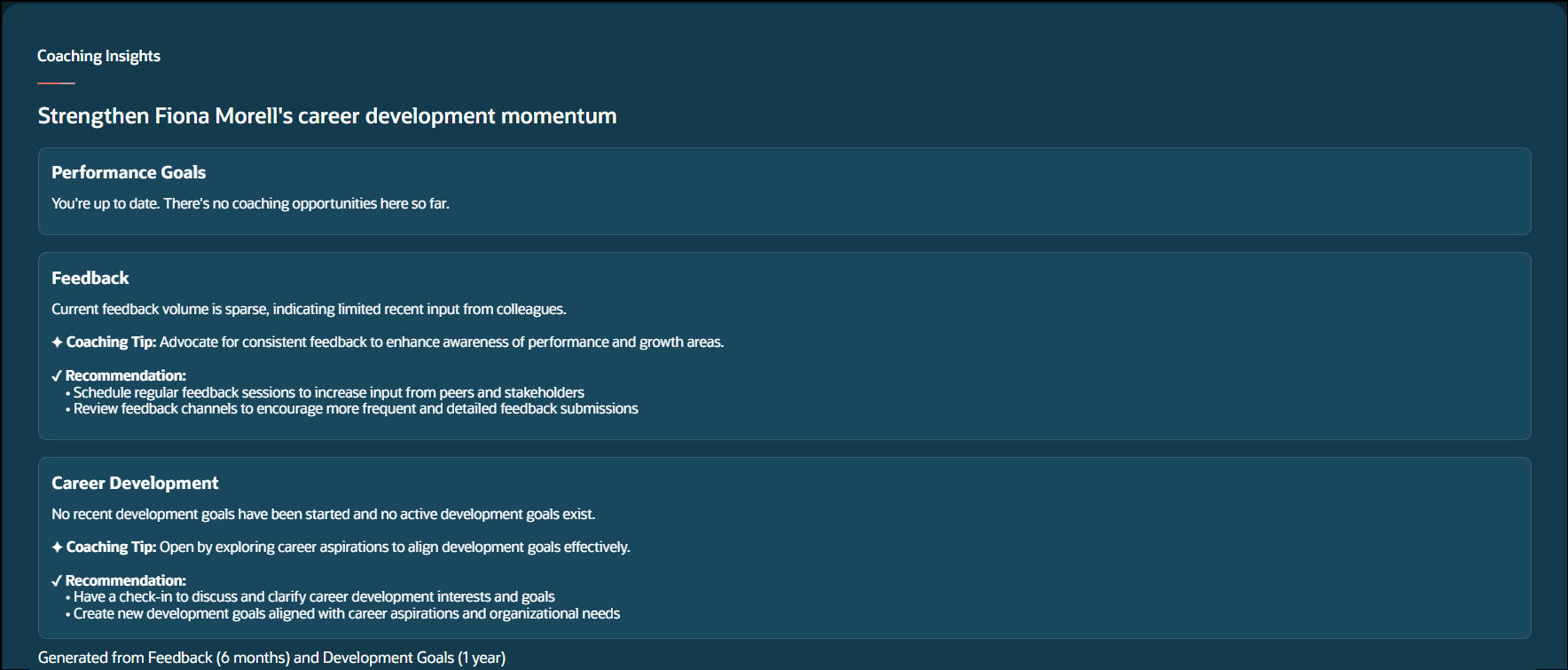
Coaching insights
This section doesn’t use check-ins, status updates, awards, recognition, or performance documents.
| Card | Lookback period | Qualifies when... |
|---|---|---|
| Performance Goals | Last 12 months | One performance goal is overdue, at risk, missed or stale. See prioritization table in My Team for information on the definitions. |
| Feedback | Last 6 months |
|
| Career Development | Last 12 months | Qualifies if at least one of below is true:
|
Strengths and Opportunities
This section displays employee-specific, evidence-based strengths and identifies two development opportunities. The Team Strengths and Opportunities Assistant frames these as growth areas.
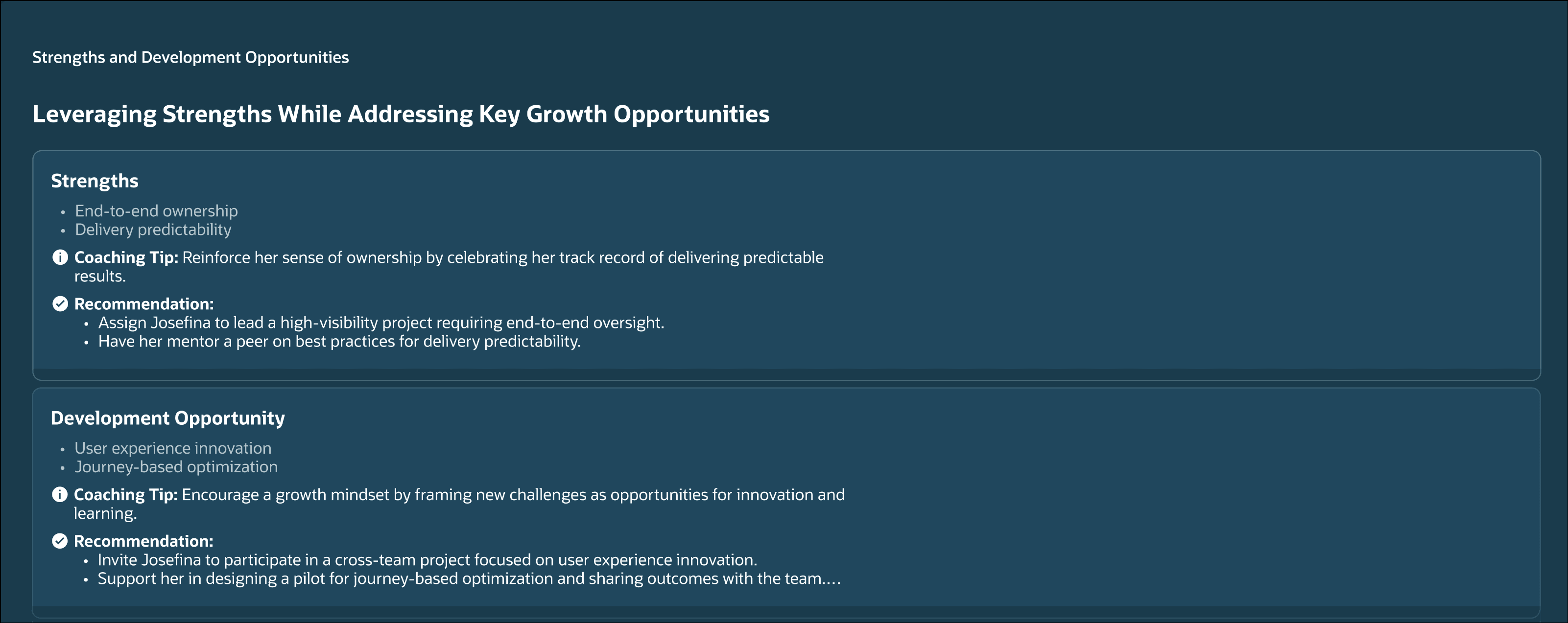
Strengths and opportunities
| Source | Lookback |
|---|---|
| Performance evaluation | Most recent review cycle |
| Feedback | Past 6 months |
| Performance goals | Past 12 months |
| Development goals | Past 12 months |
| Recognition | Past 12 months |
| Check-Ins | Past 6 months |
Based on the sources, the section displays:
- Strengths: Two to four specific, observable qualities.
- Development Opportunities: Two to three areas for growth, presented as opportunities rather than deficits.
Business benefit
- Prioritize coaching time: Signals help managers identify employees who require support, development, recognition, and reconnection
- Act on emerging signals: Identify combinations of evidence that may indicate disengagement, stalled progress, or unresolved concerns before they develop into serious performance or retention concerns
- Support employee development: Recommendations enable more focused, timely, and consistent conversations
Steps to enable and configure
Run Aggregate Oracle Touchpoints Data Scheduled Process
You must run the Aggregate Oracle Touchpoints Data scheduled process every day. For more information, see: Configure and Run Scheduled Processes for Touchpoints,
Configuring the Agent
- Your environment must have certain necessary configurations. Ask your help desk to contact Oracle Support, who can verify what your environment has and address these gaps. For more information, see FAQ2521 on My Oracle Cloud Support.
- Set the Enable Security Console External Application Integration (ORA_ASE_SAS_INTEGRATION_ENABLED) profile option to Yes and enable permission groups for the appropriate roles. See Access Requirements for AI Agent Studio.
To learn how to set up AI agents, see Create AI Agents Using Preconfigured Agent Team Templates.
Tips and considerations
- Use Manager Coaching Workspace at the start of the week, before 1:1s, or whenever you want a broader view of team health and coaching priorities.
- Use Time to Reconnect to look for patterns rather than reacting to a single signal. The workflow requires multiple qualifying signals before an employee is surfaced.
- Use individual team member insights to prepare for a specific coaching conversation and distinguish immediate issues from longer-term development opportunities.
Key resources
Access requirements
The agents you can view depend on the roles and privileges assigned to you. To access this agent, your role must be explicitly granted access to it by an AI Studio Administrator. See How can I give users access to AI agents and Access Requirements for AI Agent Studio.
To access Manager Coaching Workspace, managers must have this role.
| Duty Roles | Role Code | Job or Abstract Role | Privileges |
|---|---|---|---|
| Manager Coaching Workspace Access | ORA_HRE_MANAGER_COACHING_WORKSPACE_ACCESS_DUTY | Manager Coaching Workspace access given to Line Manager | N/A |