Redwood Experience for Workday Definitions
Create and manage workday definitions in a guided Redwood experience from the Setup and Maintenance work area.
Use the Redwood Workday Definitions task to:
- Search workday definitions and review key definition details, including:
- Definition name
- Description
- Earned day spanning rule and start time
- Overtime day spanning rule and start time
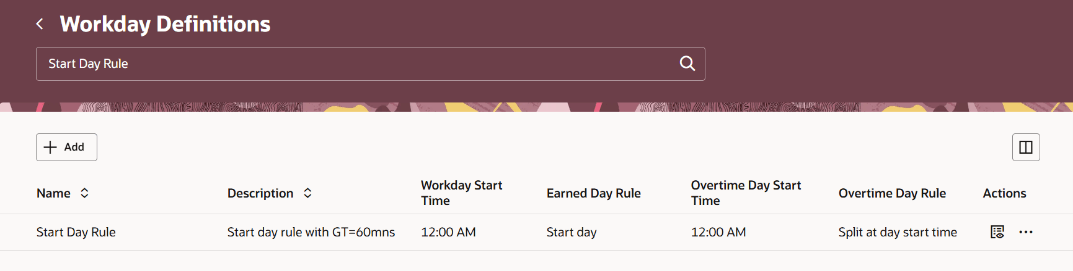
Workday Definitions Search Page
- Access current or next day and grouping-threshold details in the search results when needed; those details are hidden by default.
- Add a workday definition, edit or delete a definition that is not in use (not assigned to a worker or selected on a work pattern), or review a definition in a read-only drawer.
- Define whether the workday starts at midnight and see only the questions that apply to that selection.
- Configure how entries crossing midnight are assigned: based on entry start, based on entry end, or split at midnight.
- Specify the maximum grouping gap for entry-start and entry-end rules.
- Define the overtime day boundary, including the start time and current or next calendar day when the overtime day does not start at midnight.
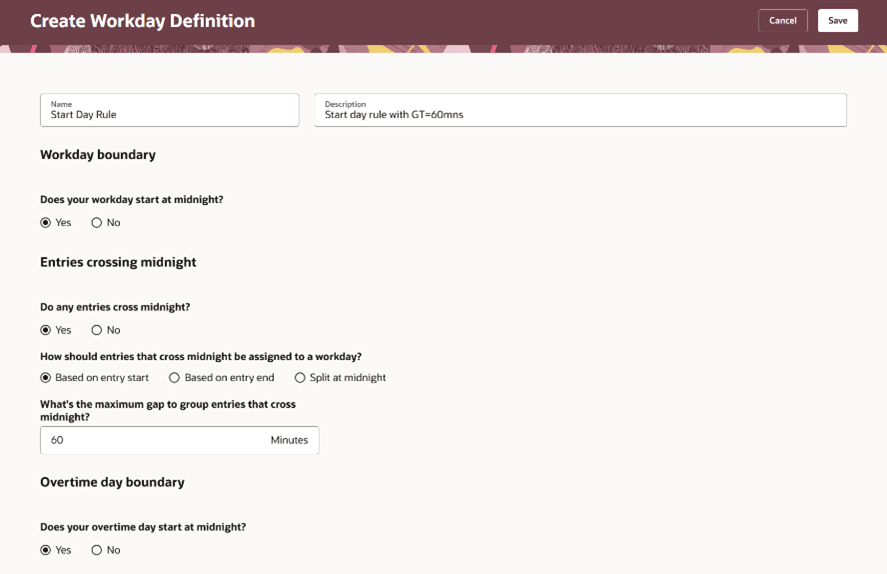
Example Workday Definition with Start Day Earning Rule
The Redwood experience provides a clearer, guided way to create and manage workday definitions. It helps administrators define day-boundary rules for standard and overnight work patterns while protecting workday definitions that are already in use.
Steps to enable and configure
No action is required. Click the Workday Definitions link when searching for the task in the Setup and Maintenance work area. The Redwood Workday Definitions setup task is enabled by default through the ORA_HWM_ADMIN_WDD_UI_ENABLED profile option.
Access requirements
No new roles are required. Time and Labor administrators access the task from the Setup and Maintenance work area.