Enhancements for Calendar Events on Redwood Time Cards
Give workers and managers clearer visibility into calendar events and automatically default full-day event entries using the applicable schedule source. For example, when a worker is assigned a public holiday through the event calendar, the Redwood time card displays the public holiday name and identifies the day with color coding, even when no public holiday entry is defaulted.
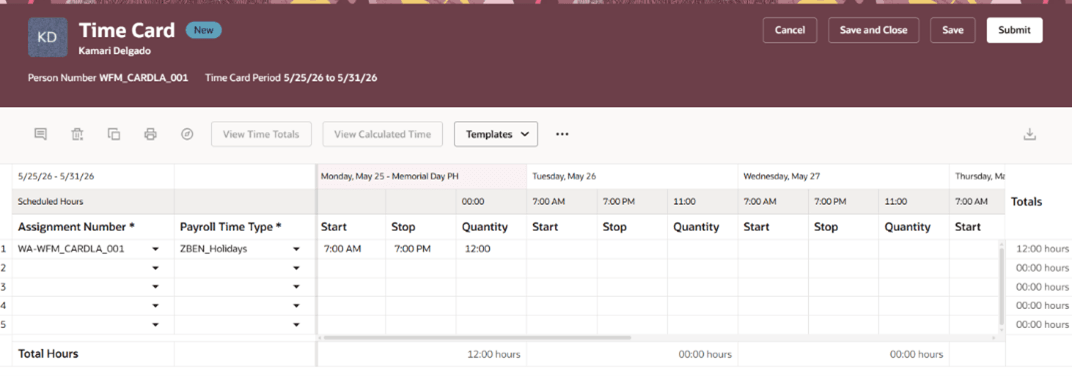
Time Card with Public Holiday
Use calendar event enhancements to:
- Prioritize the published schedule when determining whether to default a calendar event entry. It always takes precedence over the calendar event.
- Display calendar event information without defaulting an entry when the published schedule includes a shift on the event day. An entry can then be generated from that published shift.
- Default a calendar event entry from a fixed work-pattern shift, when available, or from the time-profile duration for an eligible flexible work pattern when a published schedule does not include a shift on the event day.
- Default calendar event entries from worker availability when no published schedule or work pattern applies.
- Use the configured time-profile duration for an eligible flexible work-pattern day.
- Default from availability when no work pattern applies and availability includes scheduled hours on the event day.
- Default calendar event entries for ineligible work-pattern days when the Include Ineligible Pattern Days time profile option is enabled.
- See that public holiday hours count toward total hours but are excluded from schedule deviation calculations..
- Review the renamed Scheduled Work Hours time total in the drawer, grid, and scoreboard for a new time entry layout when default label applies.
Business Benefit: These enhancements provide clearer visibility into public holidays and other calendar events while improving the accuracy of defaulted time card entries. It helps ensure calendar event entries are defaulted from the appropriate schedule source and only when applicable.
Steps to enable and configure
- Define full day public holidays and other calendar events and configure worker eligibility using event calendars and condition rules.
- Configure the default duration in the time profile for flexible workers, if needed.
- Enable Include Ineligible Pattern Days in the time profile when you want calendar event entries defaulted for workers without an eligible pattern day.
Access requirements
No new roles or privileges are required.