Enhancements for Absence Integration on Redwood Time Cards
Align absence removal with Absence Management processing and give workers and approvers clearer visibility into the related approval flow.
When you remove an absence from a Redwood time card, the application deletes or withdraws it based on the absence status and applies the configured approval rules.
Use the Absence integration on the time card to:
- Delete saved absences, while withdrawing submitted, scheduled, in-progress, completed, and approved absences.
- See that absences pending withdrawal are no longer displayed on the time card. Deleted and withdrawn absences also don't display on the time card.
- See that, with absence approval rules, the time card is approved after the applicable time entry, absence entry, and absence withdrawal approvals are complete.
- See that, with time approval rules, approving or rejecting the time card also approves or rejects the absence withdrawal.
- Submit the time card when you edit or remove a submitted or approved absence. The application prevents you from saving the time card and prompts you to submit it so the absence change can be processed.
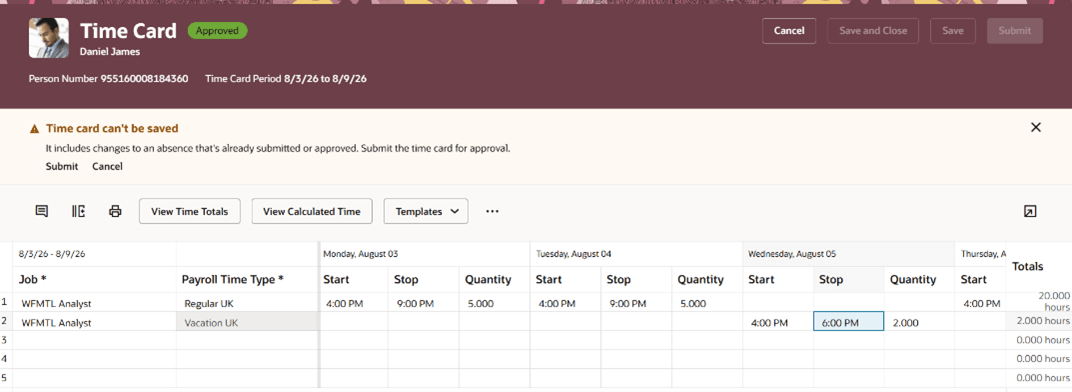
Time Card Saving Isn't Allowed
- Keep an absence read-only in Absence Management while it is part of an in-progress time card approval.
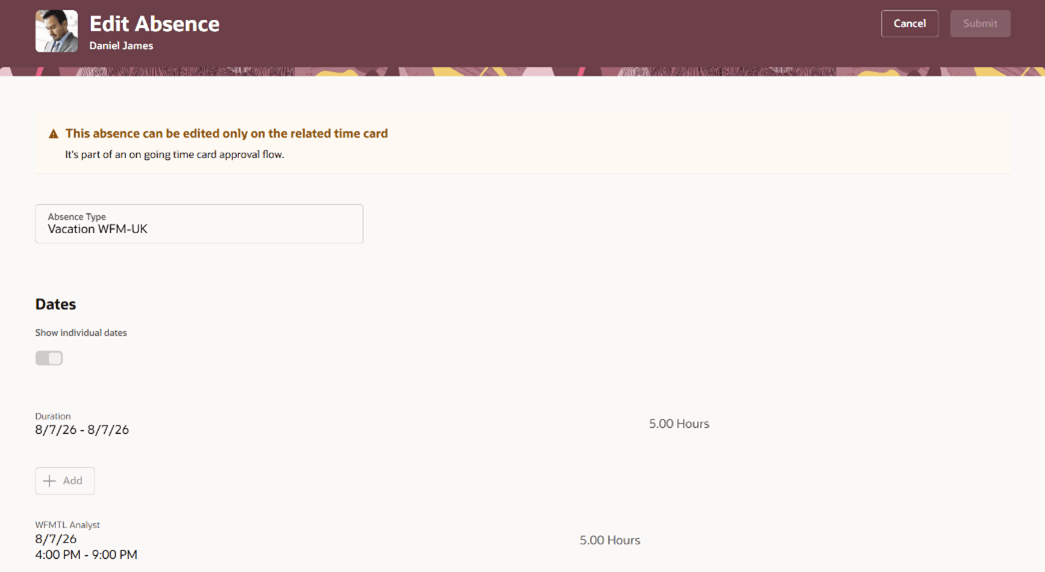
Edit Absence
- Review more complete absence information in time card approval notifications, including the status of preapproved and awaiting-withdrawal absences.
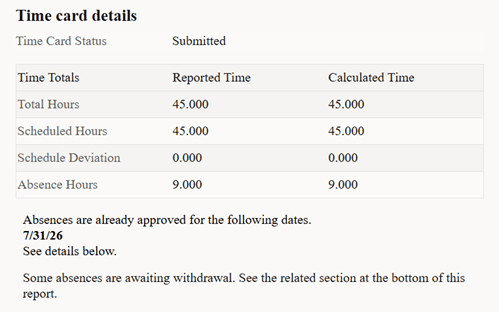
Approval Notification with Preapproved Absences
- View absences pending withdrawal in a dedicated notification section, with details such as the date, total hours or days, start and stop times or quantity, job assignment, and absence type.
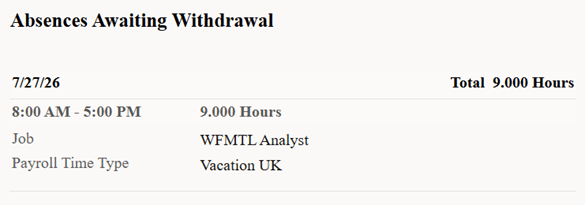
Approval Notification with Absences Awaiting Withdrawal
- Receive a notification when an absence included in a time card is updated outside the time card and the time card must be resubmitted.
- Reinstate an absence if its withdrawal is rejected. The absence displays again on the time card, and the time card might then require resubmission.
Business Benefit: This enhancement helps keep absence and time card records synchronized, applies the appropriate deletion or withdrawal process based on absence status, and gives workers and approvers clearer visibility into pending absence changes.
Steps to enable and configure
You don't need to do anything to enable this feature.
Tips and considerations
- Updating a multi-day absence by removing an individual day still edits the absence instead of withdrawing it.
-
Notifications that require users to resubmit a time card after an included absence is updated outside the time card rely on the following alert:
-
Name: HWM FYI Notification for Required Time Card Resubmission
-
Description: Notification sent when a time card must be resubmitted for approval because an included absence was updated outside the time card.
-
Code: ORA_HWM_TC_RESUBMISSION_FYI_NOTIFICATION
-