Workforce Schedule Balance Simulations in Workforce Operations Command Center
Help schedule managers and schedulers evaluate options to improve coverage when an initial schedule doesn't meet fill-rate, budget, or policy goals. Workforce schedule balance simulation compares recommended scenarios while preserving hard scheduling constraints.
Examples include:
-
Balance two departments by assigning under-FTE workers to eligible open shifts and show the resulting fill rate for both departments.
-
Compare a baseline with alternatives such as no rule relaxation, a specified overtime limit, and an increased worker FTE limit.
-
Relax a configured scheduling rule, such as the maximum consecutive days worked, and review the resulting coverage, cost, and exceptions.
-
Limit cross-department floating to one direction, allowing workers from one department to support another without reverse movement.
-
Prioritize coverage for a specific day, shift, or department and show the effect on the remaining schedule.
Hard schedule constraints, including worker eligibility and approved absences, remain enforced. During simulations, schedulers can relax configured soft constraints, such as worker preferences, overtime or over-FTE limits, coverage targets, and other rules. Each scenario includes a recommended plan; review relaxed rules, preference violations, fatigue and rest warnings, remaining open shifts, and cost impacts before applying it.
Create a schedule balancing scenario
Use Workforce Operations Command Center to identify upcoming coverage needs, compare three schedule-balancing options, and select a recommended outcome based on coverage and cost priorities.
1) Identify upcoming coverage needs — Workforce Operations Command Center highlights open shifts and coverage gaps requiring attention.
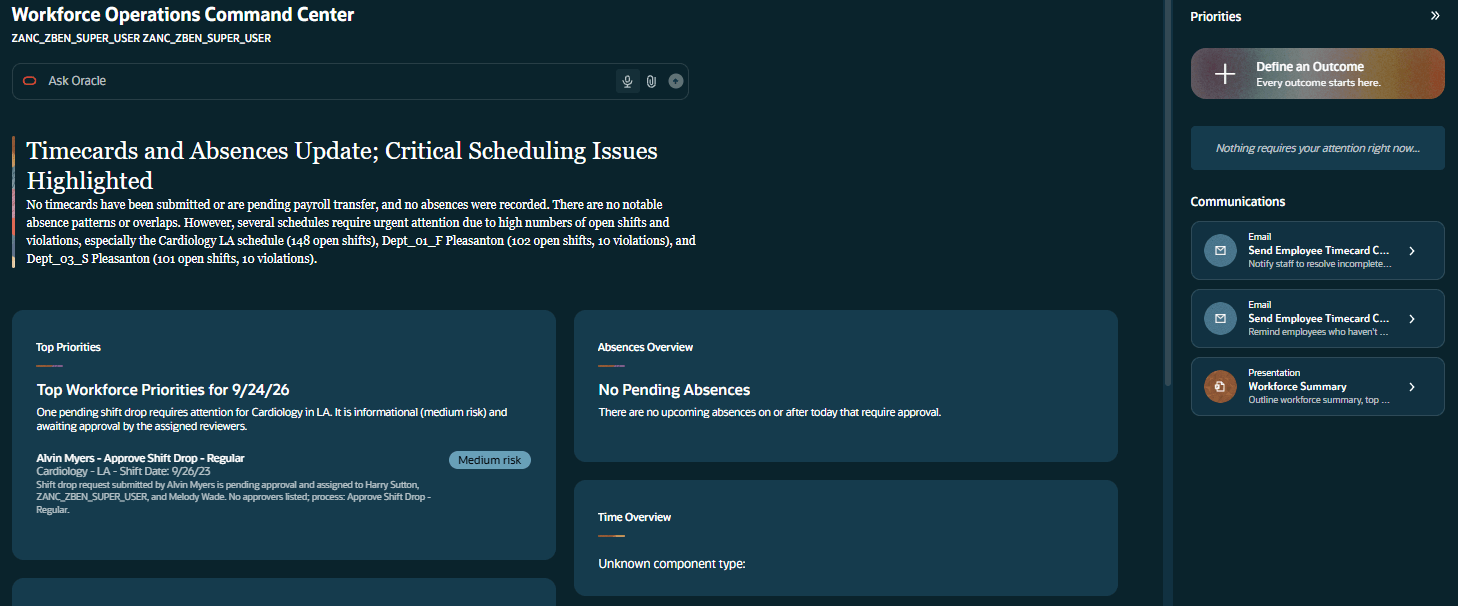
Workforce Operations Command Center View
2) Review schedule-balancing scenarios — The scheduler requests three scenarios relaxing rules and FTE constraints; the system recommends the option that best balances the stated coverage and cost priorities, with a summary of why.
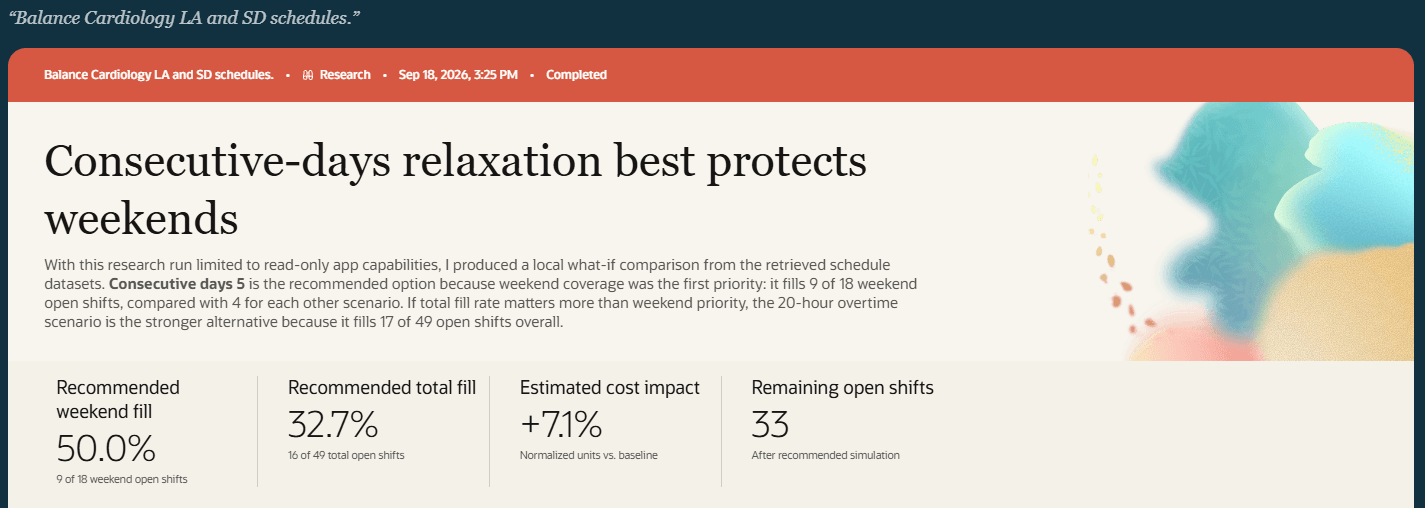
Schedule Balancing Recommendation
3) Compare the supporting evidence — The outcome compares the recommendation with alternatives, including coverage, remaining open shifts, and cost impact.
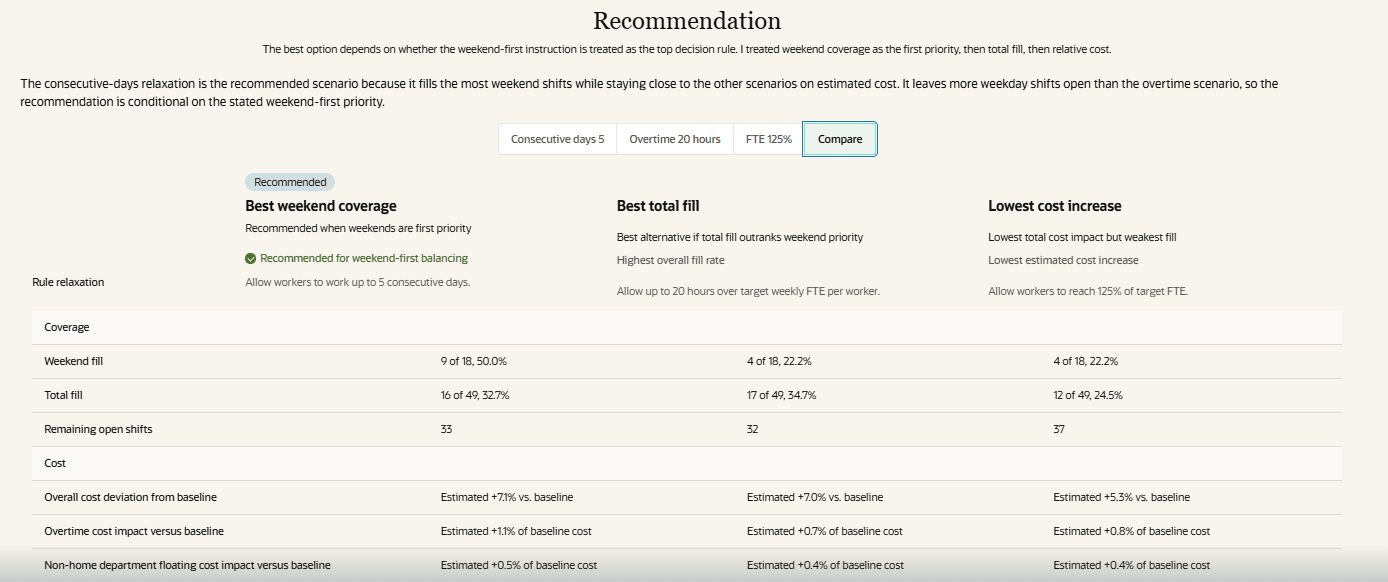
Outcome Recommendation Comparison
Schedule managers can make coverage decisions with a clear view of operational tradeoffs before changing the schedule. Comparing scenarios reduces manual trial and error and supports informed decisions about coverage, cost, overtime, worker preferences, and policy risk.
Steps to enable and configure
-
Provide the required access. Details are in the Access requirements section.
-
Go to My Client Groups > Workforce Scheduling > Workforce Operations Command Center.
-
Select Define an Outcome.
-
Enter one or more outcome scenarios in the prompt, including the relevant departments, dates, coverage goals, and any scheduling constraints.
-
Run the simulation to evaluate the proposed scenarios.
-
Review the simulation outcomes, including recommended schedule changes, coverage improvements, and any tradeoffs identified.
Key resources
- This feature uses Oracle Fusion Claw, a governed and agentic runtime capability for enterprise execution. Learn more about Fusion Claw.
- Explore AI Agents for Oracle Fusion Cloud Applications
- How do I use AI Agent Studio?
- Choose How to Create Workflows and Agentic Applications
Access requirements
Access is secured by the corresponding discretionary role, which allows users to open and use the Workforce Operations Command Center. See How can I give users access to AI agents and Access Requirements for AI Agent Studio.
| Privilege | Code | Description |
|---|---|---|
| Workforce Operations Command Center | ORA_HWM_WORKFORCE_OPERATIONS_COMMAND_CENTER_DISCRETIONARY | This discretionary role is provisioned to users who manage workforce operations across absences, time, and scheduling. It supports activities such as approving absences and assessing their schedule impact, reviewing time card statuses in preparation for payroll processing, addressing coverage gaps, and taking prioritized schedule management actions. The role is intended for workforce managers responsible for absence, time, and scheduling activities, including the related operational decisions needed to maintain workforce coverage and readiness. |
Access to workforce information and available actions is determined by assigned roles, data roles, and security profiles.