 Assign Additional Value From License Line
When enabled, this feature allows the assignment of license quantities/values that exceed the previously reserved amounts.
License management enables you to reserve license quantities and values upon receipt of a sales order to ensure compliance. However, when goods are shipped, the actual quantity or value assigned may sometimes surpass the reserved amount.
-
When enabled: If the reserved license quantity or value is insufficient, GTM automatically draws the required additional quantity/value from the license line at shipment time, assigning what is needed to fulfill the shipment. The reserved license quantity or value draws from the existing sales order.
-
When not enabled (default value): If the reserved license quantity or value is insufficient, GTM displays an error message indicating that there is not enough quantity/value available on the preceding transaction line.
NOTE: Existing capability enables you to use the Reference Number Qualifier of PRECEDING TRANSACTION LINE to link between the shipment line and the sales order line. The shipment line can have the reference number qualifier and the reference number of the the sales order line GID. If you do not have this information, you can model the linkage in the Master Data > Power Data > Licenses and Registrations > License Codes using the Transaction Line Saved Query.
Once you have configured your compliance rules to model the required controls, you can define license information, including details for license reservation and assignment. When a sales order is received, GTM applies the appropriate control based on the compliance rule defined. A corresponding license can then be assigned to release the control.
For example, you reserve license quantity and value as follows:
- Quantity Qualifier: ORDERED, with a Quantity of 1000 EA
- Value Qualifier: INVOICE VALUE with a Value of 2,000 USD
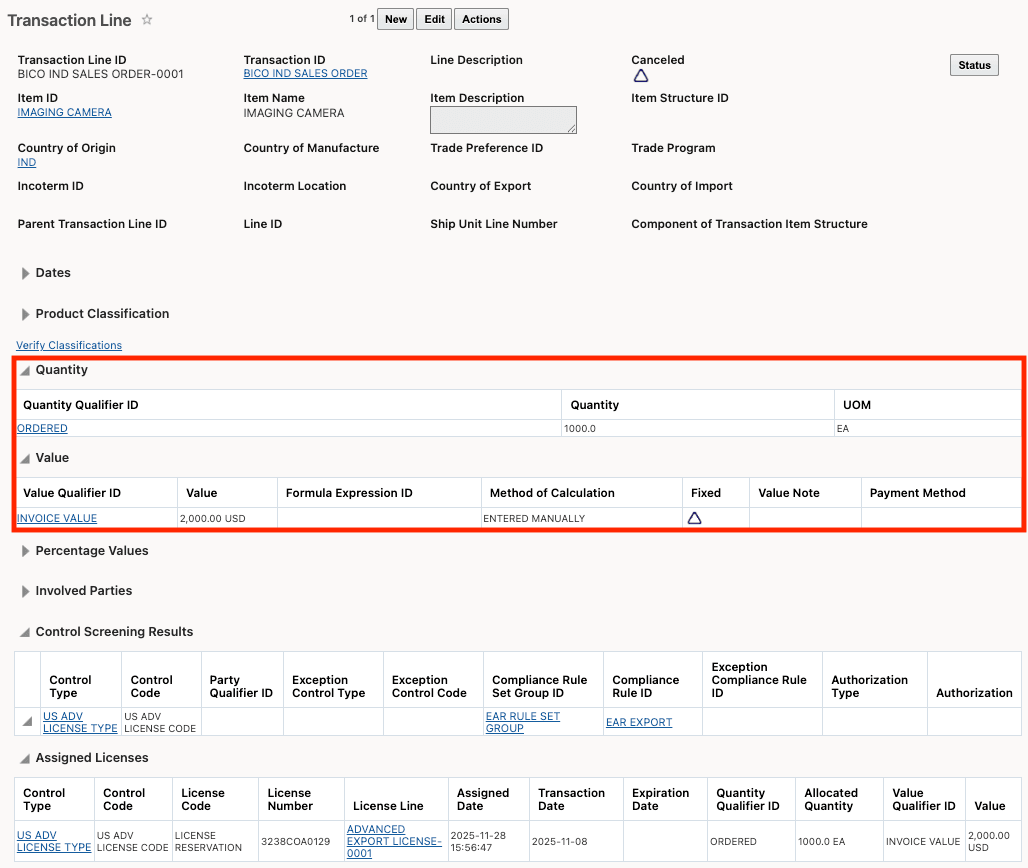
Transaction Line for Sales Order - License Reservation
When you are ready to ship the goods, you can perform license assignment. Upon receipt of a shipment, GTM applies the appropriate control based on the defined compliance rule. A license is then assigned to release this control.
In this example, the license quantity and value are assigned from what was reserved on the sales order line. The shipment quantity and value exceeds the originally reserved amounts. For the additional required quantity and value, GTM automatically draws from the license line at the time of assignment.
In this scenario, the quantity and value needed at assignment are:
- Quantity Qualifier: SHIPPED, with a Quantity of 1500 EA
- Value Qualifier: INVOICE VALUE with a Value of 3,000 USD
- Reference Number Qualifier: PRECEDING TRANSACTION LINE with a Reference Number of the sales order line GID
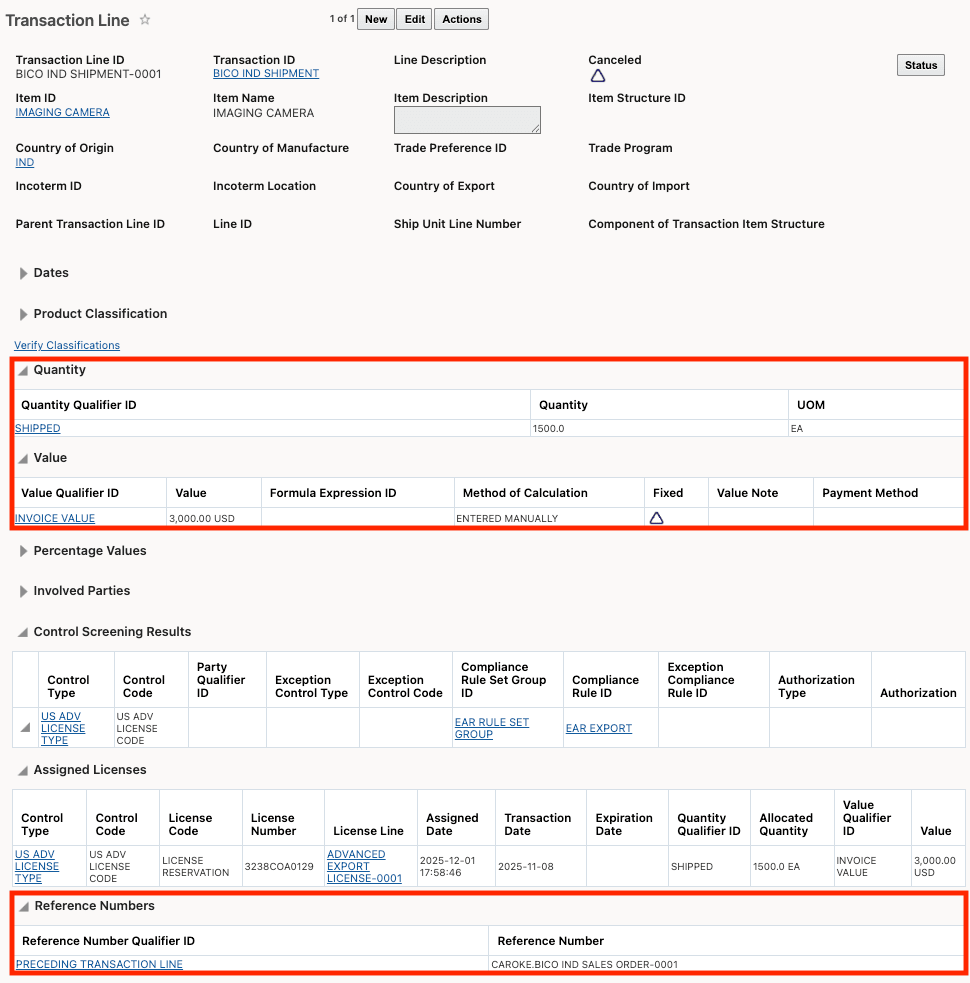
Transaction Line for Shipment - License Assignment
The License Line Usage History shows the details of the license reservation and license assignment. You can see:
- The Balance Type of R for reservation or A for assignment
- A row for the reservation with a line to the sales order line
- Two rows for the assignment - one assigning from the sales order line and another assigning the remaining quantity and value from the license line

License Line Usage History
Business Benefit: This optional feature, when enabled, assigns the required additional quantity or value from the license line. Enabling this feature provides greater flexibility and efficiency in license management by allowing you to fulfill shipments even when actual quantities or values exceed initial reservations. This reduces operational delays, minimizes disruption in order fulfillment, and helps ensure timely delivery to customers. By automatically adjusting license assignments, organizations can better manage fluctuating shipment requirements and optimize their supply chain processes.
Steps to enable and configure
If you need to change the Opt In state for this feature:
- Go to the Optional Feature UI - Configuration and Administration > Property Management > Optional Features.
Your user must have the DBA.ADMIN user role to use this functionality.
- Select the Assign Additional Value From License Line feature.
- Run the desired Action for the feature - Opt In or Opt Out.
Tips and considerations
If a license line does not have enough quantity/value to assign at shipment time, GTM can use another available license for the remaining quantity/value. Otherwise, the license will not be assigned.