Release Non-processed Goods from Foreign Trade Zone
This feature allows you to move non-processed goods from a Foreign Trade Zone (FTZ). Previously, these goods were placed into the FTZ through an admission declaration and were not used in manufacturing finished products. At a later stage, you may wish to move these goods out of the FTZ. The feature supports the following scenarios:
- Moving non-processed goods from an FTZ into free circulation
- Exporting non-processed goods from an FTZ
- Transferring non-processed goods from one FTZ to another FTZ
Move Non-processed Goods from FTZ into Free Circulation
When goods are moved from an FTZ into free circulation, applicable duties and taxes must be paid. An exit declaration is created to document the movement from the FTZ into free circulation. Although the exit declaration itself does not have a zone status, the zone status of the inventory in the FTZ may need to be recorded on the declaration and reported to customs, depending on regulatory requirements.
Additionally, there may be restrictions on which zone statuses are permitted when transferring goods from an FTZ to free circulation. For instance, customs authorities might only allow inventory with specific zone statuses — such as non-privileged, privileged, or domestic — to enter free circulation. You can configure a Declaration Type Profile that specifies the allowed declaration types. When you add a declaration type to your declaration, GTM filters the list of available Trade Incentive Zone Statuses on the declaration line based on the ones defined in your declaration type profile. Global Trade Management (GTM) can then match the import declaration with inventories of the appropriate zone statuses.
When you run the "Perform Entry/Exit Recording" action to reconcile the exit declaration and declaration lines with the inventories, the following occurs:
- The original declaration line to exit the FTZ for free circulation is split into multiple lines based on the zone status configuration.
- Inventory records and inventory movement records are created for each declaration line, representing the movement into free circulation.
- The zone status from the matched inventory is copied onto each of the split lines as the "Prior Zone Status".
- Data from the original declaration line is copied to the split lines, including Product Classification Type/Code, various Control Screening Results, Assigned Licenses (with quantity and value prorated), Produced Documents, and Reference Lines (with quantity prorated).
- The Reference Number Qualifier "PRIOR DECLARATION LINE NUMBER," referencing the exit line, is populated on each split exit line.
- The original exit declaration line that was split is removed.
After the declaration lines are split, you can perform duty and tax calculations for each individual declaration line.
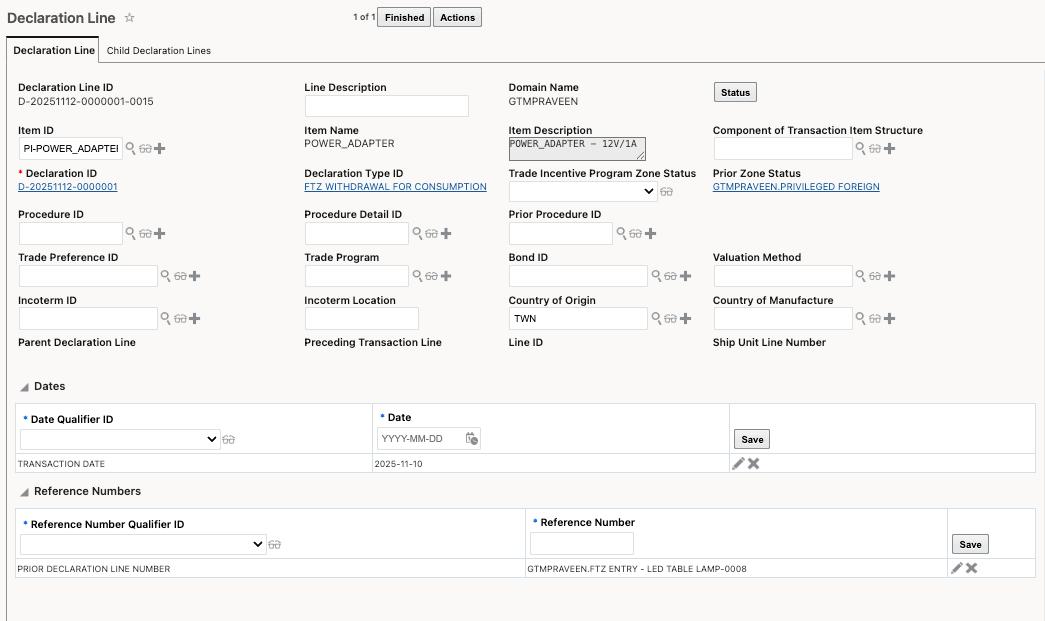
Declaration Line - Split Line for Non-processed Good
Export Non-processed Goods from FTZ
When exporting goods from an FTZ, the process is similar to moving non-processed goods into free circulation. The export declaration lines are split based on the zone status of the inventory. However, since the goods are being exported, duties and taxes do not need to be paid.
When you run the "Perform Entry/Exit Recording" action to reconcile the exit declaration and declaration lines with the inventories, the following occurs:
- The original declaration line for exiting the FTZ for export is split into multiple lines based on the zone status configuration.
- Inventory records and inventory movement records are created for each split declaration line, representing the export movement.
- The zone status from the matched inventory is copied onto each split line as the "Prior Zone Status".
- Data from the original declaration line is copied to the split lines, including Product Classification Type/Code, various Control Screening Results, Assigned Licenses (with quantity and value prorated), Produced Documents, and Reference Lines (with quantity prorated).
- The Reference Number Qualifier "PRIOR DECLARATION LINE NUMBER," referencing the original exit line, is populated on each split exit line.
- The original exit declaration line that was split is removed.
Transfer Non-processed Goods from one FTZ into Another FTZ
When transferring non-processed goods from one FTZ to another, you can exit one FTZ program and enter another using a single declaration. The new Source Inventory Organization and Destination Inventory Organization, configured through logic configurations, support this end-to-end transfer scenario.
Business Benefit: This feature provides greater flexibility and control over inventory management within Foreign Trade Zones (FTZs). By supporting the controlled movement, export, or transfer of non-processed goods, businesses can optimize logistics, comply with regulatory requirements, and improve supply chain efficiency.
Steps to enable and configure
You don't need to do anything to enable this feature.
Tips and considerations
For more information on the enhancements to defining inventory organizations in logic configuration, refer to the "Configure Source Inventory Organization and Destination Inventory Organization" topic in this document.
Key resources
- For more information on the enhancements for defining inventory organizations in logic configuration, refer to the "Configure Source Inventory Organization and Destination Inventory Organization" topic in this document.