Use Penalty Code on Tariff Rate
This optional feature, when enabled, controls whether penalty data from third-party content providers is downloaded for product classification codes. Due to recent regulatory changes, additional penalties—such as those related to Section 232, Section 301, IEEPA, and Reciprocal measures—may apply to imported goods.
For harmonized tariff codes in chapters 1–97, GTM displays information about these penalties in the Product Classification Code > Attributes grid. Because a single chapter 1–97 harmonized tariff code can have multiple potential penalties, the Attributes table may display a large number of entries.
Regardless of whether this optional feature is enabled, GTM continues to model this information as a tariff rate.
If you do not need to view this penalty data on the product classification code, you can enable this optional feature by setting it to true.
A property "gtm.dataload.suppressAttributeLoad" is added with the default values as "301_PENALTY,IEEPA_PENALTY,RECIPROCAL_PENALTY,232_PENALTY". This property takes the comma-separated attribute names, and these attributes will NOT be populated in the Product Classification Attributes grid.
The next time you download product classification data, the attributes specified in the property will not be downloaded. By default, the following penalties will NOT be populated in the Product Classification Attributes grid:
- 232_PENALTY
- 301_PENALTY
- IEEPA_PENALTY
- RECIPROCAL PENALTY
In this example, you are importing steel into the United States for use in railways. The relevant HTS US classification code is 7302101015. If the optional feature is set to false (the default setting), the product classification code attributes will include all applicable potential penalties. To view this information, navigate to Classification > Product Classification Codes.
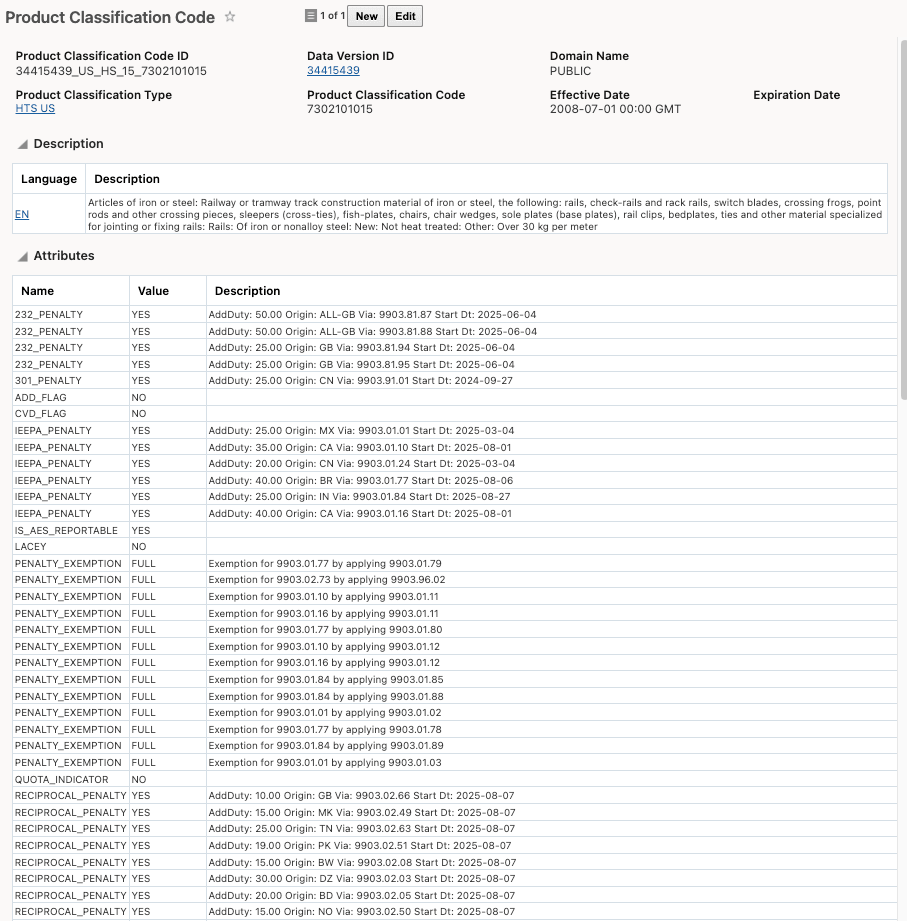
Product Classification Code Attributes with Full Penalties
If the optional feature is set to true, the product classification code attributes will not contain the following penalties: 232_PENALTY, 301_PENALTY, IEEPA_PENALTY and RECIPROCAL PENALTY.
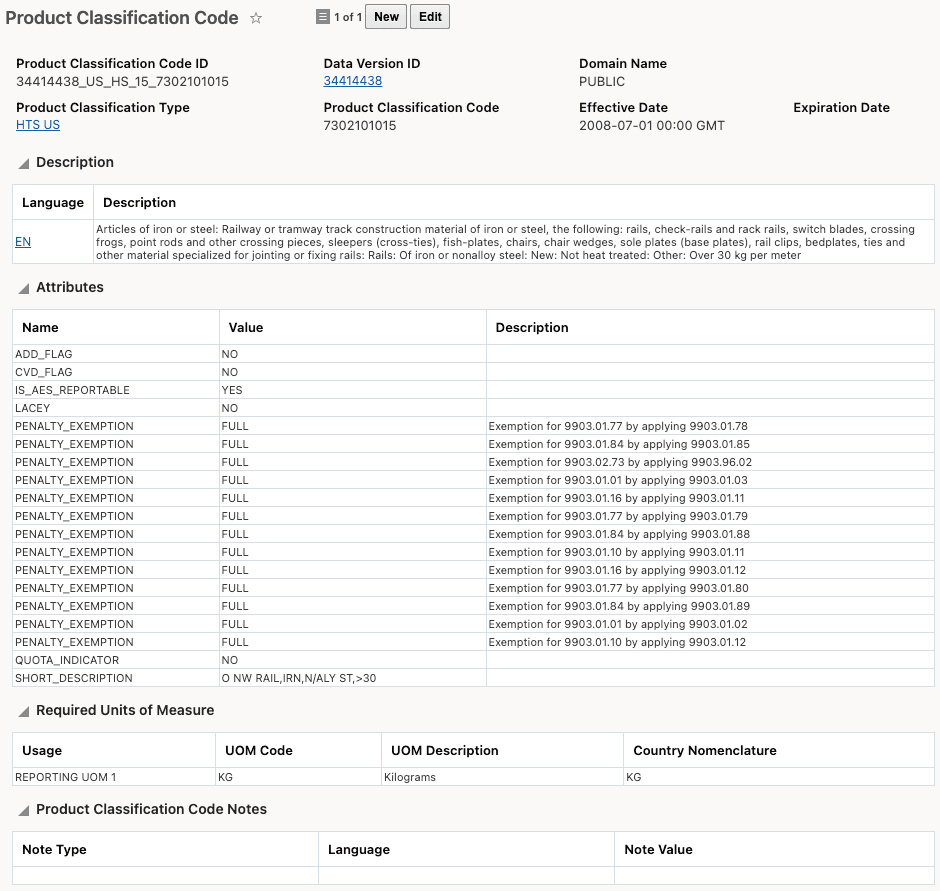
Product Classification Code Attributes without Full Penalties
If you want to view penalties associated with a particular product classification code, you can use tariff rates. Navigate to Master Data > Power Data > Tariff > Tariff Rates. This object provides detailed information, with each penalty represented as a single tariff rate.
In this example, search using Product Classification Type = HTS US and Product Classification Code = 7302101015, then select a 232 steel penalty to view its details.

Tariff Rate for 232 Additional Duty on Iron/Steel Products
Business Benefit: Enabling this optional feature streamlines the Product Classification Attributes grid by excluding penalty data that may not be relevant to daily operations. This not only reduces information overload and simplifies compliance reviews, but also improves system performance by minimizing the amount of data downloaded. As a result, users can manage large product classification code sets more efficiently. Penalty details remain accessible through tariff rates, ensuring that necessary compliance information is still available without cluttering the primary classification interface.
Steps to enable and configure
If you need to change the Opt In state for this feature:
- Go to the Optional Feature UI - Configuration and Adminstration > Property Management > Optional Features.
Your user must have the DBAADDMIN user role to use this functionality.
-
Select the Use Penalty Code on Tariff feature.
-
Run the desired Action for the feature - Opt In or Opt Out.