Configure Source Inventory Organization and Destination Inventory Organization
This feature allows you to use a single declaration to exit one trade incentive program and enter another trade incentive program. For example, when goods move from a foreign trade zone into free circulation, a single declaration can facilitate both the exit from the foreign trade zone and the entry into free circulation.
To better support when a single declaration is used for both the exit from and entry to different trade incentive programs, new parameters are available in the logic configurations for Logic Configuration Type = GTM DECLARATION CONFIGURATION and GTM TRANSACTION CONFIGURATION. The newly added parameters are:
- TIP EXIT INVENTORY ORGANIZATION QUALIFIER: Matches the inventory organization of the exit transaction/declaration line to the inventory and populates the inventory organization on the exit inventory movements.
- TIP ENTRY INVENTORY ORGANIZATION QUALIFIER: Populates the inventory organization for any new inventories created and for the entry inventory movements.
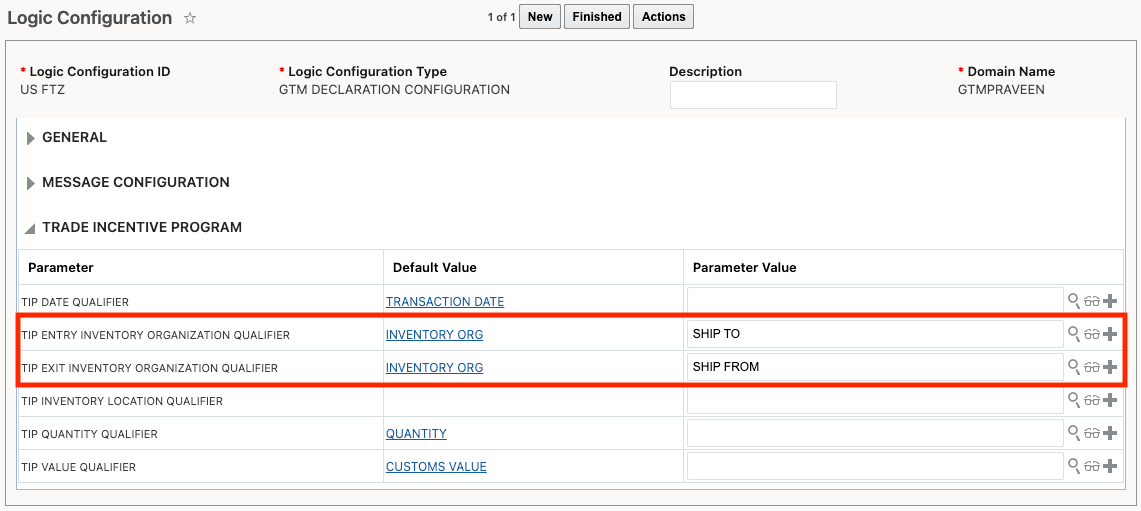
Logic Configuration
Business Benefit: This feature increases operational efficiency by allowing organizations to use a single declaration to exit one trade incentive program and enter another, reducing manual effort and errors. It also accelerates the movement of goods through regulatory processes, ensures more accurate inventory tracking, maintains strong regulatory compliance, and helps reduce administrative costs by streamlining documentation and compliance procedures.
Steps to enable and configure
You don't need to do anything to enable this feature.
Tips and considerations
These new parameters replace the existing parameter called 'TIP INVENTORY ORGANIZATION QUALIFIER'. If you configured the existing parameter, the values you've defined are copied to the new parameters.