 Mobile - Ability to add Line Details in Shipment Actuals
This feature enables you to add received quantities on the shipment ship unit line while entering an event. It is available in the Driver and Service Provider flows.
This feature is disabled by default and can be turned on by setting "captureReceivedQuantityEnabledLine" to "true" in the mobile layout as highlighted below. Note that the ability to add received quantities to a ship unit ("captureReceivedQuantityEnabled") must be set to "true" to allow the adding of received quantities on the ship unit line ("captureReceivedQuantityEnabledLine") to be shown.
  "captureReceivedQuantityLine" : {
        "enableBarCodeScannerLine": true,
        "captureReceivedQuantityEnabledLine": true,
        "captureReceivedShipUnitLine": true,
        "captureReceivedWeightLine": true,
        "captureReceivedVolumeLine": true,
        "captureReceivedRemarkLine": true,
        "mandatoryCaptureReceivedQuantityLine": {},
        "sShipUnitLineRefnumQualGid": ""
    },
    "expandShipUnitLineAccordion":  false,
    "shipUnitLineAutofill": false,
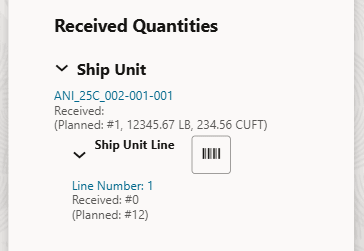
Enable Received Quantities at Ship Unit Line Level
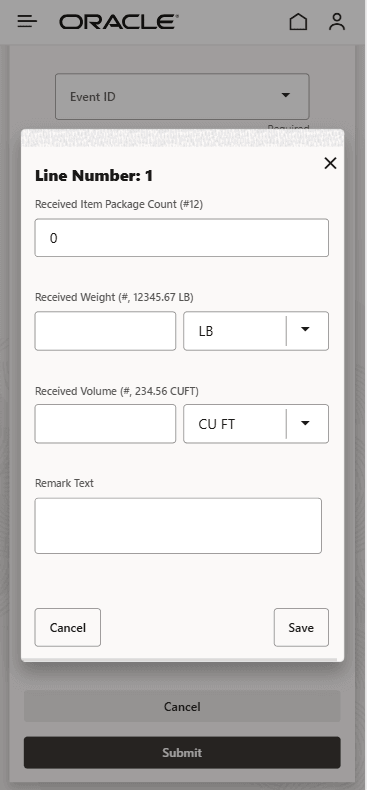
Ship Unit Line Received Quantities Screen
One prerequisite is to create an agent which will copy the received quantities from the IE_S_SHIP_UNIT_LINE table to the S_SHIP_UNIT_LINE table. The same agent also copies the fields from the IE_S_SHIP_UNIT table to the S_SHIP_UNIT table.
You can refer to the following Help topics to get more details on setting up this agent:
-
Buy Shipment Agent Actions ('Copy Received Fields to Shipment' section)
Business Benefit: Users can update the received quantities on a shipment ship unit line for true actuals received.
Steps to enable and configure
"captureReceivedQuantityEnabled" and "captureReceivedQuantityEnabledLine" should be set to true in the mobile layout.
Tips and considerations
If your use case doesn't seem to be working correctly, try running the same scenario for shipment ship unit. The shipment ship unit line should behave the exact same way.