 Mobile - Button to Show Documents
This feature provides you with a button to show documents so that the Mobile App does not automatically retrieve documents when opening a shipment, thereby reducing data usage.
When this button is enabled, by setting "displayShowDocuments" to "true" in the mobile layout, documents for a shipment will be fetched from the server only once on clicking the button. If the shipment details page for the shipment is accessed again, the documents will be fetched from the browser cache instead of making new REST API calls.
The "Show Documents" button at the stop level will be shown only if "showStopDocuments" is set to "true" in the mobile layout.
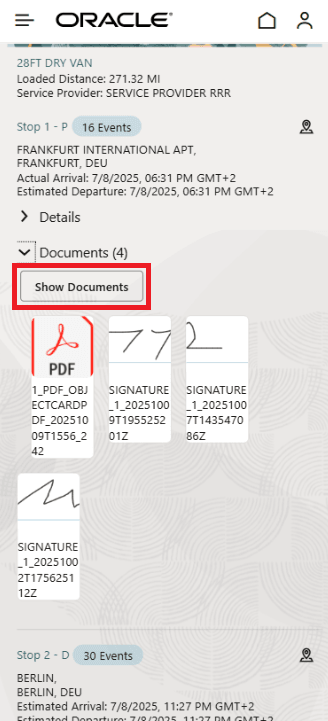
Show Documents Button
Business Benefit: When this button is enabled, the Mobile App does not automatically retrieve documents when opening a shipment, thereby reducing data usage.
Steps to enable and configure
Set "showStopDocuments" and "displayShowDocuments" to "true" in the mobile layout.
Tips and considerations
This feature can be verified best with a desktop/laptop browser.
Once you are on the dashboard page for the mobile app, right click on the browser and click on inspect to bring up Dev Tools. Click on the Network tab and make sure Fetch/XHR tab is selected to monitor the REST API calls.