Fusion AI Agent Studio Support
This feature provides the setup screens and documentation needed to connect Oracle Transportation Management (OTM) and Global Trade Management (GTM) with Oracle Fusion AI Agent Studio. It is intended for implementation leads and administrators who manage configuration, user access, and AI agent deployment across Fusion and OTM/GTM. Using the provided infrastructure and documentation, you will be able to easily setup and use the AI Agent Studio to deploy pre-packaged AI Agents (e.g.,OTM Bulk Plan Diagnostic Analyst and OTM Rate Inquiry Assistant) or use the AI Agent Studio to create and deploy your own custom agents.
Within OTM/GTM, the key AI enablement features are found by navigating to Configuration and Administration > Power Data > AI - as shown below.
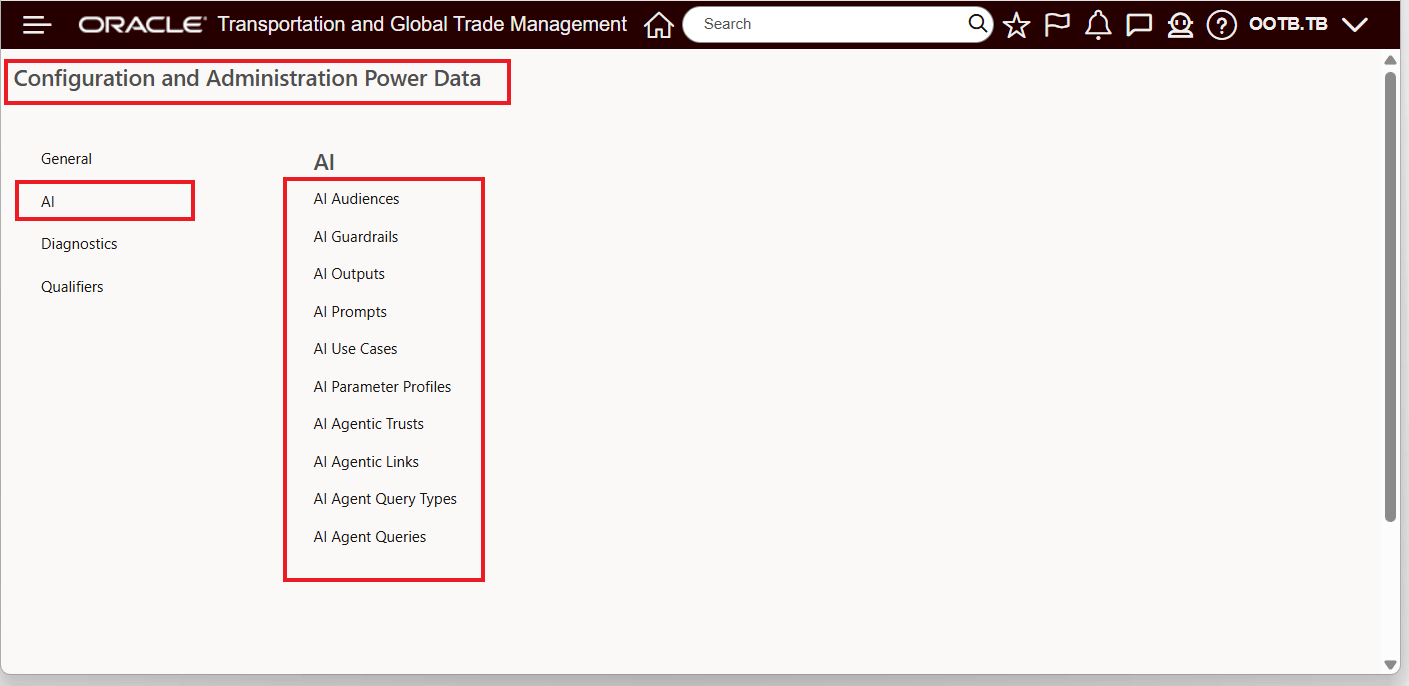
Configuration and Administration Power Data - AI
The AI configurations include the following areas:
- AI Audiences: Define user audience types (skill level/persona) used to guide AI responses.
- AI Outputs: Define selectable response output styles.
- AI Guardrails: Select or create guardrails to restrict AI responses to approved sources (for example, OTM documentation and/or Oracle Database documentation).
- AI Use Cases: Choose whether a use case is generative (select audience/output/parameter profile) or agentic (select an agent that predefines initial question, audience, and output).
- AI Parameter Profiles (generative use cases): Set response behavior (length, creativity, diversity, streaming, etc.).
Agent connectivity and definitions:
- AI Prompts: Add agentic prompts for custom AI agent queries. An agentic prompt is the first question in an agentic chat. Review the sample prompts in the PUBLIC domain for examples on how to phrase prompts.
- AI Agentic Trusts: Create the credentials (Fusion IDCS confidential app OAUTH details, keys/certs, scope/audience).
- AI Agentic Links: Point to your Fusion instance URL and API version (V1/V2) using the trust.
- AI Agent Query Types: Define content types used by agent queries (ensures compatibility between prompts and agent queries).
- AI Agent Queries: Combine the Fusion Agent Team + AI Prompt, and set required Access Role Entry Point IDs so only properly authorized users can run the agent tools.
The AI Guide provides you with an end-to-end overview for all the required steps and configuration changes required for connecting OTM/GTM to the AI Agent Studio so you can take advantage of the many AI Agent Studio capabilities. You can find the latest version of the AI Guide here: https://docs.oracle.com/pls/topic/lookup?ctx=otm-latest&id=OTMAI
Business Benefit: This feature provide you with a comprehensive infrastructure allowing for the rapid deployment of Fusion AI Agent Studio powered agents directly within your OTM and GTM instances. The provided infrastructure will accelerate your agentic automation and decision-making abilities - eliminating integration efforts and ongoing IT maintenance.
Steps to enable and configure
If you would like to review the setup requirements and configuration steps for the available AI Agents, please refer to the latest version of the AI Guide, available here:
https://docs.oracle.com/pls/topic/lookup?ctx=otm-latest&id=OTMAI
We welcome your feedback on the AI Guide, particularly if you encounter any instructions that are unclear, incomplete, or inaccurate. Your input helps us continuously improve the quality and usability of the documentation.
Key resources
- For information on using AI Agent Studio see the following:
- How do I use AI Agent Studio
- https://docs.oracle.com/en/cloud/saas/fusion-ai/aiaas/