Gen AI: Pending Cycle Count Discrepancy Summary
Reviewing pending cycle count adjustments often requires supervisors to analyze many individual records to find discrepancies in quantities, attributes, LPNs and so on. This manual process is time-consuming and can delay approval decisions and inventory updates.
To streamline this workflow, we have introduced an AI-driven Cycle Count Adjustment Summary to the Cycle Count Adjustment UI. For any pending cycle count adjustment, you can now view a concise, AI-generated overview of quantity variances, serial number differences, attribute mismatches, and so on, along with any restrictive warnings that may block approval.
This feature helps inventory controllers and supervisors to quickly view discrepancies in pending cycle count approval records, speed up discrepancy analysis, and make timely decisions.
NOTE: This feature is available only in the Redwood Cycle Count Adjustment UI.
COUNT SUMMARY
To access count summary before you approve or reject a pending cycle count adjustment header, a new action button Count Summary is added to the Redwood Cycle Count Adjustment UI. The action button opens the Count Summary pane for the selected pending cycle count adjustment.
The count summary displays a short summary for a quick read (count and location level overview), with an option to fetch a detailed summary (SKU, inventory, and LPN level overview).
NOTE:
- Permissions: The Count Summary action button is controlled by the “CC Adjustment Hdr / Can Generate Count Summary” group permission. By default, admin users are enabled with this group permission.
- Scope: The system generates a count summary only for Pending cycle count adjustments in Redwood UI.
- Localization: AI Summary features are not supported for all languages that the WMS supports. For languages not supported by AI, the summary will default to English.
- Caching: Summaries are cached per header and language. The system clears the cache when a cycle count adjustment is approved, rejected, or canceled.
SAMPLE SUMMARIES
Count Summary pane with a short summary to provide count and location level overview.
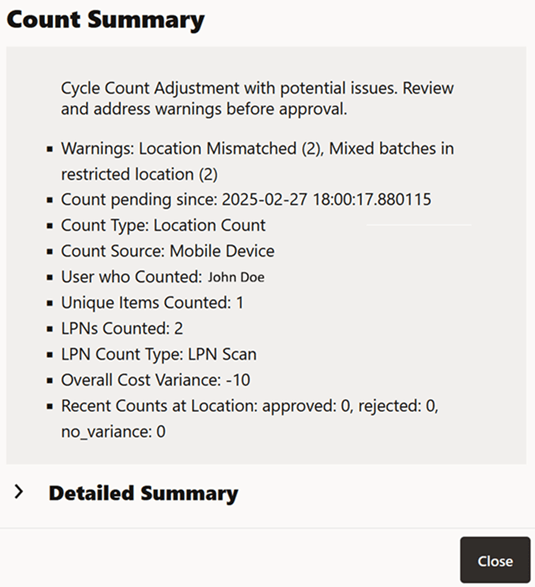
Short Summary
Detailed Summary with SKU, inventory, and LPN level overview.
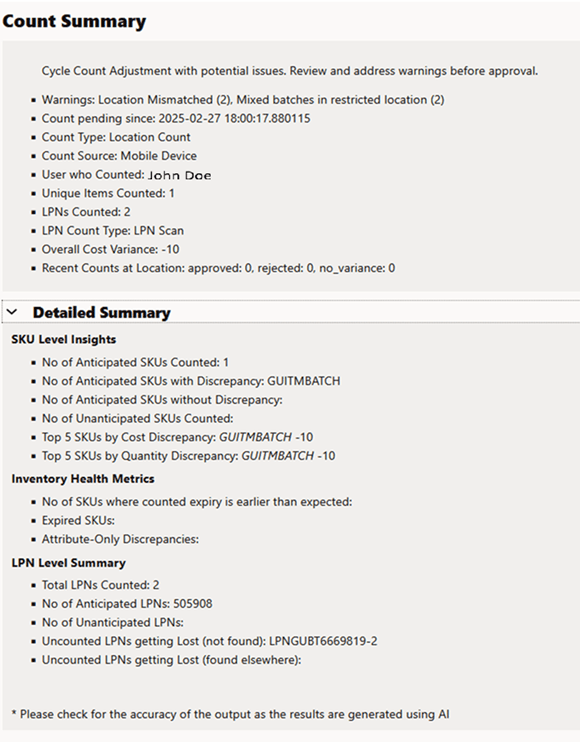
Detailed Summary
GET SUPPORT FOR COUNT SUMMARY
To retrieve cached count summaries, you can now use a GET request to query cc_ai_summary.
URL to fetch all results (paginated list):
GET .../wms/lgfapi/v10/entity/cc_ai_summary/
URL to fetch only one result based on ‘id’:
GET .../wms/lgfapi/v10/entity/cc_ai_summary/{id}
Steps to enable and configure
To access Count Summary, do the following:
- Enable the “CC Adjustment Hdr / Can Generate Count Summary” group permission.
- Navigate to the Redwood Cycle count Adjustment UI.
- Select a Pending cycle count adjustment record.
- Click … (More Actions) > Count Summary action button.
The system opens the Count Summary pane with a short summary to provide count and location level overview.
- Optional: To view SKU, inventory, and LPN level overview, on the Count Summary pane, click Detailed Summary.