Physical Inventory Tracking Available in Trade Incentive Programs
This feature enables the tracking of physical inventory within a Foreign Trade Zone (FTZ). Physical inventory represents the operational inventory currently on hand in the warehouse. Information about physical inventory is received into Global Trade Management (GTM) as trade transactions from upstream systems such as Oracle Enterprise Resource Planning (ERP), Oracle Warehouse Management (WMS), or Oracle Transportation Management (OTM). There are four supported scenarios for physical inventory tracking within an FTZ, each initiated through a trade transaction:
- Scenario # 1 – Warehouse receipt representing the receipt of components into the FTZ.
- Scenario # 2 – Work order transaction authorizing production, where the components are manufactured into a finished good.
- Scenario # 3 – Production receipt transaction for the manufactured finished good entering the FTZ.
- Scenario # 4 – Warehouse issue transaction for the finished good exiting the FTZ into free circulation.
To configure physical inventory tracking, you must define the Entry-Exit Configurations for the trade incentive program. These configurations establish the rules for inventory entering and exiting the FTZ and provide the criteria for matching trade incentive programs with the corresponding transactions.
Note: The upstream ERP/WMS maintains operational on-hand inventory details. Within the FTZ, GTM serves as the system of record for inventory position and inventory movement tracking.
Trade Incentive Program
On the Trade Incentive Program, a new section called Entry-Exit Configurations is introduced. Within this section, you can configure the following:
- Entry Exit Profile, including the linkage to the Transaction Type Profile
- Movement Type, defined as either Entry or Exit
- Tracking Type, defined as Customs Inventory, Physical Inventory, or both
- Item Evaluation Criteria, defined as Item, Components, or both
- Data Configurations that define the data copied between related objects
In this example, the following two Entry-Exit Configuration rows are used:
- Entry Exit Profile = TRANS FTZ ENTRY
- Entry Exit Profile = TRANS FTZ EXIT
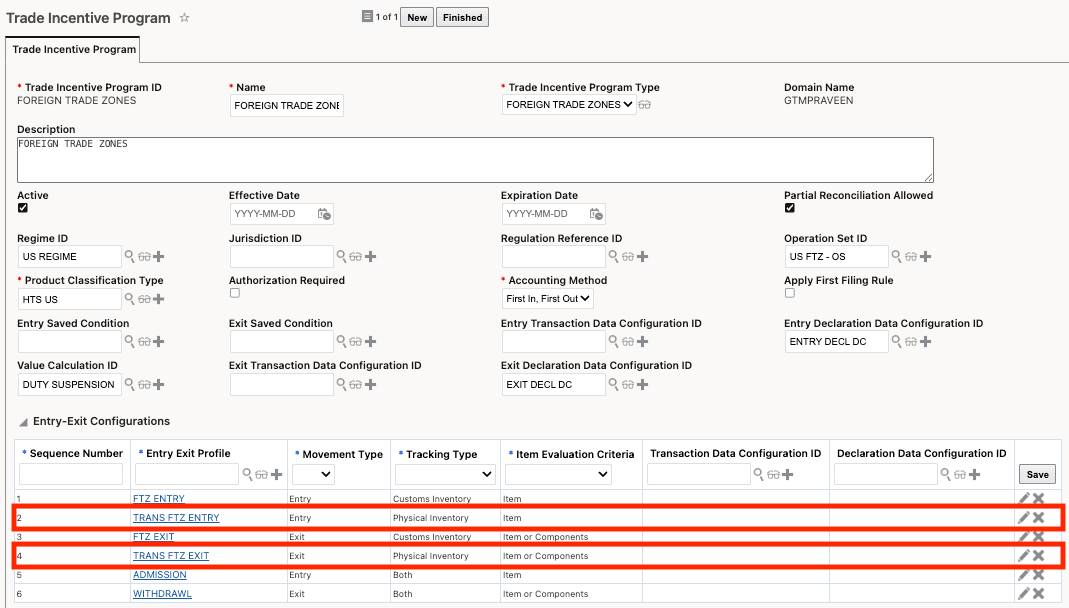
Trade Incentive Program > Entry-Exit Configurations for Physical Inventory
Physical inventory is available for trade transactions only. Ensure that your Entry Exit Profile and the data configuration are for transactions.
Data from the existing Applicable Profiles grid is migrated to the Entry-Exit Configurations section. For more information on the new section and migration, refer to the "Entry Exit Configuration on Trade Incentive Programs" topic in this document.
Entry Exit Profile for Warehouse Receipt and Production Receipt
On the Entry-Exit Configuration > Entry Exit Profile for the row defining the Physical Inventory details (in this example, Entry Exit Profile = TRANS FTZ ENTRY), the associated Transaction Type Profile is specified. This profile contains the applicable transaction types, such as PRODUCTION RECEIPT and WAREHOUSE RECEIPT, which represent inventory receipts into the FTZ.
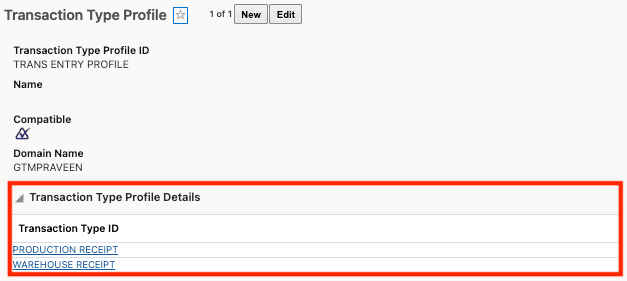
Transaction Type Profile Details for Entry
Entry Exit Profile for Work Order and Warehouse Issue
On the Entry-Exit Configuration > Entry Exit Profile for the row defining the Physical Inventory details (in this example, Entry Exit Profile = TRANS FTZ EXIT), the associated Transaction Type Profile is specified. This profile contains the applicable transaction types, such as WORK ORDER and WAREHOUSE ISSUE, which represent inventory issuances from the FTZ.
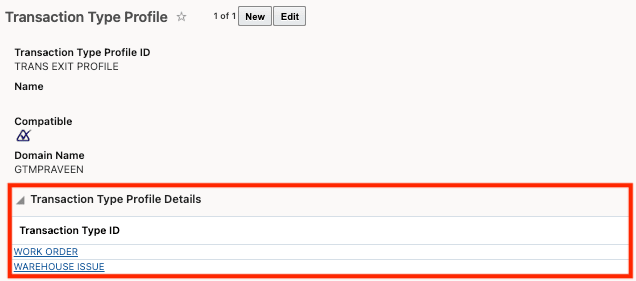
Transaction Type Profile Details for Exit
Scenario # 1 - Warehouse Receipt for the receipt of components into the FTZ
The warehouse receipt is received into GTM as a trade transaction from an upstream system and represents the physical receipt of components into the FTZ. In this example, the transaction contains the following three lines:
- Chassis – 10 EA
- Tires – 40 EA
- Engine – 10 EA

Transaction Lines for Warehouse Entry
When the Perform Entry/Exit Recording action is triggered, GTM evaluates the item ID, inventory organization, and transaction type to match the transaction to the appropriate Trade Incentive Program using the Entry-Exit Configuration. GTM then creates or updates a Physical Inventory record for each transaction line, representing the physical receipt of components into the FTZ. This Physical Inventory record represents the on-hand stock within the FTZ.
The Physical Inventory record includes the following details:
- Inventory Organization
- Item
- Quantity and Quantity UOM
In this example, the Physical Inventory quantity is higher than the quantity entered through the transaction WAREHOUSE RECEIPT 3. Since Physical Inventory represents the total on-hand stock in the warehouse, the quantity reflects both the newly received inventory and the existing stock of chassis, tires, and engines already present in the FTZ.
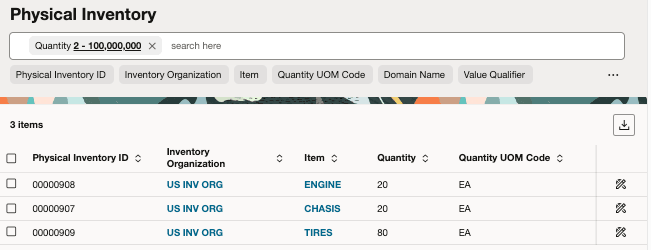
Physical Inventory for Warehouse Entry
In addition, GTM creates a Physical Inventory Movement record for each Physical Inventory transaction, representing the specific transaction or event that changed the physical inventory.
The Physical Inventory Movement record includes the following details:
- Item
- Receipt or Issue Flag (in this scenario, the flag is set to Receipt)
- Reference Type and Reference Number of the associated transaction line
- Quantity and Quantity UOM
Since the Physical Inventory Movement represents the specific event captured by the WAREHOUSE RECEIPT 3 transaction, the quantities on the Physical Inventory Movement records align directly with the quantities on the transaction lines.
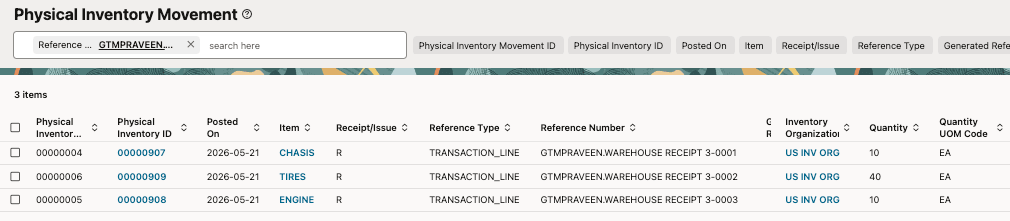
Physical Inventory Movement for Warehouse Entry
Scenario # 2 - Work Order to Authorize Production of Finished Good
The work order is received into GTM as a trade transaction from an upstream system and represents the authorization to manufacture a finished good using components within the FTZ. In this example, the transaction contains three lines related to the engine, chassis, and tires.
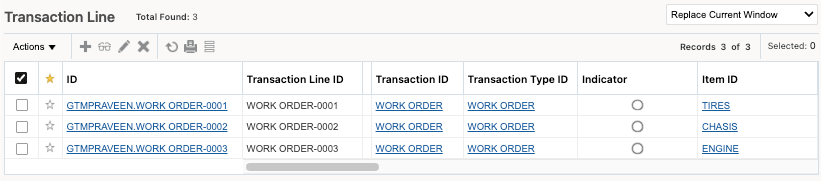
Transaction Lines for Work Order
When the Perform Entry/Exit Recording action is triggered,GTM evaluates the item ID, inventory organization, and transaction type to match the transaction to the appropriate Trade Incentive Program using the Entry-Exit Configuration. For the work order transaction, the Physical Inventory is updated to show that part of the on-hand stock of the components has moved into production.
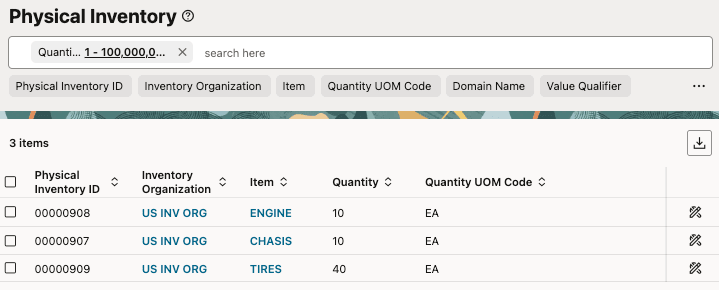
Physical Inventory for Work Order
GTM creates a Physical Inventory Movement record representing the transaction or event that impacts the physical inventory. In this example, the Physical Inventory Movement represents the components in the work order that have been authorized for manufacturing into a finished good. The Receipt/Issue value is set to I (Issue) since the components are being issued into production.
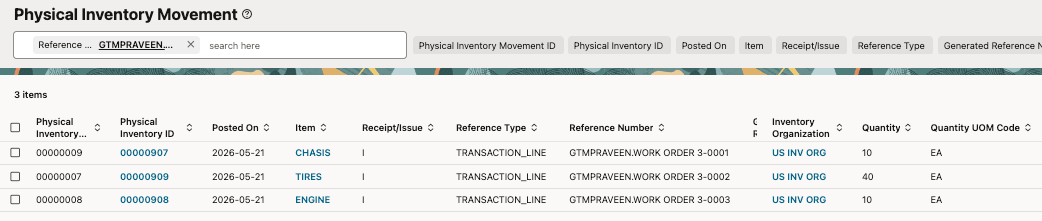
Physical Inventory Movement for Work Order
Scenario # 3 - Production Receipt to Manufacture a Finished Good
The production receipt is received into GTM as a trade transaction from an upstream system and represents the manufacturing of the finished good. In this example, the transaction contains one line related to the production of 10 cars. These cars are manufactured using the engines, chassis, and tires that were previously entered into the FTZ and for which a work order had been received.

Transaction Line for Production Receipt
When the Perform Entry/Exit Recording action is triggered, GTM evaluates the item ID, inventory organization, and transaction type to match the transaction to the appropriate Trade Incentive Program using the Entry-Exit Configuration. GTM then creates or updates a Physical Inventory record for each transaction line associated with the production receipt. This represents the on-hand stock within the FTZ.
In this example:
- A new Physical Inventory record is created for the car item since 10 cars were manufactured.
- The Physical Inventory quantities for the component items are reduced based on the quantities consumed during manufacturing. The remaining on-hand stock consists of 10 engines, 10 chassis, and 40 tires.
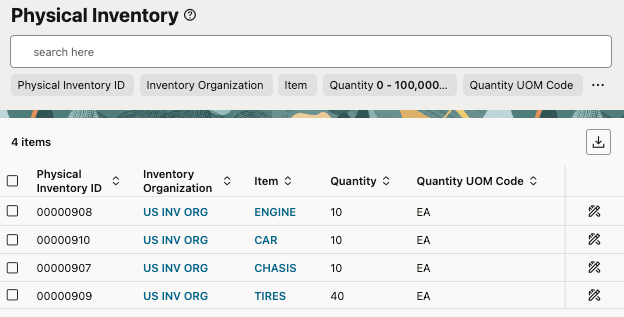
Physical Inventory for Production Receipt
GTM creates a Physical Inventory Movement record representing the transaction or event that changed the physical inventory. In this example, the Physical Inventory Movement represents the cars being manufactured. The Receipt/Issue value is set to R (Receipt) since this transaction represents receiving the finished goods into the FTZ.

Physical Inventory Movement for Production Receipt
Scenario # 4 - Warehouse Issue for Finished Good Exiting FTZ into Free Circulation
The warehouse issue is received into GTM as a trade transaction from an upstream system and represents the finished good exiting the FTZ into free circulation. When the Perform Entry/Exit Recording action is triggered, GTM evaluates the item ID, inventory organization, and transaction type to match the transaction to the appropriate Trade Incentive Program using the Entry-Exit Configuration.
In this example, the transaction contains one line related to the 10 cars moving from the FTZ into free circulation.

Transaction Line for Warehouse Issue
When the Perform Entry/Exit Recording action is run, GTM updates the Physical Inventory record for each transaction line associated with the warehouse issue. This represents the updated on-hand stock within the FTZ.
In this example, since 10 cars are moving out of the FTZ into free circulation, the on-hand stock quantity for the car item is reduced to 0. The quantities for the engine, chassis, and tires remain unchanged because those quantities were previously decremented when the production receipt transaction was processed.
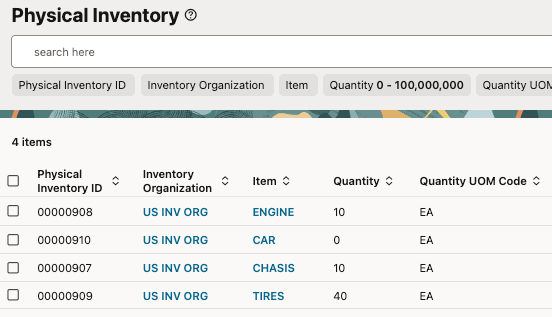
Physical Inventory for Warehouse Issue
GTM creates a Physical Inventory Movement record representing the transaction or event that changed the physical inventory. In this example, the Physical Inventory Movement represents the 10 cars exiting the FTZ into free circulation. The Receipt/Issue value is set to I (Issue) since this transaction represents the issuance of the finished goods from the FTZ.

Physical Inventory Movement for Warehouse Issue
Business Benefit: This feature improves inventory visibility and compliance within a Foreign Trade Zone (FTZ) by enabling accurate tracking of operational inventory on hand in the warehouse. By integrating inbound inventory data from upstream systems such as ERP, WMS, and OTM, it helps streamline inventory reconciliation, reduce manual effort, and support regulatory reporting and audit requirements.
Steps to enable and configure
-
The Trade Incentive Program > Entry-Exit Configurations section must include rows related to Physical Inventory processing.
-
You may also want to review your Transaction Type Profiles to ensure the applicable list of Transaction Types is current and includes all required transaction types for FTZ inventory processing.
Tips and considerations
The screenshots and notes above reflect a specific application configuration. This feature is highly flexible and can be configured to support a variety of trade incentive programs, including Foreign Trade Zones as one possible example. The behavior associated with a particular Trade Transaction Type or Declaration Type is defined during implementation based on customer requirements.
The Physical Inventory and Physical Inventory Movement are also available via "Try the New Redwood Experience" in Settings and Actions.
Key resources
- For more detailed information on the new Entry-Exit Profile section on Trade Incentive Programs, refer to the "Entry Exit Configuration on Trade Incentive Programs" topic in this document.