Entry Exit Configuration on Trade Incentive Programs
A new Entry-Exit Configuration section is now available for Trade Incentive Programs. This enhancement provides greater flexibility when configuring trade incentive programs, including:
- Replacing the existing Applicable Profile with a simplified Entry-Exit Configuration
- Supporting both Customs Inventory tracking and Physical Inventory tracking
Within the Entry-Exit Configuration section, you can define the following:
- Sequence Number - Determines the order in which the profile is applied.
- Entry Exit Profile - Defines the criteria for a trade transaction or declaration to qualify under a specific trade incentive program.
- Movement Type - Indicates whether the configuration models an Entry or an Exit.
- Tracking Type - Specifies whether tracking is based on Customs Inventory, Physical Inventory, or Both.
- Item Evaluation Criteria - Determines how reconciliation is performed – either by item or component inventory.
- For a Movement Type of Entry, GTM reconciles by item inventory.
- For a Movement Type of Exit, the following options are available:
- Item – GTM reconciles using item inventory.
- Components – GTM reconciles using component inventory from the finished goods bill of material.
- Item or Components – GTM first attempts reconciliation using item inventory. If unavailable, it then uses component inventory from the bill of material.
- Transaction Data Configuration ID - Defines the data copied between a trade transaction and inventory, based on the selected movement type.
- Declaration Data Configuration ID - Defines the data copied between a declaration and inventory, based on the selected movement type.
For example, if you are configuring an Entry-Exit Configuration for an Entry, GTM copies data from the declaration to the inventory. If you are configuring for an Exit, GTM copies data from the inventory to the exit declaration.
Note: To determine the data to copy between objects, GTM first uses the data configurations defined in the Entry-Exit Configuration section. If it is not present, GTM uses the data configurations defined in the Trade Incentive Program header.
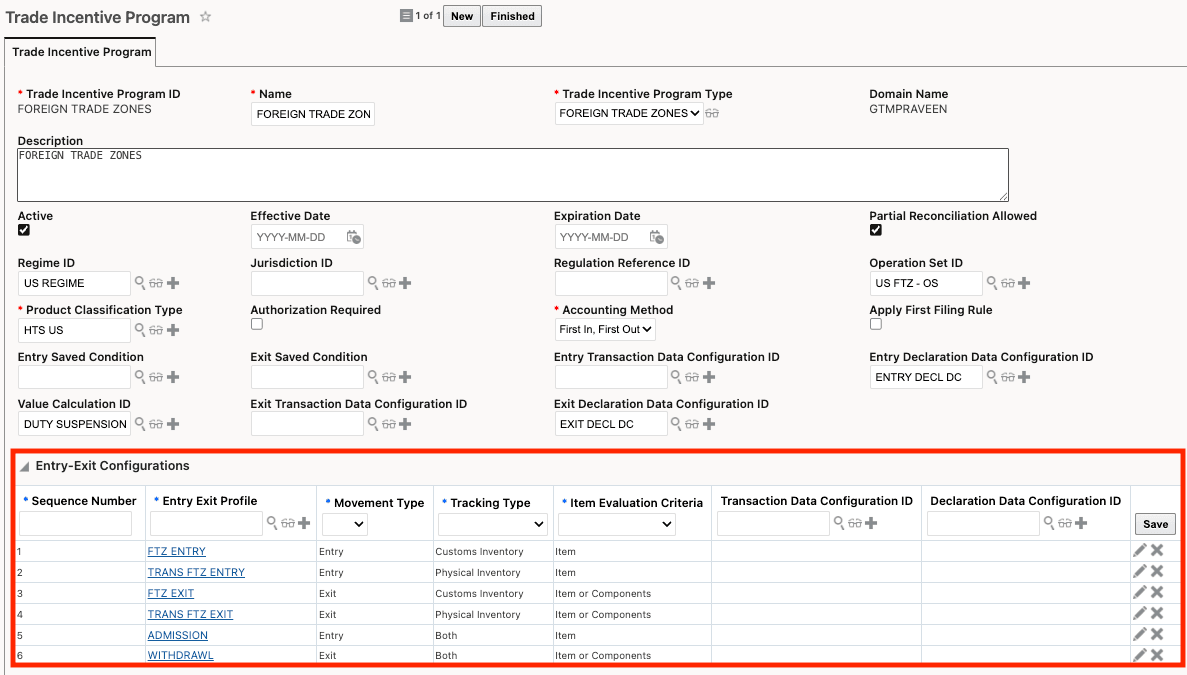
Trade Incentive Program - Entry-Exit Configurations
Business Benefit: The new Entry-Exit Configuration section enhances flexibility and control in managing Trade Incentive Programs. By simplifying configuration and replacing the Applicable Profile, it reduces setup complexity and improves usability. Support for both Customs and Physical Inventory tracking enables more comprehensive inventory management. Additionally, flexible reconciliation options (item and component-level) improve compliance, traceability, and alignment with real-world supply chain processes.
Steps to enable and configure
You don't need to do anything to enable this feature.
Tips and considerations
If you have already populated the existing Applicable Profiles section, the data is migrated to the new Entry-Exit Configuration section.
- For Entry Profiles in the Applicable Profile, GTM populates the Entry-Exit Configuration as follows:
- Entry Profile = Entry Exit Profile
- Movement Type = Entry
- Tracking Type = Customs Inventory
- Item Evaluation Criteria = Item
- For Exit Profiles in the Applicable Profile, GTM populate the Entry-Exit Configuration as follows:
- Exit Profile = Entry Exit Profile
- Movement Type = Exit
- Tracking Type = Customs Inventory
- Item Evaluation Criteria = Item or Components
Key resources
- For more information on how this data is used, refer to the 'Physical Inventory Tracking Available in Trade Incentive Programs' topic in this document.