Copy Additional Data from Inventory to Exit Declaration Line
This feature enables you to copy dates and zone status information from your inventory to an exit declaration. When moving goods out of a Free Trade Zone (FTZ), you must create an exit declaration. Information such as the entry date and zone status may be required for customs reporting. You can configure which inventory data is copied to the exit declaration by defining a data configuration.
Data Configuration
The data configuration defines which information is copied between objects. For the association type Inventory to Exit Line, the following new attributes are available:
- Dates: Enables you to copy dates, including the entry date, from the inventory to the exit line.
- Trade Incentive Program Zone Status: Enables you to copy the zone status from the inventory to the exit line.
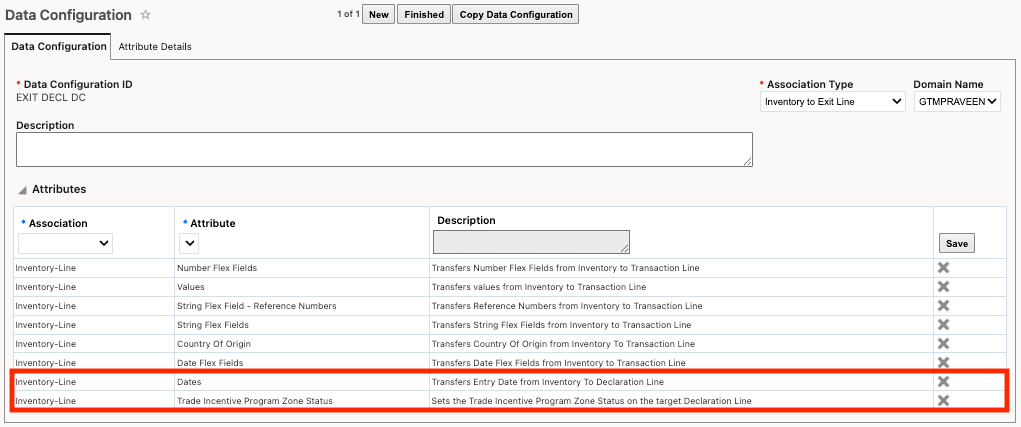
Data Configuration with Association Type of Inventory to Exit Line
Trade Incentive Program
Once you’ve defined the data configuration, assign it to your trade incentive program. You can assign the data configuration either at the header level or within the Entry-Exit Configurations section.
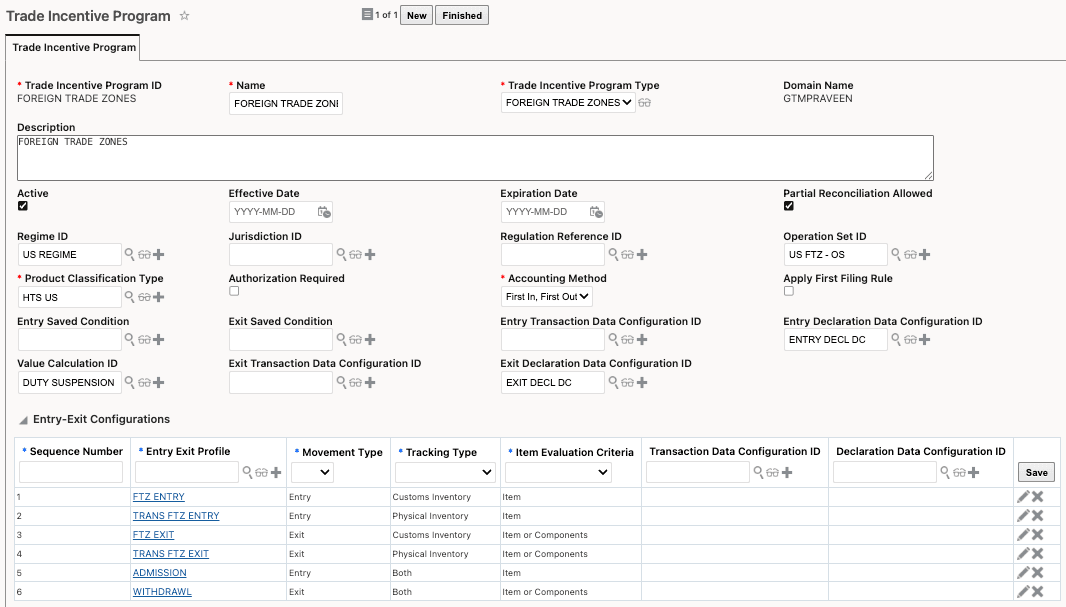
Trade Incentive Program with Exit Data Configuration
Copy Data from Inventory using Perform Entry/Exit Recording Action
Once GTM is configured, data can be copied from the inventory to the exit declaration by using the Perform Entry/Exit Recording action.
Business Benefit: This feature streamlines customs reporting by automatically transferring key inventory details, such as entry dates and zone status, to exit declarations. It reduces manual data entry, improves reporting accuracy, and helps ensure compliance when moving goods out of a Free Trade Zone (FTZ).
Steps to enable and configure
You don't need to do anything to enable this feature.