Enhanced Workbench Improvements for Trade Incentive Programs
This feature enhances the workbench to support new business objects and saved queries, including:
- New saved queries that provide linkage between business objects such as transactions, transaction lines, declarations, and declaration lines with inventory and inventory movements.
- New business objects available in the workbench, including Physical Inventory and Physical Inventory Movement.
New Saved Queries Provide Linkage Between Business Objects
New saved queries have been added to provide the linkage between various business objects and the inventories and inventory movements.
- Saved queries related to Trade Incentive Program Inventory
- Inventories for Entry/Exit
- Entry/Exit Declaration Lines for Inventory
- Entry/Exit Transaction Lines for Inventory
- Matching Entry/Exit Transaction Lines for Entry/Exit Line
- Matching Entry/Exit Declaration Lines for Entry/Exit Line
- Saved queries related to Physical Inventory
- Physical Inventories for Trade Transaction
- Physical Inventories for Trade Transaction Line
- Trade Transaction Lines for Physical Inventory
New Business Objects Add to Workbench
New business objects have been added to the workbench including the Physical Inventory and the Physical Inventory Movement. These objects enable you to model and track the physical inventory related to trade incentive programs. Using the new saved queries, you can create workbenches linking your trade transactions/trade transaction lines, declarations/declaration lines to the associated physical inventories or physical inventory movements.
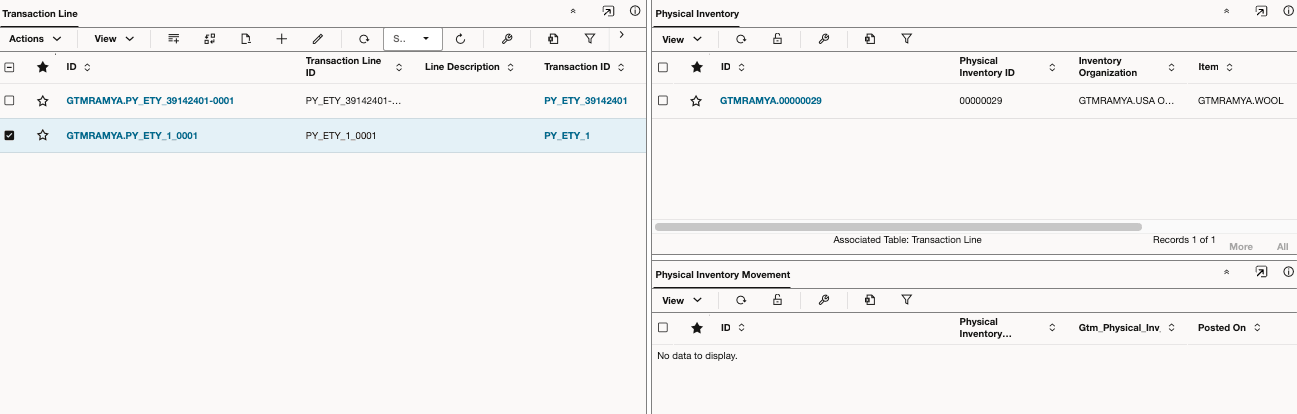
Enhanced Workbench - Physical Inventory and Physical Inventory Movement
Business Benefit: This feature enhances the workbench by introducing new business objects and expanding saved query capabilities to improve visibility and traceability across related data.
Steps to enable and configure
To take advantage of this feature:
- The new saved queries can be used on new or existing workbenches.
- Create a new enhanced workbench using physical inventory and/or physical inventory movement.
Tips and considerations
You can create enhanced workbenches that include customs inventory/inventory movement and physical inventory/inventory movement. When creating the enhanced workbench, the Object Type selected varies depending on the business object being used.
- For physical inventory, select GTM Physical Inventory or GTM Physical Inventory Movement.
- For customs inventory, select Trade Incentive Program Inventories or Trade Incentive Program Inventory Movements.