RPLS Enhancements for Forward and Reverse Matching
This feature provides additional flexibility when configuring the restricted party screening engine using the GTM property gtm.rpls.matchDirection.both.<service_preference_gid>.
A new property value, forwardAndReverseWithMaxMatchFactor, has been introduced to reduce false positives. This property applies both forward and reverse thresholds and then uses the higher of the two match factors to calculate the overall match factor. When configuring the service parameter to be assigned to the service preference, set the Match Direction to Both and define the forward and reverse thresholds. The property determines how GTM calculates the final match factor—whether by using the maximum, minimum, or average of the forward and reverse threshold results.
The forwardAndReverseWithMaxMatchFactor option introduces an “AND” condition when evaluating thresholds. Both the forward and the reverse thresholds must be satisfied. If they are met, the system selects the higher of the two match factors as the final match factor.
For example, for a service preference named RESTRICTED_PARTY_SCREENING, the property would be configured as:
gtm.rpls.matchDirection.both.RPLS.RESTRICTED_PARTY_SCREENING = forwardAndReverseWithMaxMatchFactor
In this scenario, both the Column A Forward[Threshold] and Column B Reverse[Threshold] must be met. The final match factor (Column C) is calculated using the higher value between the two.
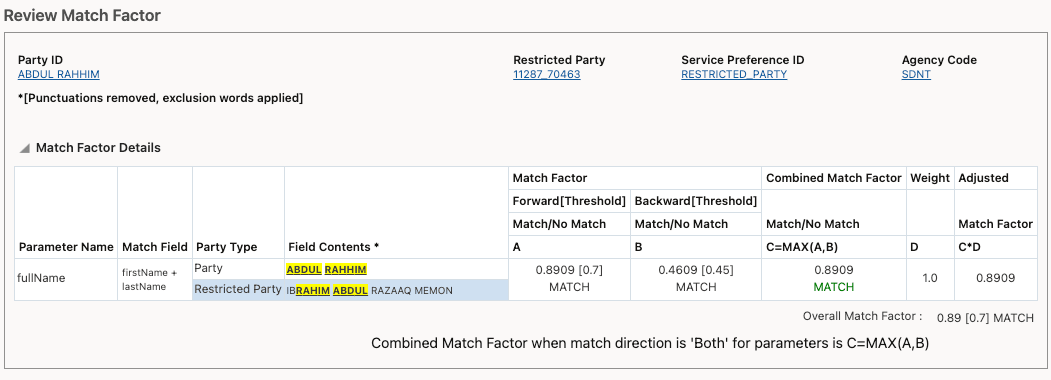
Party - Review Match Factor Action
Business Benefit: This feature helps reduce false positives in restricted party screening by requiring both forward and reverse matches to meet defined thresholds, while using the stronger match to determine the final result. The outcome is more accurate screening, fewer unnecessary alerts, and improved efficiency for compliance teams.
Steps to enable and configure
Go to the Property Sets UI via Configuration and Administration > Property Management > Property Sets.
Note: You must have the DBA.ADMIN user role to use this functionality.
- Set the gtm.rpls.matchDirection.both.<service_preference_id> with the value of forwardAndReverseMaxMatchFactor.
Tips and considerations
- On the Service Parameter, if you have the Match Direction = Both, it is recommended to set the forward threshold to a high threshold and the reverse threshold to a moderate threshold.
- The list of values for the GTM property gtm.rpls.matchDirection.both.<service_preference_id> are:
- forwardOrReverseWithMaxMatchFactor
- forwardAndReverseWithMaxMatchFactor (Added in 26C)
- forwardAndReverseWithMinMatchFactor
- forwardAndReverseWithAverageMatchFactor
Key resources
For more information on restricted party screening, refer to the GTM How To/Configuration topic called "Restricted Party Screening".