GTM Restricted Party Pre-processing Assistant
The GTM Restricted Party Pre-processing Assistant, available with Fusion AI Studio, enables you to take advantage of party data pre-processing to normalize contact and location information before screening. This normalization standardizes terminology and special-character formatting. For example, if the party address line is "426 Hyacinth St" and the denied party address line is "426 Hyacinth Street," GTM can normalize the party data to use "Street."
To access the GTM Restricted Party Pre-processing Assistant, click the AI Chat button in the global header and select the GTM Restricted Party Pre-processing Assistant agent.

AI Chat in Global Header
In the AI Chat window, enter the Party GID of the party that you want to normalize and click Send Message. GTM returns the normalized results from the pre-processing agent. In this example, the request entered is: "Normalize GTMAI.JOHN SMITH."
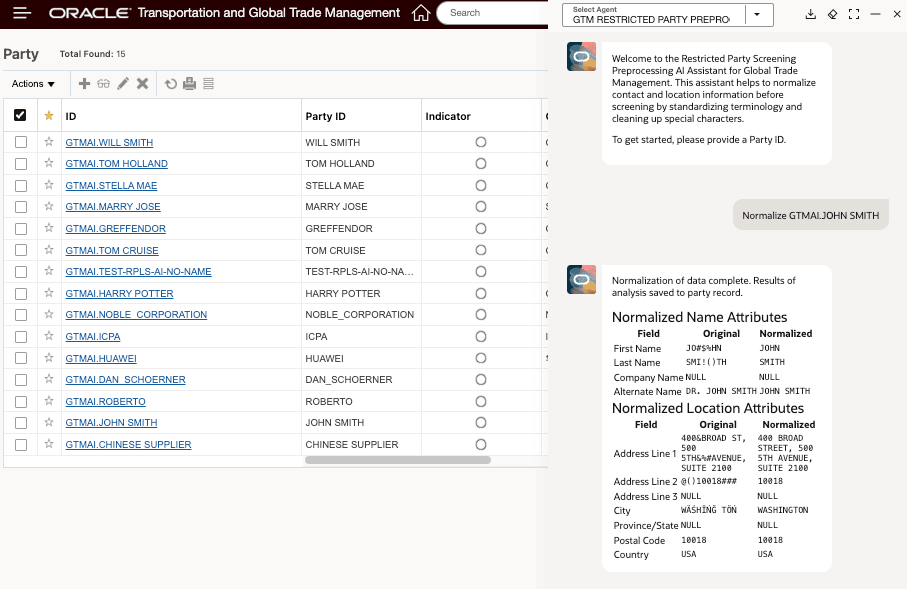
GTM Restricted Party Preprocessing Agent Results
Business Benefit: The GTM Restricted Party Pre-processing Assistant improves screening accuracy by normalizing contact and address data before restricted party checks, reducing mismatches caused by abbreviations, formatting differences, or special characters. This helps organizations streamline compliance processes, minimize false positives, and increase confidence in denied party screening results.
Steps to enable and configure
Refer to the Oracle Transportation and Global Trade Management Cloud AI Guide for information about configuring GTM and Fusion AI Agent Studio.
Tips and considerations
Currently, the normalized attribute results are displayed in the AI Chat window. Future enhancements may include making the normalized attributes available for use during restricted party screening.