 Enhancement to Restricted Party Screening Workbench
This feature introduces enhancements to the Restricted Party Screening Workbench.
- The "Passed" and "Failed" buttons for the RPLS status have been updated to display colors:
- Passed now appears in green
- Failed now appears in red
- Additionally, new buttons are available for the RPLS_OVERRIDE status values (left to right):
- Trusted Party
- Requires Screening
- Prohibited Party
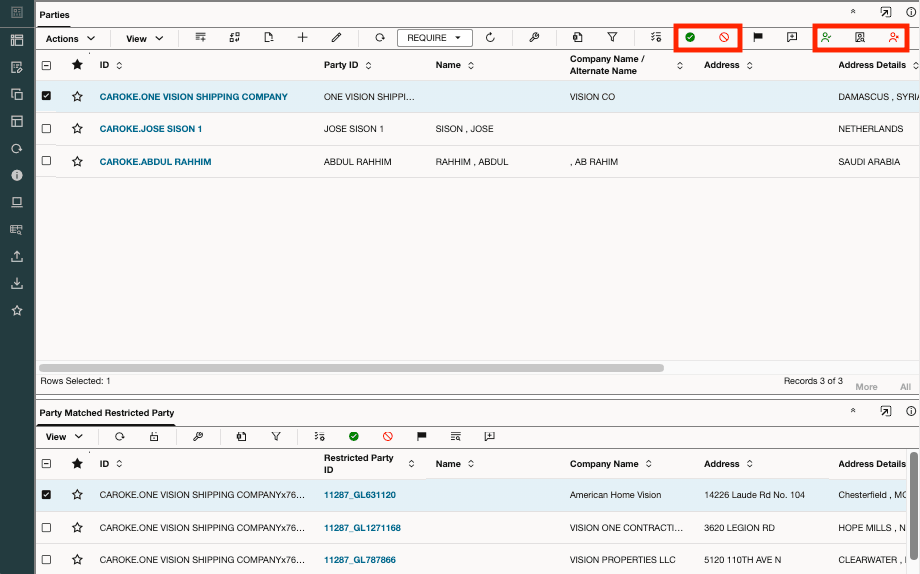
Restricted Party Screening Workbench
Business Benefit: This enhancement improves the usability and efficiency of the Restricted Party Screening Workbench by:
- Making status indicators more visually intuitive and easier to interpret
- Enabling users to quickly designate parties as prohibited or trusted
Steps to enable and configure
You don't need to do anything to enable this feature.
Key resources
For more information on the RPLS_OVERRIDE status type, refer to the Set Trusted or Prohibited Party for Restricted Party Screening topic in this document.