 Include/Exclude Agency Codes in Restricted Party Screening Configuration
You can now include or exclude agency codes during restricted party screening by using Agency Code Profiles. This enhancement allows you to define agency codes in an Agency Code Profile and apply the profile through Service Preferences during the screening process.
Agency Code Profile
A new Agency Code Profile is available that enables you to group agency codes together for restricted party screening. When creating an Agency Code Profile, use the Compatible checkbox to specify whether the agency codes in the profile are included or excluded during the restricted party screening process.
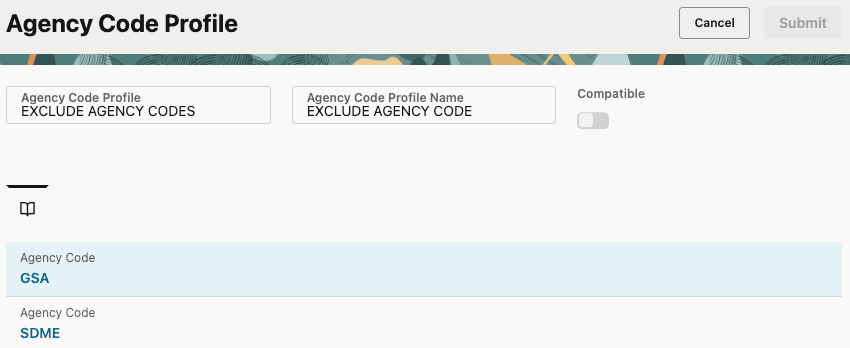
Agency Code Profile
Service Preference
Once an Agency Code Profile is created, you can associate it with a Service Preference used for Restricted Party Screening. You can configure screening behavior in one of the following ways:
- Specify an Agency Code to screen against a specific agency’s denied party list.
- Specify an Agency Code Profile to control which agency codes are included in or excluded from restricted party screening.
Screening behavior is determined by the Compatible checkbox setting in the Agency Code Profile:
- If the Compatible checkbox is selected, only denied parties associated with the agency codes listed in the profile are included in screening.
- If the Compatible checkbox is not selected, denied parties associated with the agency codes listed in the profile are excluded from screening.
To screen against denied party data from all agencies, leave both fields blank.
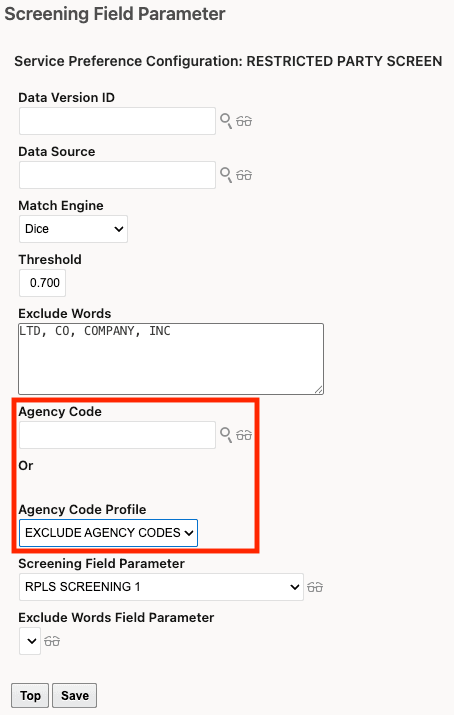
Service Preference with Agency Code Profile
Business Benefit: This enhancement provides greater control and flexibility over restricted party screening by allowing organizations to tailor screening behavior based on specific agency codes. As a result, you can improve compliance processes, reduce unnecessary screening results, and better align screening configurations with business requirements.
Steps to enable and configure
-
Navigate to Master Data > Power Data > Restricted Parties > Agency Code Profile to create or manage an Agency Code Profile. When creating a profile, use the Compatible checkbox to specify whether the listed agency codes are included in or excluded from restricted party screening.
-
After creating the profile, navigate to the appropriate Service Preference and add the Agency Code Profile in the Screening Field Parameter section.
Tips and considerations
- If both an Agency Code and an Agency Code Profile are specified, GTM performs restricted party screening using the Agency Code only. In this case, the Agency Code Profile is ignored.
- A REST API is available for the Agency Code Profile.
- In addition, the Agency Code Profile feature is available in the Try the New Redwood Experience option under Settings and Actions.